# Overview

## **What is AltLayer?**

AltLayer is an open and decentralised protocol for rollups and agents. For agents, we bring together a suite of x402 and EIP 8004-related products services to providing the necessary building blocks for the agentic economy which includes discovery of agents, establishing their reputation, seamless agent-to-agent payments and more.

For rollups, we have built a new framework [Restaked rollup](https://altlayer.io/restaked-rollup) which takes existing rollups (spun from any rollup stack such as OP Stack, Arbitrum Orbit, ZKStack, Polygon CDK, etc.) and provides them with enhanced security, decentralisation, interoperability and crypto-economic fast finality.

<figure><img src="/files/3RyF2HOjIHbT8rPKXhCH" alt=""><figcaption></figcaption></figure>

Restaked rollups combines the ease of spinning up rollups using rollup stacks such as OP Stack, Arbitrum Orbit, ZKStack by ZKSync, Polygon CDK and others with the power of EigenLayer's restaking mechanism to bootstrap network security and build a decentralised network.&#x20;

Restaked rollups are essentially a set of three vertically integrated [Actively Validated Services](https://docs.eigenlayer.xyz/overview/key-terms) (AVSes) created on-demand for a given rollup that works with any underlying rollup stack. These AVSes in conjunction offer three key services to rollups in particular to app-specific rollups:

1. **Verification of rollups' state correctness**
2. **Faster finality**&#x20;
3. **Decentralised Sequencing**&#x20;

The above services are provided via three modular components called:

* **VITAL (AVS for decentralised verification of rollup’s state)**
* **MACH (AVS for fast finality)**
* **SQUAD (AVS for decentralised sequencing)**

Built on top of this protocol, AltLayer offers a versatile, [no-code Rollups-as-a-Service (RaaS) launchpad](https://dashboard.alt.technology/login) that allows not only developers but also those with little to no coding experience to spin up a customised rollup within 2 minutes with only a few simple clicks. The RaaS product is designed for a multi-chain and a multi-VM world and hence will have factory support for EVM as well as WASM. It also supports different rollup SDKs such as OP Stack, Arbitrum Orbit, Polygon zkEVM, ZKSync's ZKStack and Starkware, different shared sequencing services such as Espresso and Radius as well as different DA layers such as Celestia EigenLayer and Avail among many other modular services at different layers of the rollup stack.

<figure><img src="/files/a0ziONrrZg7vMRWw1CGa" alt=""><figcaption></figcaption></figure>

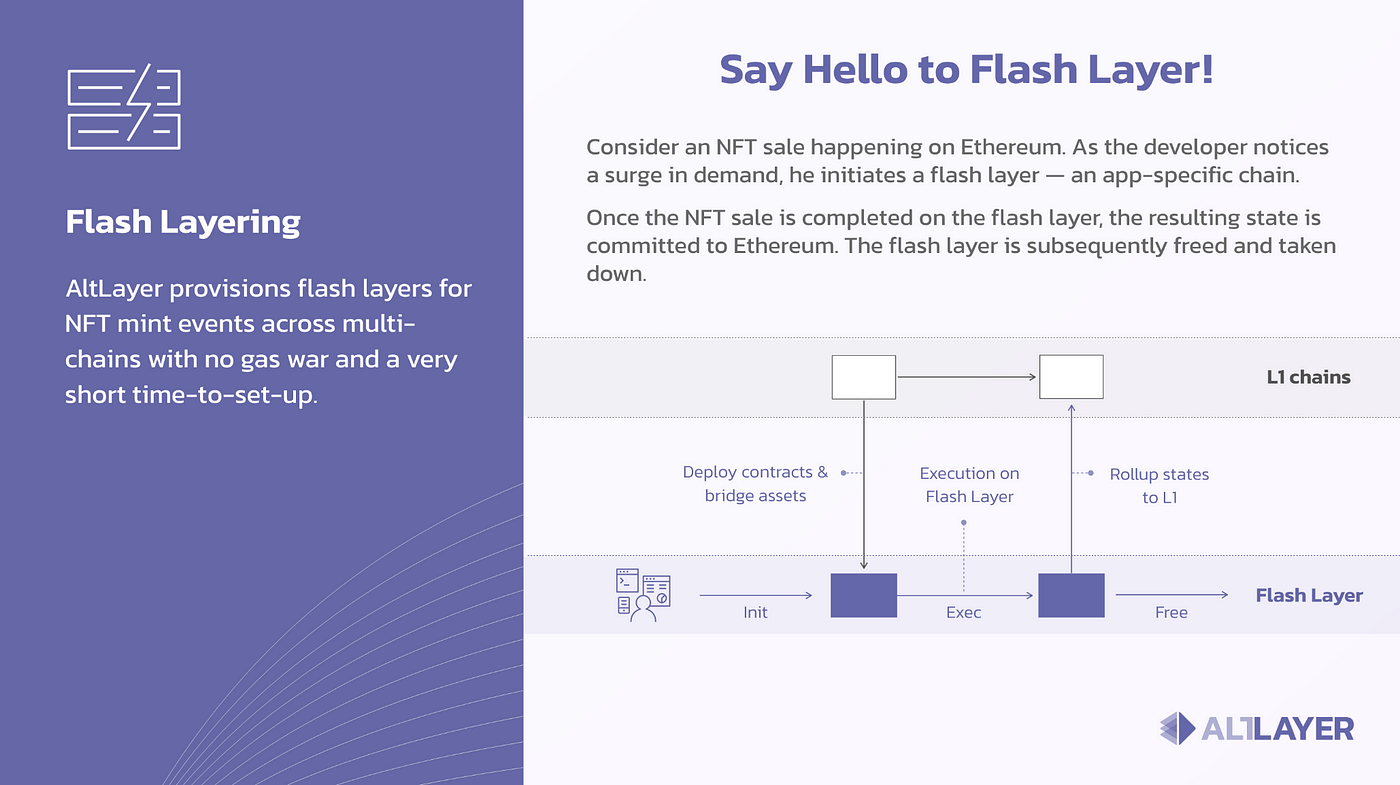
In addition to this, a key innovation that AltLayer brings to the rollup design space is the idea of **ephemeral rollups**. With ephemeral rollups, a dApp developer expecting an increase in demand for his application could: 1) quickly spin up a fast and scalable application-tailored rollup secured by a Layer 1, 2) use the rollup for as long as needed, and then 3) dispose of the rollup by doing an “end-of-life” settlement on the Layer 1. Ephemeral rollups are a highly resource-optimised rollup that gives developers the best of an application-specific rollup and a general purpose Layer 1. Under the RaaS umbrella, AltLayer offers both ephemeral as well as persistent rollups. \
\
AltLayer protocol can save considerable capital and years of development work for teams and encourage innovation and rapid experimentation while being fully open and permissionless.

## Why AltLayer?

We believe in a world of thousands of rollups, some designed for general-purpose usage such as Arbitrum One, Optimism Mainnet, ZKSync etc., while others designed for application-specific usecases, built using heterogenous and modular tech stacks. For instance, one rollup could be built using Arbitrum Orbit, while using Arbitrum One as the DA and the settlement layer, while another could be built using ZK Stack using Celestia as the DA layer and Ethereum as the settlement layer.&#x20;

In this world of heterogeneity, there is a need to have a universal and neutral protocol that these rollups can tap into for different essential needs that include but are not limited to:

1. Decentralised Verification for Instant Withdrawals as well as Security
2. Faster Finality & Cross-Rollup Interoperability
3. Flexible and Decentralised Sequencing

**Problem 1 (Why  Decentralised Verification?):** Optimistic rollups are secure under the assumption that there is at least one honest party that checks that the state committed by the rollup operators on Ethereum indeed corresponds to the correct execution of the state transition function on a set of transactions and the previously validated state.&#x20;

Many app-specific rollups however may not have an ecosystem as mature as that of popular general-purpose rollups and as a result there may not be enough ecosystem participants with the implicit incentive to validate the network.&#x20;

Moreover, there is an emergent category of using an optimistic pattern in L1 Ethereum smart contracts - where someone commits to the output of the computation – and then can be fraud proven. Another example would be ephemeral rollups introduced by AltLayer, where rollup sequencers commit the state of the rollup to Ethereum at the time of settlement where the state represents the result of an off-chain computation on a rollup for a certain application such as a Dark Forest. With these on-demand systems, having a decentralised network of verifiers that can detect and challenge a rollup’s state becomes extremely important.

Verification is not just critical for the security of a rollup system but it is also equally important to ensure interoperability. In fact, underpinning any cross-domain messaging is the need to be able to verify the state of a system to ensure that a follow-up action can be taken on another independent system.

**Problem 2 (Why Faster Finality?)**

Ethereum is the most decentralized network with almost [1M validators](https://beaconscan.com/stat/validator). It’s also the network with the [most liquidity](https://defillama.com/chains) so it is not surprising that Ethereum is the settlement layer of choice for most rollups today. However, Ethereum as a network is not the fastest of all to finalize and settle transactions as it takes about 13 minutes for a transaction to be finalized.

Given the time it takes for a transaction to be finalized, app-specific rollups that are designed to serve latency-sensitive applications such as games and social apps often end up relying on the promise provided by the sequencer that at some point in the future, it will post transactions on-chain.&#x20;

This could be acceptable in scenarios where the rollup sequencer is operated by a trusted party, but, the sequencer’s promise is certainly not worth much when there is no trust in the entity operating the sequencer. Moreover, as these centralised sequencers have no economic stake, the soft finality guarantee offered by them has no economic backing.&#x20;

<figure><img src="/files/o2XW2Y6npgpuvGJS49qJ" alt=""><figcaption></figcaption></figure>

Moreover, as the finality guarantees provided by the sequencer are not strong, the receipt generated by the sequencer is not enough for interoperability. For example, for a burn on rollup A and mint on rollup B style cross-rollup message, rollup B needs to have strong guarantees that the sequencer for rollup A has indeed burnt a certain number of tokens on the rollup A.&#x20;

**Problem 3 (Why Decentralised Sequencing?)**

Most rollups today operate with centralised sequencers operated by the entity that developed the protocol. Even though it is not ideal to have a single sequencer operate a rollup, having a centralised sequencer is somewhat acceptable for a well-established general-purpose rollup as there is some trust in the entity running the sequencer to not engage in activities that would undermine its reputation. This off-protocol trust, however, cannot be extended to the long-tail of app-specific rollups potentially operated by potentially anonymous developers with no prior reputation.

Another issue related to centralised sequencing is related to RaaS providers. Although RaaS providers offer an immensely useful service and can help save substantial financial and manpower resources for teams planning to launch a rollup. Their business model however heavily relies on the existence of centralised sequencing and execution. Most if not all RaaS providers charge a portion of the sequencing revenue and as a result, for business viability reasons, they are encouraged to lock their clients for as long as possible. Vendor locking comes with platform risks where a popular RaaS provider may unilaterally decide to dictate the fee model or extract arbitrary MEV to maximise its profits. &#x20;

Moreover, the centralised sequencer/executor model in which most RaaS providers operate today is not ideal as they present a closed environment which in principle is against the ethos of openness, transparent, and decentralised web3.

AltLayer aims to address these problems by building a set of AVSes to serve each rollup and yet give flexibility to dApp builders in deciding how to select AVS operators, how to reward them rules that the operators need to follow and set a corresponding slashing rule in case they do not follow the protocol.


# Facilitator

We’re entering a new era of how the internet pays for services. Instead of locking users into subscriptions or complicated payment gateways, the recently released x402 standard by Coinbase introduces a frictionless per-request payment model built for APIs, AI agents, and automated services. No more monthly billing cycles, no more over or under-usage. Just instant, trustless, on-chain micropayments with every request.

As a long-term infrastructure builder in the agentic-space, we’re excited to announce the official launch of the AltLayer x402 Facilitator, an easy plug-in payments-infrastructure layer built to simplify and streamline how your application, API or agent can accept micropayments with minimal friction.&#x20;

Accessible now at[ facilitator.altlayer.io](https://facilitator.altlayer.io/?utm_source=chatgpt.com), the x402 Facilitator empowers developers to replace traditional payment rails with a streamlined system that charges exactly when and only when your service is used.

### What is the AltLayer x402 Facilitator?

The x402 protocol is a new standard for “per-request” HTTP payments: clients attach a signed payment payload, the server verifies it, and settlement happens on-chain.[ ](https://www.x402.org/x402-whitepaper.pdf?utm_source=chatgpt.com)

The AltLayer Facilitator (accessible at[ https://facilitator.altlayer.io/](https://facilitator.altlayer.io/?utm_source=chatgpt.com)) is a hosted service that abstracts away the blockchain complexity and is responsible for :

1. Verifying payments:  Confirm that the client's payment payload meets the server's declared payment requirements.
2. Settling payments: Submit validated payments to the blockchain and monitor for confirmation.
3. Providing responses: Return verification and settlement results to the server, allowing the server to decide whether to fulfill the client's request.

A facilitator takes away the pain of payment verification, settlement, and other chain-specific quirks, so that your application or service can accept payments without the need to build any custom logic.&#x20;

#### Key benefits include:

* Quick integration: One endpoint, minimal setup.
* Multi-chain readiness : Use the same flow across different blockchain networks.
* Focus on your product: Let the Facilitator handle payments so you focus on your service or API.
* Built for the new economy: Micropayments, AI agents, developer APIs, per-use billing models.

Why this matters

In traditional payment models we often see subscriptions, large-ticket checkouts, heavy infrastructure, and cumbersome user flows. The x402 approach flips that for the modern web/agent economy:

* Payments can be embedded directly into HTTP flows (e.g., an API call or agent request).
* No need for heavy wallet management on the client side.
* Enables true pay-per-use monetisation: one API call, one micropayment.
* Helps developers serve the emerging use-cases: AI agents, automated services, on-demand workflows.

For the AltLayer ecosystem specifically, this aligns with its mission of making the web-native economy more seamless and composable.

### How to Get Started

Here’s a simple onboarding path:

1. Visit[ https://facilitator.altlayer.io/](https://facilitator.altlayer.io/?utm_source=chatgpt.com) and follow the integration instructions.
2. Configure your service endpoint to point to the Facilitator URL.
3. Define your pricing logic: for example, how much each request costs, in which token, and what the network/asset is.
4. On the client side, make an HTTP request; if payment is required the Facilitator handles the payload verification and settlement.
5. Once payment is settled, you fulfil the request as normal.

Because the Facilitator abstracts away RPC nodes, signature verification and chain-specific settlement, you don’t need to become a blockchain infrastructure expert.

### Use Cases & Who This Is For

* Developer APIs: charge per call instead of subscription tiers.
* AI-agent services: agents can pay on behalf of users for data, compute, or API access.
* Web2 → Web3 hybrid services: add crypto-native payments with minimal disturbance to your existing stack.
* Micropayment flows: think “pay for each request” rather than large upfront invoices.

### What’s Next & Invitation to the Community

We’re just at the beginning. As adoption grows, we'll be expanding:

* Supported assets / stablecoins
* Additional chains/networks
* SDKs, code samples, best-practices for middleware
* Dashboards and analytics for payment flows
* Community-driven feedback and feature requests

Invitation: If you’re a developer, service provider, or building an agent-driven product—give the Facilitator a spin. Provide your feedback, tell us what works (and what doesn’t). Your input helps shape the next-gen payment infrastructure.

Visit[ https://facilitator.altlayer.io/](https://facilitator.altlayer.io/?utm_source=chatgpt.com) and get started today.

\
&#x20;


# Gateway

The world of digital payments is entering a new phase — one defined by automation, interoperability, and blockchain-native settlement. Coinbase’s **x402 protocol** sits at the center of this revolution, establishing the HTTP 402 standard for on-chain payments. At the heart of this ecosystem lies the **x402 Gateway (**[**x402gateway.io**](https://www.x402-gateway.com/)**)** — the component that turns protocol specifications into working infrastructure.

#### **What Is the x402 Gateway?**

The [**x402 Gateway** ](https://x402gateway.io)is the implementation layer that allows developers and enterprises to process payments directly on public blockchains using the x402 standard. While the x402 specification defines *how* payments should be signaled and verified (through HTTP 402 status codes and EIP-3009 signatures), the Gateway is the component that actually executes the logic — verifying authorizations, coordinating transfers, and recording completed transactions on-chain.

In essence, the x402 Gateway is to the x402 protocol what a web server is to HTTP — the engine that makes requests and responses move across the network.

#### **Why the Gateway Matters**

HTTP 402 has existed in the internet standards for decades as the “Payment Required” response code, but it was never properly implemented. With x402, Coinbase transforms that dormant placeholder into a living system for blockchain-based payments. The **x402 Gateway** operationalizes that concept, serving as the settlement and coordination layer for HTTP 402-based transactions.

This makes it possible for any web service, API, or autonomous agent to accept on-chain payments in a standardized way — without reinventing wallet integrations or token logic from scratch.

#### **How the Gateway Works**

1. **Payment Request**\
   A client (for example, an AI agent or web app) sends a request to an API endpoint that requires payment. The server responds with HTTP 402, including payment details inside custom headers defined by the x402 specification.
2. **Authorization and Settlement**\
   The client uses **EIP-3009** authorization — a standard that allows “gasless” token transfers via off-chain signatures — to approve payment. The Gateway verifies this authorization and executes the token transfer on-chain.
3. **Confirmation and Fulfillment**\
   Once the transfer settles, the Gateway marks the transaction as complete, allowing access to the requested resource, API call, or service.

This flow happens in milliseconds and can be fully automated — enabling true *machine-to-machine* payments at web scale.

#### **Architecture Overview**

The x402 Gateway interacts with three key components:

* **Clients / Agents:** Applications or AI systems that initiate payment-required requests.
* **Facilitators:** Middleware services that coordinate transaction verification and relay information between client and blockchain.
* **Smart Contracts:** On-chain components that handle settlement, nonce tracking, and validation under EIP-3009.

Together, these elements create a seamless bridge between HTTP-based web services and blockchain settlement infrastructure.

#### **Developer Benefits**

* **Standardization:** Uses existing web primitives (HTTP, headers, status codes) instead of proprietary APIs.
* **Interoperability:** Works across any EVM-compatible blockchain.
* **Security:** Uses signed authorizations and on-chain verification to prevent replay or double-spend attacks.
* **Scalability:** Facilitator model allows high throughput and batching strategies for enterprise workloads.
* **Simplicity:** Developers integrate using standard HTTP responses — no need to handle raw blockchain RPCs directly.

#### **Why x402 Gateway Is Important for the Agent Economy**

The x402 Gateway isn’t just for human-driven apps — it’s designed for the coming wave of **autonomous AI agents**. These agents will continuously buy data, pay for APIs, and charge for digital services on behalf of users or organizations. For that to work, they need infrastructure that can handle microtransactions natively, without manual intervention.

The x402 Gateway provides exactly that: a standardized, programmable, and secure way for AI agents to send and receive value online — just as easily as sending an HTTP request.

#### **A Foundation for the Future**

As institutions like Visa, Google, and PayPal explore blockchain-native payment systems, the x402 Gateway represents a concrete step toward a unified standard. It bridges decades of internet protocol design with the new reality of decentralized finance and automated agents.

With the Gateway in place, developers can focus on building applications — not reinventing payment rails. The x402 Gateway turns the once-hypothetical “HTTP 402 Payment Required” into a living, production-ready mechanism for the next generation of the web.


# x402 rumour

The internet runs on information — but in the world of crypto, finance, and AI, *information asymmetry* is alpha. Getting early access to the right data, insight, or whisper can make the difference between a winning trade and a missed opportunity.

Now imagine a world where instead of paying for expensive subscriptions or gated memberships, you could pay **per rumour**, **per signal**, or **per data point** — instantly, trustlessly, and on-chain.

That’s the vision behind **x402 Rumour**, built on top of the **x402 payment protocol and <https://rumour.app>**.

#### **Your Opportunity to Pay-Per-Signal**

Whether you’re building a **perpetual DEX**, a **DeFi analytics tool**, a **SocialFi product**, or a **data aggregation agent**, x402 Rumour gives you on-demand access to verified, timestamped “rumours” — the signals that move markets before they become mainstream narratives.

Each rumour is a self-contained **micro-intelligence unit**: a headline, a short description, a credibility score, and on-chain metadata that proves its authenticity. You don’t subscribe. You don’t commit monthly. You simply **pay for what you read** — or even more granularly, **what you extract**.

x402 Rumour turns attention into currency and information into infrastructure.

#### **How x402 Rumour Works**

x402 Rumour is powered by the **x402 protocol**, the HTTP 402 standard for blockchain-native payments. Here’s how the flow works:

1. **Discover Rumours**\
   Browse the latest trending rumours, signals, and whispers across DeFi, AI, gaming, and social ecosystems on [rumour.app](https://rumour.app). Each entry shows a teaser and metadata — but the full details are gated behind a payment wall.
2. **Pay with x402**\
   When you click to unlock a rumour, the app triggers an **HTTP 402 “Payment Required”** response. Using the x402 standard, your wallet signs a one-time, gasless authorization (EIP-3009) to pay the micro-fee on-chain.
3. **Instant Unlock**\
   Once the transaction settles, the content is revealed instantly — no subscriptions, no intermediaries, no account management. Each interaction is a direct value exchange between user and platform.

It’s **pay-per-signal**, not paywall.

#### **Why Pay-Per-Signal Matters**

Traditional data subscriptions are static — you pay monthly or yearly for content you may never use. But in the real-time, algorithmic economy, attention is scarce and information is dynamic.

x402 Rumour embraces this shift by making data **programmable** and **atomic**:

* **Programmable** — AI agents or bots can autonomously purchase rumours as part of their trading or research workflow.
* **Atomic** — Each payment corresponds to a single access action, fully verifiable on-chain.
* **Fair** — Creators and curators of rumours get paid per access, creating a direct economy for insight.

This model unlocks a **new market for intelligence**, where every signal, leak, or verified speculation becomes a tradable unit of attention.

#### **Use Cases: Where x402 Rumour Fits**

* **DeFi Builders:** Pay-per-signal market data for DEX strategies or alpha discovery.
* **AI Agents:** Autonomous systems purchasing contextual insights before executing trades or writing analyses.
* **SocialFi Products:** Let users unlock premium gossip threads or speculative narratives with a single on-chain payment.
* **Data Platforms:** Integrate x402 to sell access to datasets or signals without managing subscriptions or keys.

Every rumour becomes an *API call with a price tag.*

#### **The Future of On-Chain Information Markets**

With **x402 Rumour**, **rumour.app** demonstrates what the future of the internet might look like — an ecosystem where information is modular, payments are frictionless, and access is priced dynamically by demand.

No intermediaries. No accounts. Just **signals and payments**, running at machine speed.

As the **x402 protocol** becomes the standard for HTTP-based blockchain payments, apps like rumour.app are leading the way — proving that on-chain commerce isn’t just for tokens or NFTs, but also for **knowledge itself**.

In the agent economy, data is money — and **x402 Rumour** is how you’ll pay for it.


# Overview

The agent economy is no longer a vision—it’s live. Autonomous software agents are trading data, executing tasks, managing workflows, and interacting economically with each other. But as this economy grows, so does the need for transparency, discovery, and analytics. Enter **8004scan**: [8004scan.io](https://www.8004scan.io/) the explorer built for the agents of tomorrow.

#### What is 8004scan?

[8004scan](https://8004scan.io) is a web application that lets you **explore AI agents built on the ERC‑8004 protocol**. Whether you’re a developer, builder, data scientist, or curious observer, 8004scan gives you visibility into the agent layer of the blockchain economy.

On the platform you’ll find:

* Listings of featured agents operating under ERC-8004.&#x20;
* Live activity feeds showing agent interactions and network behaviour.
* Network stats and metrics that indicate growth, maturity and ecosystem health.
* A builder section for developers looking to launch their own ERC-8004 agents.&#x20;

In short, 8004scan gives you a window into the emerging agent layer—much like how block explorers unlocked visibility into smart contract and token economies.

#### Why it matters

As agents become first-class participants in the economy, you need to know who they are, what they do, and how they interact. Traditional dashboards and explorers are built for human actors or token transfers; 8004scan is built for **agent-native activity**. Here’s why that matters:

* **Discovery**: Builders and users can browse live, active agents and find ones relevant to their domain (data access, workflows, orchestration).
* **Transparency**: With the live feed, you can track agent behaviour, reputations, and network health—helping you gauge trust and viability.
* **Analytics**: Network stats give useful signals on adoption, usage patterns, and where the activity hotspots are.
* **Developer Enablement**: The builder section lets developers launch their own agent projects with visibility and ecosystem integration.

#### How it works

Here’s the simplified flow that underpins 8004scan:

1. **Agent Onboarding**\
   Developers create agents using the ERC-8004 protocol. These agents register metadata, capabilities, and interfaces on-chain.
2. **Data Aggregation**\
   8004scan indexes these agents, capturing their registrations, live transactions, interactions, and network affiliations.
3. **User Exploration**\
   Users visit 8004scan to browse featured agents, filter by categories or networks, and track recent activity via real-time feeds.
4. **Developer Integration**\
   Developers use the builder tools to register new agents, monitor their adoption, and promote their services to the ecosystem.

#### Key Use-Cases

* **Market Intelligence**: Data scientists and analysts can use 8004scan’s live feed to identify emerging agent behaviour, high-volume agents, and usage patterns.
* **Agent Discovery**: Product teams building on top of agents can find complementary services (e.g., data providers, workflow orchestrators) to integrate with.
* **Trust & Governance**: By observing an agent’s on-chain history and interactions, users can gauge trustworthiness before engaging.
* **Ecosystem Growth**: Builders launching new agents benefit from visibility through 8004scan, enabling faster discovery and adoption.

#### The Path Ahead

With 8004scan acting as the agent-layer explorer, the ERC-8004 economy gains visibility and infrastructure maturity. As autonomous agents proliferate—coordinating APIs, trading signals, executing workflows—the need for discovery and analytics will only accelerate.

8004scan is positioned to become the “Google Maps” of the agent economy: navigate, discover, analyze.

***

Would you like a version ta


# VITAL for Decentralised Verification

Vital acts as an enshrined verification layer for rollups. It consists of a network of AVS-registered operators that verify all new states proposed across by SQUAD operators. Vital operators detect invalid state roots and can challenge SQUAD operators in a bisection protocol.&#x20;

Vital can also operate with [optimistic ZK proofs](https://www.risczero.com/news/altlayer-zkfraudproofs) whereby Vital operators demand SQUAD operators to create a ZK proof for a disputed state root instead of engaging in a bisection protocol. Another operation mode would be to verify intermediate proofs that do not need to go to an L1.  Vital is crucial as the Mach AVS leverages it to provide a fast finality layer.

<figure><img src="/files/xW2USxkhZdGLLJCurWEf" alt=""><figcaption></figcaption></figure>

VITAL consists of a network of operators that verify a new state. Unlike the pre-confirmation offered by a rollup sequencer, the confirmation provided by the VITAL is much stronger than usual due to the underlying economic backing. This allows assets to be instantly withdrawn.

<figure><img src="/files/RyrckcH5qhV7zbDlp2Wy" alt=""><figcaption></figcaption></figure>


# Tier-1 Finality

To understand this, consider the lifecycle of a rollup transaction on Arbitrum or Optimism today. As these networks operate with a centralized sequencer, the sequencer takes a user’s transaction, processes it and issues a transaction receipt that acts as proof of soft finality. Note that this transaction could either come directly to the sequencer or could come from the L1 (when it is a withdrawal request from Layer 2 -> Layer 1). However, as the soft finality is issued from a single centralized sequencer, the guarantee offered here is mostly a “trust me” guarantee. Also in scenarios, where the sequencer goes unavailable, this guarantee is impossible to obtain in the first place.

On the other hand, as rollups in AltLayer have decentralized sequencers via SQUAD, and as these sequencers themselves can potentially run a consensus protocol amongst themselves,  the soft finality guarantee  here is in fact slightly “harder” than the corresponding guarantee at the same level from rollups with centralized sequencers. We refer to this finality as Tier 1 finality.

<figure><img src="/files/HoTNl8zAGfVSyTIpsoSQ" alt=""><figcaption></figcaption></figure>


# Tier-2 Finality

In most rollups, after 1-3 minutes, the sequencer batches the transactions processed so far and pushes them to the underlying Layer 1 using calldata which essentially stays as on chain storage but is not part of the global account state of Layer 1 and hence cannot be accessed by other contracts. The Layer 2 transaction now has the same finality as the Layer 1 block that included it in a batch, and this is referred to as “hard finality”. &#x20;

In addition to the transaction data, the sequencer also submits old (state prior to the batched transactions) and new (state after the batched transactions are executed) state roots, which are necessary to prove the correctness of state changes.

Once the sequencer submits the batch, the contract verifies that the pre-state root matches the existing state root. If the two match, the contract discards the old state root and stores the new state root proposed by the sequencer.

Note that at the stage, Layer 1 has all the transactions that the sequencer claims to produce the new state root. However, there is no guarantee that the sequencer's claim and its commitments on the state root are correct. This is exactly why optimistic rollups have a withdrawal period to allow anyone to contest the claims made by the sequencer.&#x20;

<figure><img src="/files/bQ0HxkTPIgTcrV4YQvrH" alt=""><figcaption></figcaption></figure>

AltLayer improves upon this in two ways. First, as the sequencing network is decentralized via SQUAD, the sequencers can potentially run a consensus protocol, it is unlikely that the sequencing network will generate invalid or incorrect state roots.

Second, and more importantly the sequencers rely on VITAL operators to verify the validity of the state transition via something called proof of validity. VITAL acts as an intermediate network to keep the sequencers accountable via a proof of validity.

**Proof of Validity:** A rollup’s state is stored in a Merkle tree. For example, a key could be an account ID and a value could be the number of tokens it controls.

<figure><img src="/files/ejbXbsAEbv3X4KzmOEcW" alt=""><figcaption></figcaption></figure>

In AltLayer, the rollup network generates a proof of valid state transition called proof of validity that allows the VITAL operators to verify a state transition for a rollup without having access to the entire state. In fact, they only need:

* The block (list of state transitions),
* The values in the state database that the block modifies, and
* The hashes of the unaffected points in the Merkle tree.

With these, the VITAL operators can generate the new state root and compare whether the state root claimed by the sequencers is the same as the one they generated themselves. As a result, VITAL acts as a decentralized network of stateless lightclients for the rollup.

<figure><img src="/files/Lq0naYhHN8UgW4PuAFx7" alt=""><figcaption></figcaption></figure>

The rollup network generates the validity proof and submits it to VITAL periodically (every 6 rollup blocks) in a special block called PoV block. In order to be able to verify a proof of validity produced by the rollup network,  VITAL operators implement  a state transition validation function (STVF), the Web assembly code for which is a part of the validator’s runtime. The STVF takes as an input the PoV block and outputs the validity of the block. If the proof is valid, VITAL will submit the transaction batch and the pre and post state roots to Layer 1. Note that in existing rollups, this is done directly by the sequencers, while in case of AltLayer, it is the responsibility of VITAL operators.

Note that VITAL detects any sequencer-level fraud at a much earlier stage and therefore reduces the chances of a dispute happening on the underlying Layer 1. In simple terms, VITAL acts as a lower-court for fraud adjudication while the underlying Layer 1 acts as the final supreme court. As a result, VITAL provides better finality guarantees compared to rollups with a sequencer.  We refer to this as Tier 2 Finality.

<figure><img src="/files/KLGOCzsqov3XvmVChDWB" alt=""><figcaption></figcaption></figure>


# Tier-3 Finality

**Tier 3 Finality**

At this state the transaction data and the new state is committed on Layer 1. The rollup system now undergoes a challenge period.

If a proposed state commitment goes unchallenged for the duration of the challenge period, then it is considered final, after which smart contracts on Layer 1 can safely accept withdrawal proofs about the state of the rollup based on that commitment. If a state commitment is challenged successfully, the invalid batch and those published afterward will be reverted, restoring the rollup to its old state root. The rollup protocol will then need to re-execute the transactions and update the rollup's state accordingly.

After the challenge period is over, withdrawals from Layer 2 to Layer 1 are finally allowed. Withdrawals are cross-domain transactions that are initiated on Layer 2 and finalized by a transaction executed on Layer 1, such as to transfer tokens from a Layer 2 account to a Layer 1 account. A user just needs to provide a Merkle proof (using calldata) to the rollup contract that proves their transaction was included in the rollup’s state root.

<figure><img src="/files/LMp5W8ekpqH95qzPGeo8" alt=""><figcaption></figcaption></figure>


# MACH for Faster Finality

To address the slow finality of rollups, we present MACH: a fast finality layer for Ethereum rollups with the following key desiderata:

1. **Fast confirmation for rollup transactions**
2. **Crypto-economic security so as to handle any malicious network participants**
3. **Support both ZK as well as optimistic rollups**
4. **Generic enough to support different proof systems and runtimes**

In order to guarantee finality, MACH as a network needs to verify the validity of a rollup state to ensure that the rollup operators have followed the state transition function correctly. To this end, MACH supports three state validity modes.

**Pessimistic Mode**

<figure><img src="https://lh7-us.googleusercontent.com/jNUl8UDGU0RkNqhWJh-DTFoPjpJBVe_c3HmIPkH7bprfIBMMBJNfDixc6JeR8U73eox3fJa0Hob5NicQJtaapLyFaOZatV5gOwAU_1hnmedy04vKXLY0gDbUTzDMirs5ST1sRRLdw65Dk22g" alt=""><figcaption></figcaption></figure>

In the pessimistic mode, each transaction is considered by default invalid, and hence needs to be replayed. As a result, the rollup operator feeds transaction data directly to the MACH network which in turn re-executes the transaction and reaches consensus on the validity of the proposed state by the rollup operator.

While this operational mode is the simplest of all, one of its major downsides is that it is not very efficient as MACH practically operates as a network of full nodes for the rollup. And this results in beefy node requirements.

A future work is to build stateless clients that require a smaller state footprint to operate a node for the rollup.

**Optimistic Mode**

In this mode, the rollup operator asserts a state claim on MACH, stating that the execution of a specific block of transactions leads to a particular state commitment. Any node in the MACH network can then challenge the claim and prove that the new state is not valid by engaging with the rollup operator in a bisection protocol. This is the classical Optimistic Mode as shown in the diagram below.

<figure><img src="https://lh7-us.googleusercontent.com/EU9R2OT6UbnEEmtIyP_3D-vUog9qZWzpy1guL5orrl1QSMV813aLeC2rah-qNgrEC6lmDn9V_G-C4O_iqyxZFF1nHaht0XsVF6mxzn5a29HgmU7VmgCVF4EYqszYhQ3FlY6XsOY1h80NjFMh" alt=""><figcaption></figcaption></figure>

Note that the bisection protocol is triggered only when a challenger believes the state commitment is not valid. Alternatively, one could also replace the bisection protocol by [on-demand ZK proofs, where the ZK proof is only generated if there is a challenge.](https://www.risczero.com/news/altlayer-zkfraudproofs) This is explained in the diagram below.

<figure><img src="https://lh7-us.googleusercontent.com/dEzX9mDEwUcyGZgIvwnF9ajaCA8R1x37EBvL01AcMd6RtiHy6BAx_1rPlVTKRZUG2DR9rR2xT8gFMz4MDR4KqWg_YC1JbeXSunLznTE8DZ7Sv_dztogjC58g-PyZH_JmmRBtgXZu8JVY2FcX" alt=""><figcaption></figcaption></figure>

This setup assumes the existence of at least one honest node in the MACH network and network nodes are mostly in observation mode.

**Validity Proof Mode**

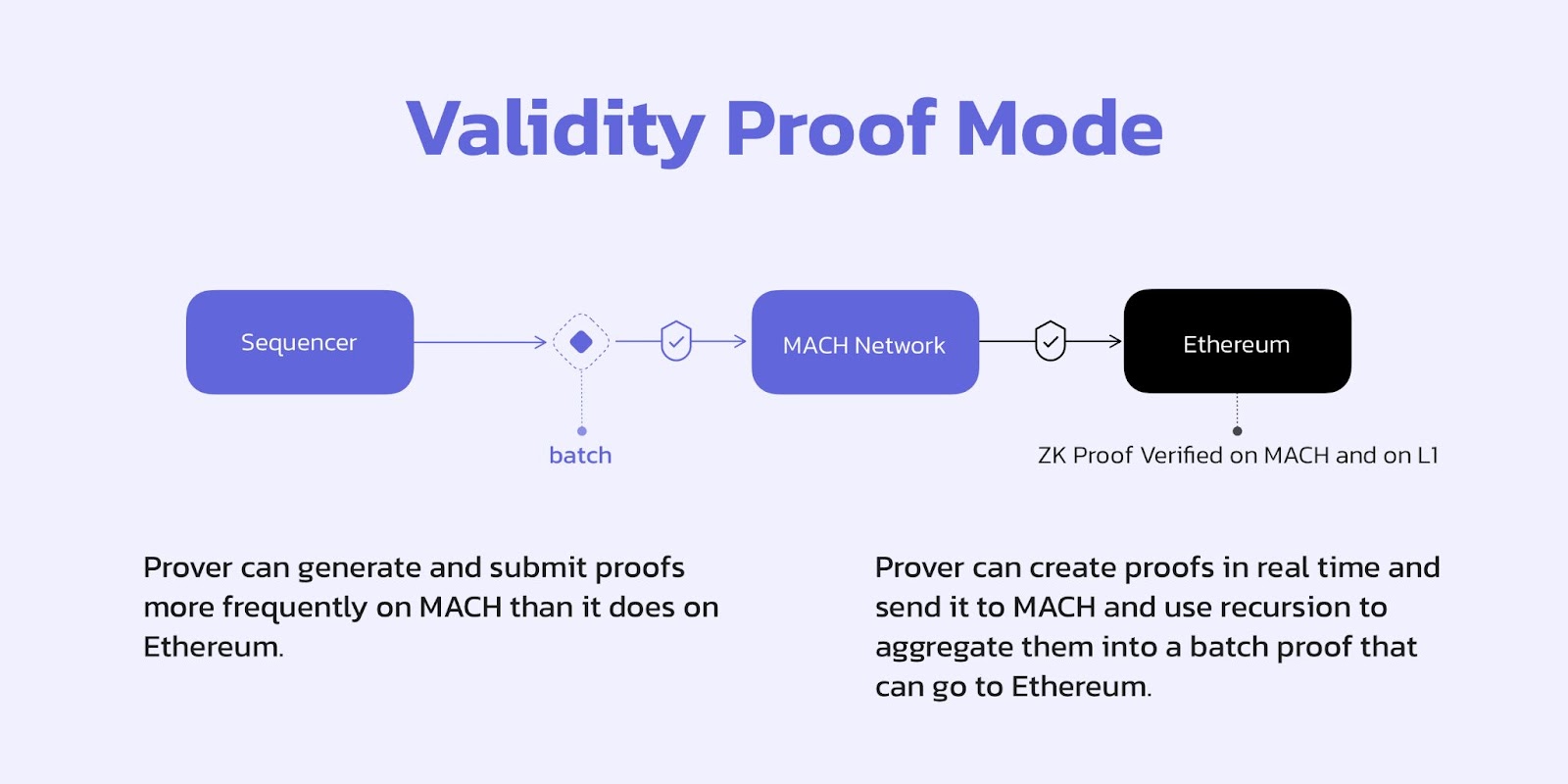
In this mode, the MACH network acts as a decentralised verifier network for validity proofs. The rollup operator such as a sequencer will commit to a newly set of transactions, the resulting state, together with the validity proof on MACH. The MACH network will then verify and reach consensus on the validity of the proof.&#x20;

<figure><img src="https://lh7-us.googleusercontent.com/H-o4H8yNfXbTe7HEb2KVUit8GXnWcnEZjsVWWpbWqk4FQVZBsvEvcVjYO0VYXTQV3a36-KOaWeqvj9d8-NimF9G8dl7WaOUDTOuPTZGJraet4AgLOERhB9utBryi_7jmxrfOgnbU0fUHLF0Y" alt=""><figcaption></figcaption></figure>

Despite the explicit usage of validity proofs, this mode can also work well with optimistic rollups. With optimistic rollups, any designated prover with the right incentive (outside of MACH), can generate a proof of validity and submit it to the MACH network which in turn verifies and reaches consensus on the validity of the proof.&#x20;

Note that for ZK rollups, the prover can generate and submit proofs more frequently on MACH than it does on Ethereum and it is important they do so for faster finality. Moreover, this does not need to happen at the expense of more proving work: Instead of waiting to create a single batch proof, the prover can create proofs in real time and send it to MACH and use recursion to aggregate them into a batch proof later that can go to Ethereum. As long as the incremental proofs are distributed right away to MACH, the transactions will experience fast finality.&#x20;


# Interoperability via MACH

If a RaaS provider had many instantiated rollups, then to have interoperability across the rollups, one would normally build an enshrined bridge on the DA layer, one per rollup. An alternative would be to have one bridge between every two rollups that use the same DA layer.&#x20;

With AltLayer, we adopt a third design that leverages MACH to serve as a bridging hub to coordinate across all rollups.&#x20;

<figure><img src="/files/70KhpIV4D6fqIeYCW5QR" alt=""><figcaption></figcaption></figure>


# SQUAD for Decentralised Sequencing

**Why Decentralized Sequencing?**

A central component to any rollup is the sequencer. Sequencers are nodes in the rollup network that are tasked with the following operations of a rollup:

1. Aggregate transactions:  Accept transactions from the end users via a mempool.&#x20;
2. Order transactions: Select transactions from the mempool and order them according to some policy.
3. Execute transactions: In most rollups, the sequencer is also tasked with executing the transactions according to the underlying VM.
4. Produce  pre-confirmation: As finality for a rollup transaction ultimately comes from the underlying Layer 1, sequencers often produce pre-confirmation for a user transaction that allows clients and applications to proceed while waiting for finality from the Layer 1.
5. Send ordered transaction data to the DA Layer:  As the last step, sequencer also commits the ordered transaction data to a DA layer, for example the underlying Layer 1. Once posted on Layer 1, transactions have Layer 1-level finality.&#x20;

Sequencers are therefore the heart of a rollup. Now, imagine a rollup with a single sequencer. What would happen if the sequencer were to become unavailable? Well, the network would then effectively stop processing transactions. This is not entirely a hypothetical question as there have been instances where rollups stopped processing transactions when the sequencer was down.&#x20;

While one could argue that even when a sequencer goes down, the network is still operational as users could instead send their Layer 2 transaction directly to Layer 1. However, those transactions can take up to 24 hours to be considered final and will cost the same fees as the underlying Layer 1 and hence would result in poor user experience. Also, a 24 hour delay may not be ideal for time-sensitive transactions like liquidation of a debt position.

More generally, a centralized sequencer may:

* Censor user transactions
* Become a choke-point or in the worst-case could go completely unavailable
* Extract excessive rent
* Frontrun user transactions or more broadly create bad MEV and adversely affect users

It is therefore imperative to decentralize the sequencer. Unfortunately, none of the live rollups have decentralized sequencing enabled today.\
\
**Decentralized Sequencing via SQUAD**\
\
AltLayer is designed in a way that application developers who wish to have a rollup can request one via the rollup launchpad and specify the number of sequencers they wish to have for their rollup. The application developers themselves do not have to worry about finding and bootstrapping the sequencers or hosting any component of the rollup themselves, thereby making the entire process of setting up a rollup with decentralized sequencers a straightforward and seamless experience.

<figure><img src="/files/KayH8S9pH9vmSvda0GMq" alt=""><figcaption></figcaption></figure>

This is achieved by leveraging SQUAD which allows nodes run by EigenLayer AVS operators to register their interest to be a sequencer for rollups instantiated by our RaaS no-code dashboard. When an end user makes a request for a rollup via our RaaS platform, the user specifies the minimum and the maximum number of sequencers needed to operate the rollup and the minimum amount of economic collateral needed from each sequencer and a list of tokens in which the collateral could come from. The collateral needs to be restaked via EigenLayer and is later used to slash any misbehaving sequencer.&#x20;

Once the required number of sequencers have put the minimum collateral, these sequencers can then start sequencing transactions for the rollup.

To facilitate discovery of sequencers, SQUAD is designed as a network of nodes open for any EigenLayer AVS operators to join and in fact a full-fledged blockchain in itself with WASM as well as EVM runtimes.  The nodes in the SQUAD are called validators, typical of any PoS network. Once a validator becomes a part of the SQUAD network, it can start registering sequencing needs from the rollups and match them with sequencers.

**Registering as a Sequencer with the SQUAD**

Sequencers bring in the minimum required LST stake themselves or implement a delegated staking mechanism allowing LST holders to stake with the sequencer. Staking on the Squad is implemented natively at AVS contract.

**Registering a Rollup Request with the SQUAD**

If a developer wishes to deploy his own rollup of a certain type (a flash layer or a persistent layer) via AltLayer’s rollup launchpad, he would start by registering his execution layer request to SQUAD in the form of a smart contract call to a contract named `ExecutionLayerRegistryContract`.&#x20;

<figure><img src="/files/3FyEKxwDyz8l7J5MxEzQ" alt=""><figcaption></figcaption></figure>

The registration request has the following JSON format. Basically, the developer specifies the settlement and the DA layer for the execution layer, the runtime (i.e., WASM, EVM, etc.) and the type of execution layer (optimistic execution with fraud proofs or ZK with validity proofs) and the purpose of the execution-layer (i.e., general purpose or app-specific). Note that the request also specifies the number of sequencers required for this execution layer.

```
“execution_layer_req” : {
 “settlement_layer” : “ethereum”,
 “da_layer”: “celestia”,
 “vm”: “wasm”,
 “type”: “optimistic”,
 “purpose”: “app-specific”,
 “nb_sequencers”: “3”,
 “allowed_tokens”: [{“sym”: “ALT”}, {“sym”: “stSOL”}],
 “min_stake_per_seq”: [{“sym”: “ALT”, val: “100"}, {“sym”: stSOL, val: “1000”}]
}
```

**Selecting Sequencers for a Rollup**

Upon receiving a rollup request, SQUAD selects validators from those that have committed the minimum number of LSTs based on their stake and some randomness generated from a VRF. These nodes are then allowed to become sequencers for the given rollup.

<figure><img src="/files/iGKUrfiAIixwENTeaid2" alt=""><figcaption></figcaption></figure>

Once a rollup has been instantiated, it will become possible to obtain the network information such as chainID, RPC endpoint etc. At this stage the network is fully operational and the sequencers are expected to start processing transactions.


# Staking of dApp Token

Each of the AVSes leverage restaking to bootstrap the AVS. Moreover, each AVS will also support dual staking whereby, an AVS operator will be required to bring a certain dApp token alongside LST tokens like stETH. This will help bring more utility for the dApp token via rollup services and will also allow dApp team to incentivize operators who help create secure the AVSes by staking the dApp token.

<figure><img src="/files/yVxzb9KNPE8SoCrSgXJ1" alt=""><figcaption></figcaption></figure>

Moreover, if any of the AVS operators deviates from the protocol, then the stake can be slashed.&#x20;


# Introduction

Wizard is the world’s first AVS-as-a-Service platform offering rapid AVS deployment and management for builders in the EigenLayer ecosystem. Wizard empowers builders to leverage AVS (Actively Validated Services) in a hassle-free, affordable way, reducing deployment and management time from months to mere minutes!&#x20;

<figure><img src="/files/OSWxdQY5VHynaZkSevpJ" alt=""><figcaption></figcaption></figure>

**How Wizard was born**

Thanks to our experience with deploying multiple AVSs in production, onboarding over 50 operators to service these AVS, and managing them, we clearly saw the challenges that a new AVS builder faces - both at the launch time and thereafter, when operating and overseeing the AVS functions.&#x20;

AltLayer had both the expertise and a bird’s eye view of bottlenecks. We were best positioned to build a platform that makes the deployment and management of AVSs 10x easier, significantly reducing the go-to-market time for AVS builders.

\
[Wizard](http://saas.altlayer.io) acts as a comprehensive no-code AVS service platform offering 10x speed to manual deployment, with the singular goal of hyper-accelerating the adoption of AVS and restaking for everyone.

With this in mind, the product offers an array of amazing features:&#x20;

* **Deployment of AVSs:** AVS Wizard makes it 10x easier to deploy AVS contracts of any kind by providing template AVS contracts (e.g MACH, Coprocessor, Bridge) and a fully-functional custom AVS contract editor. Developers who wish to experiment with a new AVS deployment pipeline now only need to click a few buttons in a simple and intuitive dashboard
* **Management of AVSs:** While AVS deployment is a one-off step, a deployed AVS may need periodic management and maintenance, for instance, to add new restaking strategies (to allow a new token to be used for economic security). Other features for AVS management include the ability to deploy a custom implementation contract and use the “Upgrade Service Manager” feature to update to your own implementation
* **Operator Whitelisting & Onboarding:**  One of the biggest challenges in launching an AVS is to onboard a varied set of operators with sufficient assets delegated to them needed by the AVS for economic security. Onboarding of operators can be an extremely time-intensive process. AltLayer AVS Wizard aims to take away this pain by offering a simple checkbox of operators. Developers can pick and choose operators they wish to onboard for their AVS. As a part of the service, AltLayer also offers an AltLayer-hosted operator and aggregator for all AVSs making it much easier for AVS builders to quickly experiment with a new AVS idea without the need to onboard any external operators.

  Once the hosted operator is activated, it will be registered to your AVS and be part of your operators.  You can also use the wizard to manage operators such as ejection out of the network. This operator is pre-configured to use our generic aggregator. You can then design your operator business logic and call our hosted operator to interact with the AVS. Our operator API docs will be released soon.&#x20;
* **View your AVS on EigenLayer AVS dashboard:**  Once you have updated your AVS metadata, conforming to [EigenLayer requirements](https://docs.eigenlayer.xyz/eigenlayer/avs-guides/avs-dashboard-onboarding), your AVS will automatically appear on EigenLayer AVS Dashboard (<https://holesky.eigenlayer.xyz/avs>). To update metadata, users can simply head over to your AVS profile and update it!

<br>


# Technical overview

Wizard is a no-code platform where builders can easily choose, deploy and manage their preferred AVS solutions, including MACH (a fast finality network for rollups), bridges or co-processor - enjoying an experience that is 10x faster and 100x easier than a manual AVS deployment pipeline.&#x20;

## **What is AVS?**

An Actively Validated Service (in short, AVS), proposed and popularized by EigenLayer, is a network of operators that offer decentralized services such as sequencing and asset bridging to its users. To ensure liveness and safety of an AVS, the network borrows economic security from Ethereum via EigenLayer’s restaking mechanism. Restaking makes it possible for already staked ETH to be reused to service AVSs. Misbehaving operators that violate liveness or safety guarantees get their stake slashed.

## **How does Wizard create and manage AVS?**

Wizards provides an intuitive UI that allows users to create and customize their AVS based on their needs.

<figure><img src="/files/N3UgYiKyxcYFTl8aicZy" alt=""><figcaption></figcaption></figure>

After customizing the AVS, users can proceed to AVS deployment, which will include both on-chain and/or off-chain components. This includes selecting which service manager (either a Template or Custom) and strategies to support.

Wizards will deploy the following on-chain components

1. AVS Base contracts
2. Service manager contract (either a Template or Custom)

Wizard includes an AVS factory contract that helps you deploy the following base contracts.

* Registry Coordinator
* Service Manager Base (ECDSA or BLS)
* Stake Registry (ECDSA or BLS)
* Index Registry
* Operator State Retriever
* BLS Apk Registry

After the base contracts are deployed, Wizard will deploy the template service manager contract and upgrade the service manager implementation to the newly deployed contract.&#x20;

<figure><img src="/files/6n2jnsDvgZssNdxAYfB1" alt=""><figcaption></figcaption></figure>

For BLS-based service manager template,  AltLayer hosted aggregator will be activated upon deployment of the newly deployed AVS.&#x20;

<figure><img src="/files/8s2pPxaY139MTJwjm5NE" alt=""><figcaption></figcaption></figure>

Next, users can activate the AltLayer-hosted operator to connect to the aggregator. Alternatively, the user can run operator and connect to the aggregator independently.&#x20;

<figure><img src="/files/UDFap0JOdzeSrl3HoNZd" alt=""><figcaption></figcaption></figure>

Finally, Wizard provides an intuitive UI to manage your AVS post-deployment, which includes managing roles, operator whitelisting and updating metadata.&#x20;

<figure><img src="/files/2SayU3n6Yr6cxJaB6est" alt=""><figcaption></figcaption></figure>


# Create AVS

{% embed url="<https://youtu.be/_9xSxsEj9kg>" %}

## Getting Ready

Make sure you have Holesky Testnet ETH. You can get hold of some Holesky ETH by requesting tokens from any of the faucets listed below:

* [https://cloud.google.com/application/web3/faucet/ethereum/holesky<br>](<https://cloud.google.com/application/web3/faucet/ethereum/holesky&#xA;>)
* [https://holesky-faucet.pk910.de/<br>](<https://holesky-faucet.pk910.de/&#xA;>)
* [https://faucet.quicknode.com/ethereum/holesky<br>](<https://faucet.quicknode.com/ethereum/holesky&#xA;>)

## Creating an AVS via Wizard

1. Head over to [https://wizard.altlayer.io/](https://wizard.altlayer.io/login)

<figure><img src="/files/AIVqV5WnCGlZOyBrP13C" alt=""><figcaption></figcaption></figure>

2. Log in using your Google credentials. Once you are logged in, you will be asked to create an organisation. Type in your organisation name and click "create". Later, you will be able to add your fellow team members to your organisation. Organisation team members can view and manage your deployed AVS.
3. Click on “New AVS” to start deploying a new AVS.

<figure><img src="/files/jUyApY3mGJ7uS6zXMfWD" alt=""><figcaption></figcaption></figure>

4. To deploy a new AVS, do the following step and then click on "Submit" after confirming the details on the summary panel:
   1. Type in your preferred AVS name
   2. Choose a service manager template as your AVS type
      1. You can either choose to deploy a preloaded AVS template that is provided by us, such as Hello World (ECDSA), AltLayer Mach (BLS), or Bridge (BLS) etc.; OR
      2. Choose to deploy a Custom AVS (either ECDSA or BLS). To deploy a Custom AVS, you have to paste a [flattened ](https://book.getfoundry.sh/reference/forge/forge-flatten)version of your service manager contract to the editor. \
         \
         Do note that your custom AVS contract must implement the `IServiceManager` interface. This ensures that the AVS can be indexed, managed, and interacts properly with both EigenLayer and AltLayer services. Below are the details for the primary interfaces:
         1. **`IServiceManager`**\
            The `IServiceManager` interface forms the main point of interaction for an AVS to push updates to the EigenLayer rewards system. It is an extension of `IServiceManagerUI` and includes functionalities to create reward submissions and manage operator interactions.
            * **Source File:** [`IServiceManager`](https://github.com/Layr-Labs/eigenlayer-middleware/blob/v0.2.0-mainnet-rewards/src/interfaces/IServiceManager.sol)
         2. **`IServiceManagerUI`**\
            This interface outlines the required user interface functionalities that every AVS should provide. It includes the following functionalities:
            * Updating the metadata URI
            * Registering and deregistering operators with the AVS
            * Fetching restaked strategies for operators
            * Providing the list of restakable strategies
            * **Source File:** [`IServiceManagerUI`](https://github.com/Layr-Labs/eigenlayer-middleware/blob/v0.2.0-mainnet-rewards/src/interfaces/IServiceManagerUI.sol)
         3. **\[Optional] `IOperatorAllowlist`**\
            To further enhance security and control over which operators can interact with the AVS, the `IOperatorAllowlist` interface can be optionally implemented. This allows the AVS to dynamically manage a list of approved operators who can register and participate. AVS that do not wish to impose restrictions on operators can ignore this feature.

            * **Source File:** [`IOperatorAllowlist`](https://github.com/alt-research/wizard-templates/blob/731aa353758f64f55f709f9acff0a1df3e862731/src/interfaces/IOperatorAllowlist.sol)

            You can easily inherit and use the `OperatorAllowlist` implementation from the template provided in [this repository](https://github.com/alt-research/wizard-templates/blob/731aa353758f64f55f709f9acff0a1df3e862731/src/templates/OperatorAllowlist.sol).<br>
      3. Last but not least, you have to compile the code on the Wizard UI and enter your custom arguments. Finally, you can continue with the deployment process.

**How to deploy a Custom BLS AVS**

{% embed url="<https://www.youtube.com/watch?v=o-fr5IliO8s>" %}

**How to deploy a Custom ECDSA AVS**

{% embed url="<https://www.youtube.com/watch?v=N1xBcIXe5rQ>" %}

5. Select your preferred supported restaked strategies for this AVS

<figure><img src="/files/1luZIQDWgXfCAvk8hnA3" alt=""><figcaption></figcaption></figure>

6. To start the deployment process, you will need to connect your Ethereum wallet (e.g., MetaMask) to continue.

<figure><img src="/files/dk1SwxNyGzHpNAjtPQ31" alt=""><figcaption></figcaption></figure>

7. The first step is to deploy the AVS base contracts. Click on “Deploy” and confirm the transaction in your Ethereum wallet. Once the transaction is included in the blockchain, you will receive a deployment confirmation.

<figure><img src="/files/WyqI3234GJXo6rgsGv9h" alt=""><figcaption></figcaption></figure>

8. Next, you will be prompted to deploy the selected AVS service manager template contract. Similarly, click " Deploy " to confirm the Ethereum wallet transaction. You will get a deployment confirmation once the blockchain includes the transaction.

<figure><img src="/files/mL1kLFg1sG7JAOfsp5Fk" alt=""><figcaption></figcaption></figure>

9. After the deployments have been confirmed, you may view and manage your newly deployed AVS.


# Manage AVS

{% embed url="<https://youtu.be/HOfVMzGrZ28>" %}

## Managing quorum and strategies&#x20;

You may wish to change the restaked strategies this AVS supports.&#x20;

If you wish to select more strategies (e.g. EIGEN, reALT), you can select them and click on “Save Changes”. You will then be prompted to confirm a transaction in your Ethereum wallet.

<figure><img src="/files/EieJm2Pl8kI7fl8NOLcG" alt=""><figcaption></figcaption></figure>

## Contract addresses

Click on "Contract addresses" to view your corresponding AVS contract addresses. &#x20;

<figure><img src="/files/le07ZScfCsIOaqOOvECw" alt=""><figcaption></figcaption></figure>

## Contract roles management&#x20;

Click on "Contract Roles" to view the addresses of various roles. &#x20;

<figure><img src="/files/Y3eIeoyNTkRqQui9au1S" alt=""><figcaption></figcaption></figure>

If you wish to modify any roles, click the edit button and submit the transaction.&#x20;

{% hint style="info" %}
Please note that role changes are only available to contract owners. You can check out the current owner's address in the "Contract roles" section.&#x20;
{% endhint %}

<figure><img src="/files/iD6PuLZg2nCgTal0yAkB" alt=""><figcaption></figcaption></figure>

## Upgrade service manager contract

Suppose you have custom logic and have deployed your service manager contract implementation. In that case, you can use the "Upgrade Service Manager" functionality to point your service manager proxy contract to the new implementation.&#x20;

<figure><img src="/files/wO1ZxcL33NHL8TWlhSHz" alt=""><figcaption></figcaption></figure>

## Updating AVS metadata and adding to the [EigenLayer Holesky App](https://holesky.eigenlayer.xyz/)

<figure><img src="/files/RPCNQeGrpo0cAczd7NPO" alt=""><figcaption></figcaption></figure>

Click "Edit" to edit the metadata. Provide the link to your metadata JSON

<figure><img src="/files/Tl240beI8nOZ9Y7GiYm1" alt=""><figcaption></figcaption></figure>

Wait for around 10-20 minutes. Your AVS will appear in the [Holesky Eigen App](https://holesky.eigenlayer.xyz/avs).

<figure><img src="/files/OBMPePJugu41HQXadYZx" alt=""><figcaption></figcaption></figure>

{% hint style="info" %}
Please note that&#x20;

* Metadata format should follow the format outlined in this [example](https://holesky-operator-metadata.s3.amazonaws.com/avs_1.json)
* For proper rendering of your logo on the UI, the logo *must* be hosted on GitHub and its reference must point to the raw file&#x20;

For more information, you can check out <https://docs.eigenlayer.xyz/eigenlayer/avs-guides/avs-dashboard-onboarding#metadatauri-format>&#x20;
{% endhint %}

## Creating new rewards

To issue new rewards to your restakers and operators, use the "Add Rewards" function.

1. Select the reward token or input your reward token
2. Select the number of tokens to issue
3. Select which strategies to reward to
4. Select the start date. Do note that you can only start on a specific day of the week.
5. Select the reward range&#x20;

<figure><img src="/files/ixIZRIvZ2VD6WK7i0DiS" alt=""><figcaption></figcaption></figure>

Proceed to the next step&#x20;

1. Approve the token amount for the rewards
2. Submit the reward transaction

<figure><img src="/files/EcmwDUnUgar0Uhvh6wRi" alt=""><figcaption></figcaption></figure>

You may want to check out [EigenLayer documentation on AVS Rewards ](https://docs.eigenlayer.xyz/eigenlayer/avs-guides/rewards)for more information.

## Update Stake

You can track your last AVS stake update and update your stake status using the "Refresh" button.

<figure><img src="/files/eFZ5VPBSv0OSxR4yKUI1" alt=""><figcaption></figcaption></figure>

1. <br>


# Operator management

{% embed url="<https://youtu.be/4Kt4rpxKuDo>" %}

## Operator whitelisting

You can select the operators you wish to whitelist and submit a transaction to add them to the operator whitelist.&#x20;

<figure><img src="/files/aCismC5JQza7TZC9uagE" alt=""><figcaption></figcaption></figure>

Once you have whitelisted the operator, you can contact the various operators to ask them to host the operator. Please note that you will need to provide operator setup and instruction, e.g., dockerFile, to the operators.&#x20;

## Aggregator endpoint

Your operator (for a BLS-based service manager) will need to connect to an aggregator to aggregate the signatures and submit them on the chain.&#x20;

The endpoint can be easily found in the "Manage AVS" UI.

<figure><img src="/files/t4k1apECyb4NKEqgDPZ5" alt=""><figcaption></figcaption></figure>

## Checkng operator status

You can hover over a particular operator to check its status, such as whether it is whitelisted or registered. You can also eject or terminate the operator if it is already registered and running.&#x20;

<figure><img src="/files/amdkZFHxNBQj1EY9Hqzq" alt=""><figcaption></figcaption></figure>

<figure><img src="/files/gU7H5NgoRW6CUN8wDO6d" alt=""><figcaption></figcaption></figure>

## Activating AltLayer Hosted Operator (Gated feature)&#x20;

**Please note this feature is in the closed alpha phase and is currently available to selected developers.**&#x20;

Click "Activate Hosted Operator" and select the quorum and strategies you wish to use. Click "Register" to proceed to the next step.&#x20;

<figure><img src="/files/d2aLoZMwgchXozTKrau5" alt=""><figcaption></figcaption></figure>

Fill in the code you received from AltLayer team and click on "Launch" to proceed.&#x20;

<figure><img src="/files/ScbuGHa6ZzbtxlWeWuDL" alt=""><figcaption></figcaption></figure>

Once activated, your operator will start running.&#x20;

<figure><img src="/files/sOXRFyULEwBNZTYeUG54" alt=""><figcaption></figcaption></figure>

You can hover over the operator and click "Credentials" to access your operator endpoint information.&#x20;

<figure><img src="/files/QOR97T1pTvlFqWsdRSa4" alt=""><figcaption></figcaption></figure>

<figure><img src="/files/6H1CE5SyVOPOjKaPuPKd" alt=""><figcaption></figcaption></figure>

{% hint style="info" %}
We will be providing the operator API information in the near future.&#x20;
{% endhint %}


# Hosted operator API (BLS based)

## Overview

The AltLayer-hosted operator comes with APIs. With the APIs, AVS only needs to design and implement its business logic. The API will handle the signature signing and submission to the aggregator.&#x20;

<figure><img src="/files/cQRF7tHP6pXeZJWOqEbS" alt=""><figcaption></figcaption></figure>

To interact with the API, there are two options

1. Interact with the managed operator&#x20;
2. Interact with the managed operator proxy

## The rationale of operator proxy

While direct interaction with the operator provides the most significant degree of flexibility, it is often necessary to construct the parameters, which can be low-level.&#x20;

Let's use the following example to illustrate it

```solidity
    function confirmMessage(
        Params1 p1,
        ...
        ParamsN pN,
        NonSignerStakesAndSignature memory nonSignerStakesAndSignature
    ) external whenNotPaused onlyConfirmer {
    ...
    }

```

The operator API has a parameter called `params_raw`. This is the abi-encoded bytes of `p1....pN`. It can be complex to construct the encoded bytes.

The managed operator proxy abstracted away the complexity. It supports any AVS using the [task manager convention](https://github.com/Layr-Labs/incredible-squaring-avs/blob/master/contracts/src/IncredibleSquaringTaskManager.sol). When using the operator proxy API, there is no need to compute `param_raw`. The AVS builder can focus on providing the actual payload.  As such, the API is much simpler and easier to use.&#x20;

## Getting the operator and/or operator proxy endpoint and credentials

Go to the operator section and click on the menu button for "Hosted Operator Service".

<figure><img src="/files/K4qGhyA6nPv19kXBNBBf" alt=""><figcaption></figcaption></figure>

Click on the "Credentials" link to display the endpoints, username and password. The username and password are required as the operator and operator proxy API have basic access authentication enabled.&#x20;

<figure><img src="/files/2G5TpG2UWCv959dkJoIK" alt=""><figcaption></figcaption></figure>

## Operator API

### Request header

* Content-Type: application/json
* Authorization: Basic \<base64 encoded of admin`:password`>

### Request body

```json
{
  "id": "1",
  "jsonrpc": "2.0",
  "method": "operator_createSigTask",
  "params": [
    {
      "avs_name": "op",
      "method": "tt",
      "params_raw": "0x00",
      "reference_block_number": 1000,
      "quorum_numbers": [
        0
      ],
      "quorum_threshold_percentages": [
        66
      ],
      "sig_hash": "0x0000000000000000000000000000000000000000000000000000000000000000"
    }
  ]
}
```

* `method`: operator\_createSigTask. This is the API method and should not be changed
* `params.avs_name`: name of the AVS
* `params.method`: the smart contract method that handled the contract call from the aggregator e.g `respondToTask`
* `params.param_raw`: the abi-encoded call data. It can be all calldata or a subset of the calldata
* `params.reference_block_number`: reference block number for quorum\_numbers and quorum\_threshold\_percentages&#x20;
* `params.quorum_numbers` : quorum number in which operators have signed for
* `params.quorum_threshold_percentages` : quorum threshold for the particular quorum number
* `params.sig_hash` : the signed hash of `param_raw`

### Sample curl request&#x20;

{% hint style="info" %}
Remember to update&#x20;

1. basic auth credentials
2. avs name
3. method
4. params
5. operator endpoint
   {% endhint %}

```bash
curl --noproxy '*' \
  -H "Content-Type: application/json" \
  --header 'Authorization: Basic <base64 encoded admin:password>' 
  -d '{
    "id": "1",
    "jsonrpc": "2.0",
    "method": "operator_createSigTask",
    "params": [
      {
        "avs_name": "op",
        "method": "tt",
        "params_raw": "0x00",
        "reference_block_number": 1000,
        "quorum_numbers": [0],
        "quorum_threshold_percentages": [66],
        "sig_hash": "0x0000000000000000000000000000000000000000000000000000000000000000"
      }
    ]
  }' \
  https://your-avs-operator.alt.technology

```

## Operator Proxy API

### Request header

* Content-Type: application/json
* Authorization: Basic \<base64 encoded of admin`:password`>

### Request body

```bash
{
    "id": 2,
    "jsonrpc": "2.0",
    "method": "operator_createSigTaskResponse",
    "params": [
        {
            "method": "respondToRequest",
            "task_created_block": 3003011,
            "message": "0x00",
            "task_index": 100,
            "resp_message": "0x0000"
        }
    ]
}
```

* `method`: operator\_createSigTaskResponse. This is the API method and should not be changed
* `params`.method: the smart contract method that handled the contract call from the aggregator, e.g `respondToTask`
* `params.task_created_block`: the block number in which the task is created
* `params.message`: the task message found inside the Task struct
* `params.task_index`: the task index in the smart contract&#x20;
* `params.resp_message`: the response message for the task

### Sample curl request&#x20;

{% hint style="info" %}
Remember to update&#x20;

1. basic auth credentials
2. params
3. operator proxy endpoint
   {% endhint %}

```bash
curl --noproxy '*' -H "Content-Type: application/json" --header 'Authorization: Basic <base64 encoded admin:password>' \
-d '{
    "id": 2,
    "jsonrpc": "2.0",
    "method": "operator_createSigTaskResponse",
    "params": [
        {
            "method": "respondToRequest",
            "task_created_block": 3003011,
            "message": "0x00",
            "task_index": 100,
            "resp_message": "0x0000"
        }
    ]
}' \
https://your-avs.alt.technology
```

### Sample success response

```json
{
    "jsonrpc": "2.0",
    "id": 2,
    "result": {
        "task_index": 1,
        "tx_hash": "0x0000000000000000000000000000000000000000000000000000000000000000",
        "sig_hash": "0x0000000000000000000000000000000000000000000000000000000000000000"
    }
}
```


# Custom AVS specification

This section describes the AVS specification requirement for deploying or importing custom AVS into WIZARD


# Constructor specification requirements

To use WIZARD to deploy your custom contract code, the following convention must be met for WIZARD to support it.

## ECDSA based AVS

The `ECDSAServiceManagerBase` constructor is responsible for initializing key contract addresses and disabling initializers. The mandatory arguments are:

* **AVS Directory (`_avsDirectory`)**: Manages AVS-related data for registered operators.
* **Stake Registry (`_stakeRegistry`)**: Records registration and staking details.
* **Rewards Coordinator (`_rewardsCoordinator`)**: Handles reward distributions.
* **Delegation Manager (`_delegationManager`)**: Manages staker delegations to operators.

The code snippet below shows how these parameters are set:

[`eigenlayer-middleware/src/unaudited/ECDSAServiceManagerBase.sol`](https://github.com/Layr-Labs/eigenlayer-middleware/blob/74438b7915c35ca5a0d312654716160c2499169d/src/unaudited/ECDSAServiceManagerBase.sol)

```solidity
constructor(
    address _avsDirectory,
    address _stakeRegistry,
    address _rewardsCoordinator,
    address _delegationManager
) {
    avsDirectory = _avsDirectory;
    stakeRegistry = _stakeRegistry;
    rewardsCoordinator = _rewardsCoordinator;
    delegationManager = _delegationManager;
    _disableInitializers();
}
```

## BLS based AVS

The `ServiceManagerBase` constructor sets various immutable addresses.  The mandatory arguments are:

* **AVS Directory (`__avsDirectory`)**
* **Rewards Coordinator (`__rewardsCoordinator`)**
* **Registry Coordinator (`__registryCoordinator`)**
* **Stake Registry (`__stakeRegistry`)**

The constructor calls the base storage initializer and then disables further initializers.

[`eigenlayer-middleware/src/ServiceManagerBase.sol`](https://github.com/Layr-Labs/eigenlayer-middleware/blob/74438b7915c35ca5a0d312654716160c2499169d/src/ServiceManagerBase.sol)

```solidity
constructor(
    IAVSDirectory __avsDirectory,
    IRewardsCoordinator __rewardsCoordinator,
    IRegistryCoordinator __registryCoordinator,
    IStakeRegistry __stakeRegistry
)
    ServiceManagerBaseStorage(
        __avsDirectory,
        __rewardsCoordinator,
        __registryCoordinator,
        __stakeRegistry
    )
{
    _disableInitializers();
}
```


# Import Externally-Deployed AVS

{% hint style="info" %}
Importing Externally-Deployed AVS into WIZARD is currently still work in progress
{% endhint %}

### Overview

An externally-deployed AVS (Active Validator Set) must adhere to a set of standardized interfaces and practices to ensure compatibility within the EigenLayer ecosystem and AltLayer. This document outlines the requirements for these AVS contracts, guaranteeing that they work seamlessly with other components expecting AVS conformity. Additionally, an optional allowlist feature using `IOperatorAllowlist` can be implemented to further restrict which operators can register.

### Version Requirement

At the moment, developers are required to use version `v0.2.1-mainnet-rewards` of the [EigenLayer Middleware](https://github.com/Layr-Labs/eigenlayer-middleware/releases/tag/v0.2.1-mainnet-rewards). Ensure that your AVS contract adheres to this version for proper functionality and compatibility.

### 1. Interface Compliance

Every AVS must implement the `IServiceManager` interface. This ensures that the AVS can be indexed, managed, and interacts properly with both EigenLayer and AltLayer services. Below are the details for the primary interfaces:

#### `IServiceManager`

The `IServiceManager` interface forms the main point of interaction for an AVS to push updates to the EigenLayer rewards system. It is an extension of `IServiceManagerUI` and includes functionalities to create reward submissions and manage operator interactions.

* **Source File:** [`IServiceManager`](https://github.com/Layr-Labs/eigenlayer-middleware/blob/v0.2.0-mainnet-rewards/src/interfaces/IServiceManager.sol)

#### `IServiceManagerUI`

This interface outlines the required user interface functionalities that every AVS should provide. It includes the following functionalities:

* Updating the metadata URI
* Registering and deregistering operators with the AVS
* Fetching restaked strategies for operators
* Providing the list of restakable strategies
* **Source File:** [`IServiceManagerUI`](https://github.com/Layr-Labs/eigenlayer-middleware/blob/v0.2.0-mainnet-rewards/src/interfaces/IServiceManagerUI.sol)

#### Optional: `IOperatorAllowlist`

To further enhance security and control over which operators can interact with the AVS, the `IOperatorAllowlist` interface can be optionally implemented. This allows the AVS to manage a list of approved operators who can register and participate. AVS that do not wish to impose restrictions on operators can ignore this feature.

* **Source File:** [`IOperatorAllowlist`](https://github.com/alt-research/wizard-templates/blob/731aa353758f64f55f709f9acff0a1df3e862731/src/interfaces/IOperatorAllowlist.sol)

You can easily inherit and use the `OperatorAllowlist` implementation from the template provided in [this repository](https://github.com/alt-research/wizard-templates/blob/731aa353758f64f55f709f9acff0a1df3e862731/src/templates/OperatorAllowlist.sol).

**Benefits of `IOperatorAllowlist`**

* Restricts which operators can register, providing better security and control over participation.
* Operators can be added or removed from the allowlist dynamically through the AVS interface.

### 2. Metadata Requirements

The AVS metadata must be stored at a URI accessible through `updateAVSMetadataURI`. The JSON file at this URI should follow the example structure below:

```
{
  "name": "Example AVS",
  "website": "https://example-website.xyz/",
  "description": "This is an example of an AVS",
  "logo": "https://example-bucket.s3.amazonaws.com/logo.png",
  "twitter": "https://twitter.com/examplehandle"
}
```

Each field is required and should accurately reflect the AVS service.

### 3. Signature Validation

The contract must handle operator registration and deregistration securely by validating the signatures properly using the `ISignatureUtils` interface. Ensure:

* **Signatures include a salt and expiry to avoid replay attacks**.
* **Signature validation logic complies with the `ISignatureUtils.SignatureWithSaltAndExpiry` structure**.

### 4. Compatibility with AVS Directory

Your AVS contract must be able to communicate with the AVSDirectory contract. This involves:

* **Correctly forwarding operator registration and deregistration calls** to the AVSDirectory.
* **Ensuring your contract’s structure and state are compatible with AVSDirectory expectations**.

### 5. Examples

You can find examples in [here](https://github.com/alt-research/wizard-templates).

By adhering to these standards, externally-deployed AVS contracts will be able to maintain full compatibility with both the EigenLayer and AltLayer ecosystems, ensuring smooth operations across all services and interfaces.


# Report bug or submit a feature request

Proceed to <https://github.com/alt-research/wizard-issues-tracker> and open an issue&#x20;


# Deploy AI Agent

## Deploying an AI Agent via Autonome

1. Head over to <https://apps.autono.meme/>.<br>

   <figure><img src="https://lh7-rt.googleusercontent.com/docsz/AD_4nXfEAPe68wv8pYjJ9QUu7fX7jGXvW8k0oQBvbAmiXKlmwAbpF1Lxdd8voRQ2ghxDH1nsN0WsSwsOjySt2rGogktDQkf7tHXWh_xE-cY9mXoMkaGoOHVpdLOhypMfN5F9bG6HS_yw?key=rtQosRDvxM6lsBa6hOd2nPS6" alt=""><figcaption></figcaption></figure>
2. Log in using your Google credentials. Once you are logged in, you will be asked to create an organisation. Type in your organisation name and click "Create". Later, you will be able to add your fellow team members to your organisation. Organisation team members can view and manage your deployed AI Agent.
3. Click on “+” to start deploying a new AI Agent.<br>

   <figure><img src="https://lh7-rt.googleusercontent.com/docsz/AD_4nXctDfv86tECtodAEbuOnEPLqjeICuUz0mrbHPXvby-9pNd_n96SroEDivd0bU5QeAgXAXS5x8Tm0i00f4j3K__bby7FcY2Xht_iGvvJYoPLuwAe919aX3bXkx4AoO6LGUA-XxwXYA?key=rtQosRDvxM6lsBa6hOd2nPS6" alt=""><figcaption></figcaption></figure>
4. Select your preferred stack for your agent and click on “Submit”. We currently support Agentkit, Based Agent, Eliza and Perplexica agent frameworks. Additionally, we also provide the feature of verifiable agents via TEE (using [Automata services](https://github.com/automata-network/amd-sev-snp-attestation-sdk)).<br>

   <figure><img src="https://lh7-rt.googleusercontent.com/docsz/AD_4nXeonSncFKYKa2W52lzNIfe4n3yEYicLMG7mm7tzXUjFr6qPlhfksblM2MIJg672l5oMuCArOuO0NKWBU44IOdibPbPaHXrn_iQ_yz4HXUCbqOX7iNe3NlG_g0RI-09XPLSs3L-Xdw?key=rtQosRDvxM6lsBa6hOd2nPS6" alt=""><figcaption></figcaption></figure>
5. Enter your API keys for deployment. For the Agentkit framework, we will require your OpenAI API key, Coinbase CDP API key and private key. You will be able to fetch these API keys by referencing the [OpenAI guide](https://help.openai.com/en/articles/4936850-where-do-i-find-my-openai-api-key) and the [Coinbase CDP guide](https://docs.cdp.coinbase.com/coinbase-app/docs/getting-started).<br>

   <figure><img src="https://lh7-rt.googleusercontent.com/docsz/AD_4nXfbPmSVUNaZ1Nf5z6kia6fvnlB6FxaCuDVTle8wyNrHNr5nEXTosPK2a5TrZe-iTdGQSQoVu-rdhHQ8HbEID3KWYUMqnGpaKDT5aIMjxaF4rPSsPqJ6cstzQ9Y3ctpIC3Zz-Xby?key=rtQosRDvxM6lsBa6hOd2nPS6" alt=""><figcaption></figcaption></figure>
6. Click on "Free Trial" to deploy your first AI Agent on-the-house!<br>

   <figure><img src="/files/dmRY1bYSjZobFqKPHOhZ" alt=""><figcaption></figcaption></figure>
7. Wait for the deployment of your AI agent to be completed. This process usually takes \~5 minutes.<br>

   <figure><img src="https://lh7-rt.googleusercontent.com/docsz/AD_4nXfPm5477uVQVbfZDuL0t4E3B9T0GsQv-9S9Yqpvt6VrnrLCN-5TWz_3FzZPBQKA4-BSMSX7Ut_ceotKbN-zBaXybG5SSxIhShBEjK902j0MC9fyKspDlT5aUCcCC1S0l96ul4owPg?key=rtQosRDvxM6lsBa6hOd2nPS6" alt=""><figcaption></figcaption></figure>
8. Once the AI agent is successfully deployed, you can chat with your AI agent by clicking on "Chat with Agent".<br>

   <figure><img src="https://lh7-rt.googleusercontent.com/docsz/AD_4nXeiM2FJpN8zRh_1MmIV1YgEEKYY7_KMd_a2-CaE1M_0XYmiylRQm_UbfkZZMyKGzNjEwvS6E2zst5DoSVMDdb7fviG72Gpgd4_tne_k9fYDxspI2DtWg0WjqEdwxZcLmiXFPIywnA?key=rtQosRDvxM6lsBa6hOd2nPS6" alt=""><figcaption></figcaption></figure>


# Autonome API guide

### Guide

1. Go to your Manage agent page post-deployment. Fetch your API URL and “View details” to get the username and password to access this API:\ <br>

   <figure><img src="https://lh7-rt.googleusercontent.com/docsz/AD_4nXfE9Ic75qqsrqeaCayELa9S5EHDG9p2Mf0Rzqm9mO8GFdQJ9WH5uiZuqWW2FumLFSgy8px3qazYLAsZEbj7s8RSyXRIa37RC3DXe9LBqkQ2nM9t9uXhGgxWBs8DtXHXA_QB36NVQg?key=nx8FXxUst_RfWvTPhvOCwK2P" alt=""><figcaption></figcaption></figure>

   <figure><img src="https://lh7-rt.googleusercontent.com/docsz/AD_4nXfJT36kuDyQhMPZ5rZ8AANqdwhuXwPGjvdJEvwvm6Qk8uvdY_yirZi0GrM_8FsSU0MCY41RrqgFBVpTK4xU85pSLw6eQM_M4ZyLHaKH0GLqrKtKJCbHSPD7luaYS9C9z7ITJ24AVg?key=nx8FXxUst_RfWvTPhvOCwK2P" alt=""><figcaption></figcaption></figure>
2. Generate the HTTP Basic Auth Header with the username and password (using a tool like [this](https://www.debugbear.com/basic-auth-header-generator))<br>
3. Fetch the agent ID via the curl request below:

```bash
curl --location --request GET '
https://autonome.alt.technology/nader-mqgsil/agents
' \
--header 'Authorization: Basic bmFkZXI6cElDVHRaYURUYw==
```

You will receive a response like below:

<figure><img src="https://lh7-rt.googleusercontent.com/docsz/AD_4nXeIQcBx027yFsGdAKT64kz-Te_NxaH5PcwgniUPVIe9IOoA6c7IrUa5mSC93KwOOz4RPluo0xVEf9z_P4jOsNHi-rVIEnNbVHUMIeQEM7vS6i0mWSFFRar8JLK-MU7aggu6dHAj?key=nx8FXxUst_RfWvTPhvOCwK2P" alt=""><figcaption></figcaption></figure>

4. Start talking to your agent via the curl request below (following the chat request schema that was previously defined by the default frameworks available or by you when uplaoding your own custom framework):

```bash
curl --location --request POST '
https://autonome.alt.technology/nader-mqgsil/981a34a8-9479-01e6-bf53-201149f63ddf/message
' \
--header 'Content-Type: application/json' \
--header 'Authorization: Basic bmFkZXI6cElDVHRaYURUYw==' \
--data '{
    "text": "hi"
}
```

You will receive a response like below:<br>

<figure><img src="https://lh7-rt.googleusercontent.com/docsz/AD_4nXcNS3y4L9mmIauEFeJ1Dv4TlOeBRnA6yCvATHkLbW5U3jobb0MX0UDAnp2U2RfUi_l5LG9KV8MuW14yO5VSWoj6uicMAVChvG15uL9dELIWSH08lQxrbEgYUFYJ4Cs77IbBaV40?key=nx8FXxUst_RfWvTPhvOCwK2P" alt=""><figcaption></figcaption></figure>

<br>


# Uploading your own agent framework

### Guide

1. Click on “Upload New Framework”.

<figure><img src="https://lh7-rt.googleusercontent.com/docsz/AD_4nXd2FITqnMZBR6877573VVVz5WjrI0QIA1pImUe3ThiUGCFskL91C_icEwYzqu6ETNIktD1Z7KF5KCMyyBDziHpN6cBWhGxg5nIl5qqILIyN4xbAKEhS_ruVfgbH0eV46Js2m9A52A?key=19XjXm-yQaJmOPO_gjzEZh4T" alt=""><figcaption></figcaption></figure>

2. Complete the following steps and review the summary panel before clicking “Submit”

   1. Enter your Agent Framework name (lowercase letters only, e.g. `helloworld`)
   2. Write a description of the AI Agent Framework (e.g., “ A sophisticated furry chat agent specializing in handling mission-critical conversations”)
   3. Input the Docker Image(e.g., `docker_org_name/imagine:tag`)
   4. Input Agent Logo (e.g. <https://example.com/ottie007.png>)
   5. Choose your Chat Endpoint (e.g. `/poke`)
   6. Input Port ( e.g. `3000`)
   7. Ensure your agent chat framework follows the Chat Request and Chat Response Schema as shown below.<br>

      <figure><img src="/files/UJm8e7KvuSSu03Q7v3AD" alt=""><figcaption></figcaption></figure>
   8. Input GitHub URL (e.g. <https://github.com/alt-research>)
   9. Specify Environment Variables (optional)
   10. Finally, ensure all details are correct in the Summary panel and click on “Submit”.

   <br>
3. You can now find your uploaded framework under "My Uploads" tab. If you wish to, you can opt to "Make Public" your framework in our Autonome App Store by submitting your request. Typically, these requests will be approved in two to three business days if there are no issues.<br>

   <figure><img src="https://lh7-rt.googleusercontent.com/docsz/AD_4nXfTVx3-k-3IdSuazof021zWiSBMe1CxgmirVn4bfUmSH6tgWEOUjffh_TjMEVFlG1ysMF_tW7OJJ00tlagh-iE7QrYwJwh7UvUfrjaqU6BQYgsNAzZ4ZYps62IIdzawXockbXV6Uw?key=19XjXm-yQaJmOPO_gjzEZh4T" alt=""><figcaption></figcaption></figure>

### Troubleshooting bad deployments with uploaded frameworks

If your agent deployment doesn't work with your uploaded framework, please do ensure your framework meets the following criteria before uploading again:

* It has to be built for Linux architecture, you can use `docker buildx build --platform=linux/amd64` if you are on MacOS;
* The docker image url should be publicly accessible in order for our infrastructure to pull the image (<https://hub.docker.com/>);
* The agent must have some API endpoints available to communicate, instead of being just a CLI application


# Twitter/X login troubleshooting guide

### **X/Twitter flagging the account as inauthentic**

To avoid being flagged as inauthentic on X/Twitter, enabling the "Automated" label on your account can help. Here's how to do it:

1. Navigate to "More" in the menu.
2. Select "Your account."
3. Go to "Account information."
4. Choose "Automation" and follow the prompts to enable the label.

### **AI agent Unable to log in to X/Twitter account**&#x20;

If your AI agent is unable to log in to your X/Twitter account, it could be due to several reasons, such as two-factor authentication (2FA) or suspicious login activity. Here’s how to troubleshoot the issue:

* Disable 2FA. The Eliza framework does not support accounts with 2FA enabled. To turn off 2FA:
  1. Navigate to "More" in the menu.
  2. Go to "Settings and Privacy > Security and account access > Security > Two-factor authentication.
  3. Uncheck all 2FA authentication modes.
* Check for Suspicious Login Emails:\
  If X/Twitter detects an unusual login attempt, they may send an email requesting a "single-use code" for verification. Since agents launched via Autonome are hosted in the US East region on our cloud provider, X/Twitter might flag this as suspicious, especially if your previous logins were from a different location. \
  \
  As a workaround, you can try the following steps:

  1. Connect to a VPN provider and set your location to a region near US East.
  2. Log in to your X/Twitter account using your browser.
  3. Check your email for the suspicious login notification containing the "single-use code."
  4. Enter the "single-use code" to complete the login process successfully.
  5. Re-launch or restart the agent to ensure it functions properly.

  This approach can help resolve login issues caused by location-based security measures.<br>


# Overview

As a part of the restaked rollup framework, AltLayer is facilitating the launch of several fast finality Actively Validated Services (AVSes) called MACH for different rollups. As a fast finality AVS, MACH offers the following core services to end users on these rollups:

1. Fast confirmation for rollup transactions,
2. Crypto-economic security to detect any malicious network participants,
3. Decentralized validation of rollup states.

MACH operates by validating rollup blocks and ensures that blocks are valid wrt the rollup's state transition function. When an invalid block is detected, MACH operators will raise an alert, if enough operators agree on the alert, then it can be pushed upstream to dApps. dApps that  subscribe to MACH's services upon receving the alert can act upon it to ensure that invalid state is rejected.

<figure><img src="/files/uAz5YwWvm4bE9N1VyXKu" alt=""><figcaption></figcaption></figure>

## How to use MACH's Services

MACH services to end users will come in the form of an RPC endpoint that reports if a certain rollup block is considered final. This RPC endpoint can be integrated into any dApp on the rollup and would allow for faster and reliable confirmation. By tapping into the economic guarantees provided by MACH, dApps can safely update the contract state in the UIs and frontends allowing them to offer a better and reliable UX.

MACH will also be helpful for exchanges, bridges, light-weight explorers and other ancillary services that need streamed access to rollup states and blocks to provide their product and services. By tapping into MACH, these providers can offer a faster service to the end users. For example, an exchange may not need to wait too long to allow a customer to withdraw their assets on OP Mainnet or Arbitrum One.


# AltLayer MACH AVS

AltLayer MACH AVS is a dedicated MACH AVS that serves OP Mainnet. MACH AVS is built as an AVS, leveraging EigenLayer’s restaking mechanism to bootstrap economic security and build an open and decentralized network. It will be the first AVS under the restaked rollup framework to serve one of the largest rollup, i.e., OP Mainnet.


# Operator Guide

This guide contains the steps needed to set up and register your node for AltLayer  MACH AVS&#x20;

## Minimal system requirements

* 4 CPU
* 16GB Memory
* 50GB SSD
* Ubuntu 24.04 LTS
* [Docker](https://docs.docker.com/engine/install/) v24 and above
* EigenLayer CLI
* Full node with RPC service or managed RPC services for the target rollup

## Minimal stake requirements

💡 For smooth onboarding of operators, we will set the initial stake requirement to be 0.

1. AltLayer MACH AVS Mainnet - 0 ETH

## Supported token strategy

**Mainnet**&#x20;

| Quorum ID | strategies                        | Min Stake |
| --------- | --------------------------------- | --------- |
| 0         | <p>Native ETH<br>All ETH LSTs</p> | 1         |
| 1         | bEIGEN                            | 0         |

## Currently active AVS

1. [AltLayer MACH AVS](https://app.eigenlayer.xyz/avs/0x71a77037870169d47aad6c2c9360861a4c0df2bf) - Fast finality AVS for OP Mainnet and Arbitrum One

## Operator setup

#### Key generation and wallet funding

1. Follow [EigenLayer guide](https://docs.eigenlayer.xyz/eigenlayer/operator-guides/operator-installation#installation-1) and Install EigenLayer CLI
2. Generate ECDSA and BLS keypair using the following command

```bash
eigenlayer operator keys create --key-type ecdsa [keyname]
eigenlayer operator keys create --key-type bls [keyname]
```

💡 **Please ensure you backup your private keys to a safe location. By default, the encrypted keys will be stored in \~/.eigenlayer/operator\_keys/**

1. Fund at least 0.3 ETH to the ECDSA address generated. It will be required for node registration in the later steps.
2. Please submit the ECDSA address via MACH AVS interest form <https://forms.gle/3A6xNWwRf9ip9CnN9>.

#### Register on EigenLayer as an operator

💡 **You may skip the following steps if you are already a registered operator on the EigenLayer testnet and mainnet.**

**You will need to do it once for testnet and once for mainnet.**

1. Create the configuration files needed for operator registration using the following commands. Follow the step-by-step prompt. Once completed, `operator.yaml` and `metadata.json` will be created.

```jsx
eigenlayer operator config create
```

2. Edit `metadata.json` and fill in your operator's details.

```json
{
  "name": "Example Operator",
  "website": "<https://example.com/>",
  "description": "Example description",
  "logo": "<https://example.com/logo.png>",
  "twitter": "<https://twitter.com/example>"
}
```

3. Upload `metadata.json` to a public URL. Then update the `operator.yaml` file with the url (`metadata_url`). If you need hosting service to host the metadata, you can consider uploading the metadata [gist](https://gist.github.com/) and get the `raw` url.
4. If this is your first time registering this operator, run the following command to register and update your operator

   ```bash
   eigenlayer operator register operator.yaml

   ```

   Upon successful registration, you should see `✅ Operator is registered successfully to EigenLayer`

   If you need to edit the metadata in the future, simply update `metadata.json` and run the following command

   ```bash
   eigenlayer operator update operator.yaml
   ```
5. After your operator has been registered, it will be reflected on the EigenLayer operator page.

   Testnet: <https://holesky.eigenlayer.xyz/operator>

   Mainnet: <https://app.eigenlayer.xyz/operator>

<figure><img src="/files/YF1ZVU9QWHYr04SDvqc9" alt=""><figcaption></figcaption></figure>

You can also check the operator registration status using the following command.

```bash
eigenlayer operator status operator.yaml
```

## Joining MACH AVS

💡 **Training wheels** AltLayer Mach AVS will initially launch in operator allowlist mode. Interested operators can register their interest with us using this form: <https://forms.gle/LmPABTNQcwJhw4UB7>

### Mach AVS Setup

#### Clone the Mach AVS repository

Run the following command to clone the [MACH AVS operator repository](https://github.com/alt-research/mach-avs-operator-setup)

```bash
git clone https://github.com/alt-research/mach-avs-operator-setup.git
```

Inside this repository, we have configurations for various MACH AVS. Select the AVS you would like to run.

💡 You can be an operator of different MACH AVS. Repeat the following steps for each MACH AVS

Change the directory to the network and MACH AVS you would like to run

| AVS                       | Directory                                                        |
| ------------------------- | ---------------------------------------------------------------- |
| AltLayer Mach AVS Mainnet | cd mach-avs-operator-setup/ethereum/mach-avs/altlayer-multi-mach |

#### Opt-in and out of MACH AVS

For opt-in and out, copy the following env

```
cp .env.opt-example .env.opt
```

Update the `TODO` sections in the `.env.opt`

```bash
###############################################################################
####### TODO: Operators please update below values for your node ##############
###############################################################################
# TODO: Set the metadata url for operator
METADATA_URI=https://path/to/metadata.json

# TODO: Operators need to update this to their own paths
USER_HOME=${HOME}
EIGENLAYER_HOME=${USER_HOME}/.eigenlayer

# TODO: Operators need to update this to their own keys
NODE_ECDSA_KEY_FILE_HOST=${EIGENLAYER_HOME}/operator_keys/opr.ecdsa.key.json
NODE_BLS_KEY_FILE_HOST=${EIGENLAYER_HOME}/operator_keys/opr.bls.key.json

# TODO: Operators need to add password to decrypt the above keys
# If your password contain space, / or $, please use single quote to 
# encapsulate your password e.g 'mypassword /$'
OPERATOR_BLS_KEY_PASSWORD=
OPERATOR_ECDSA_KEY_PASSWORD=
```

**To opt-in**

💡 Before you opt-in to MACH AVS, please ensure that

1. You have the right infrastructure (e.g., cloud hosting) to keep the operator up and running. Non-performing AVS operators may be subjected to ejection out of MACH AVS.
2. You have already been whitelisted as an operator for MACH AVS.

```bash
# All quorum
./run.sh opt-in 0,1

# ETH and LST only 
./run.sh opt-in 0

# bEIGEN only
./run.sh opt-in 1
```

**If you no longer want to run the AVS, you can opt out by running**

```bash
# All quorum
./run.sh opt-out 0,1

# ETH and LST only 
./run.sh opt-out 0

# bEIGEN only
./run.sh opt-out 1
```

💡 It may take a few minutes for EigenLayer AVS and operator page to be updated This is an automatic process.

#### Running MACH AVS

#### Create the environment file

```bash
cp .env.example .env
```

#### Configuring MACH AVS operator

Update the `TODO` sections in the `.env`

💡 **The default path where your generated keys are stored in \~/.eigenlayer/operator\_keys/**

```bash
###############################################################################
####### TODO: Operators please update below values for your node ##############
###############################################################################
# TODO: Operators need to update this to their own paths
USER_HOME=${HOME}
EIGENLAYER_HOME=${USER_HOME}/.eigenlayer

# TODO: Operators need to set it ecdsa address
# can got by `eigenlayer operator keys list`, the address is in `Key Type: ECDSA`
OPERATOR_ECDSA_ADDRESS=

# TODO: Operators need to update this to their own keys
NODE_BLS_KEY_FILE_HOST=${EIGENLAYER_HOME}/operator_keys/opr.bls.key.json

# TODO: Operators need to add password to decrypt the above keys
# If your password contain space, / or $, please use single quote to 
# encapsulate your password e.g 'mypassword /$'
OPERATOR_BLS_KEY_PASSWORD=
```

#### Configuring rollup endpoint

💡 **As public RPC endpoints typically have a rate limit, it is highly recommended that you use managed RPC services such as** [**Infura**](https://www.notion.so/897c331db50947f480b9e45c22f410e5?pvs=21)**,** [**Alchemy**](https://www.alchemy.com/)**, or** [**QuickNode**](https://www.quicknode.com/) **for public rollups like OP Sepolia Testnet.**

1. Navigate to `/configs/chain`
2. Go to the respective chain config i.e `optimism` and `arbitrum_one`
3. Locate the `collector` and look for the variable `url`. Replace the value with the endpoint you generated from the RPC service provider, such as Infura or Alchemy.&#x20;

{% hint style="info" %}
Please note that operators of AltLayer MACH AVS need to run both OP Mainnet and Arbitrum Operator. It is best to set the url as public RPC may have strict rate limit in place
{% endhint %}

## Running MACH AVS

To run MACH AVS, you may launch it using docker compose.

```bash
docker compose pull
docker compose up -d 
```

## Helm chart

To run MACH AVS within your Kubernetes cluster, you can use the reference Helm chart available in the MACH AVS Operator Setup repository. You can find the Helm chart at the following link:&#x20;

* [Operator and operator proxy](https://github.com/alt-research/mach-avs-operator-setup/blob/master/helm-charts/multi-mach-operator/example-mainnet-values.yaml)
* [OP Verifier](https://github.com/alt-research/mach-avs-operator-setup/blob/master/helm-charts/multi-mach-verifier/example-optimism-verifier.yaml)
* [Arbitrum Verifier](https://github.com/alt-research/mach-avs-operator-setup/blob/master/helm-charts/multi-mach-verifier/example-arbitrum-verifier.yaml)

## Facing issues?

Please feel free to reach out to us via the Slack working group.

## Frequently ask questions

1. **How do I know whether my operator is running?**

First, check whether your operator docker container is running by running `docker compose ps`.

```bash
docker compose ps    
NAME                         IMAGE                                          COMMAND                  SERVICE                  CREATED          STATUS          PORTS
mach-avs-operator-node       public.ecr.aws/altlayer/mach-operator:latest   "operator"               mach-operator-node       33 seconds ago   Up 32 seconds   0.0.0.0:9092->9092/tcp, :::9092->9092/tcp
mach-avs-operator-verifier   public.ecr.aws/altlayer/mach:latest            "/usr/local/bin/op-m…"   mach-operator-verifier   33 seconds ago   Up 32 seconds   0.0.0.0:9094->9094/tcp, :::9094->9094/tcp, 9715/tcp
mach-avs-reverse-proxy-1     nginx:latest                                   "/docker-entrypoint.…"   reverse-proxy            33 seconds ago   Up 32 seconds   80/tcp, 0.0.0.0:9091->9091/tcp, :::9091->9091/tcp
```

Next, you can check the logs to see whether the services has been started or not

```bash
2024-04-01T17:04:29.613Z        INFO    logging/zap_logger.go:49        Start operator  {"address": "0xAD6B95793DD4D2b8e184FB4666D1cfb14871A035"}
2024-04-01T17:04:29.956Z        INFO    logging/zap_logger.go:69        Starting operator.
2024-04-01T17:04:29.956Z        INFO    logging/zap_logger.go:69        Starting node api server at address 0.0.0.0:9091
2024-04-01T17:04:29.956Z        INFO    logging/zap_logger.go:69        Starting metrics server at port 0.0.0.0:9092
2024-04-01T17:04:29.956Z        INFO    logging/zap_logger.go:49        start rpc server for got alert
2024-04-01T17:04:29.957Z        INFO    logging/zap_logger.go:49        node api server running {"addr": "0.0.0.0:9091"}
```

Finally, to determine whether your AVS is actively validating the target rollup, you can look for logs of the verifier container to see whether there is block validation activities

```bash
docker logs <name of container> 
```

```bash

[2024-04-01T17:06:28Z INFO  actor::scheduler] Validate block #166853(0x7ddde84c28da088639bb699a8982e206ca4aea4031fe37b2aa9c69fd23bac940) passed
[2024-04-01T17:06:32Z INFO  actor::block-fetcher] Finalized block #166666(0x747828ae5886e1c254462ab586a32ac2fd69f93c06af8b339819160997de3879)
[2024-04-01T17:06:32Z INFO  actor::block-fetcher] Latest block #166853(0x7ddde84c28da088639bb699a8982e206ca4aea4031fe37b2aa9c69fd23bac940)
[2024-04-01T17:06:36Z INFO  actor::block-fetcher] Finalized block #166666(0x747828ae5886e1c254462ab586a32ac2fd69f93c06af8b339819160997de3879)
[2024-04-01T17:06:37Z INFO  actor::block-fetcher] Latest block #166854(0x6f3029b754134107c4e341e1d37a4be99709b1781ba281a7d8483b5dc63b1dbb)
[2024-04-01T17:06:37Z INFO  actor::scheduler] Pre validate block #166854(0x6f3029b754134107c4e341e1d37a4be99709b1781ba281a7d8483b5dc63b1dbb) passed
[2024-04-01T17:06:37Z INFO  actor::scheduler] There are 1 block validation tasks waiting for result
[2024-04-01T17:06:37Z INFO  actor::scheduler] Validate block #166854(0x6f3029b754134107c4e341e1d37a4be99709b1781ba281a7d8483b5dc63b1dbb) passed
[2024-04-01T17:06:41Z INFO  actor::block-fetcher] Finalized block #166666(0x747828ae5886e1c254462ab586a32ac2fd69f93c06af8b339819160997de3879)
[2024-04-01T17:06:41Z INFO  actor::block-fetcher] Latest block #166854(0x6f3029b754134107c4e341e1d37a4be99709b1781ba281a7d8483b5dc63b1dbb)
[2024-04-01T17:06:46Z INFO  actor::block-fetcher] Finalized block #166666(0x747828ae5886e1c254462ab586a32ac2fd69f93c06af8b339819160997de3879)
[2024-04-01T17:06:46Z INFO  actor::block-fetcher] Latest block #166855(0x07fbc09cf59e93b965c471153d4fabbff38ed0f72a7a2da43a141861b500fea1)
[2024-04-01T17:06:46Z INFO  actor::scheduler] Pre validate block #166855(0x07fbc09cf59e93b965c471153d4fabbff38ed0f72a7a2da43a141861b500fea1) passed
[2024-04-01T17:06:46Z INFO  actor::scheduler] There are 1 block validation tasks waiting for result
[2024-04-01T17:06:46Z INFO  actor::scheduler] Validate block #166855(0x07fbc09cf59e93b965c471153d4fabbff38ed0f72a7a2da43a141861b500fea1) passed
```

2. **Who is running the aggregator and doing BLS signature aggregator?**

AltLayer will provide an aggregator where your MACH AVS can connect to and submit the signatures for aggregation. Aggregator endpoint has been pre-configured in the configuration file.

3. **How do I know when I do not meet sufficient minimal stake requirements during registration?** You will encounter `execution reverted: StakeRegistry.registerOperator: Operator does not meet minimum stake`

```bash
2024-04-02T19:05:40.535Z	INFO	logging/zap_logger.go:49	registering operator with the AVS's registry coordinator	{"avs-service-manager": "0xAE9a4497dee2540DaF489BeddB0706128a99ec63", "operator": "0x44220295991E4Fe4f3A4C5FE04E96B1b19960766", "quorumNumbers": "AA=="}
2024-04-02T19:05:42.162Z	ERROR	logging/zap_logger.go:57	Unable to register operator with avs registry coordinator	{"error": "execution reverted: StakeRegistry.registerOperator: Operator does not meet minimum stake requirement for quorum"}
github.com/Layr-Labs/eigensdk-go/logging.(*ZapLogger).Error
```

Please check that your ECDSA address is sufficiently funded. We recommend to maintain at least 0.3 ETH to ensure you have sufficient gas tokens for AVS registering, opt-in and de-registering operation.&#x20;


# User Delegation Guide

We invite delegators to restake ETH or other assets to help secure AltLayer MACH AVS. This post presents a guide that will walk you through the process of delegating assets to AltLayer MACH.

## Restake your token

**Step 0:** Acquire Beacon Chain ETH, or supported LSTs.&#x20;

**Step 1:** Head over to EigenLayer’s web application at <https://app.eigenlayer.xyz/> and connect your Web3 wallet.

**Step 2:** In the dashboard, click “Restake Your Tokens”.

<figure><img src="https://lh7-us.googleusercontent.com/0g9zAkOaIK6oxttTNNpCkKOXz13EgJyP2rbGTqDfHmyEq8RPZ48zbL3rkd03cIjmfw114jhTyqq7fhGj4TkXyxut3Z_30mO9U4EvhkWd2LMetDGH1jJDYFmdeQpzbBj53e5w0kmPDiHtWp4P6i-ywuo" alt=""><figcaption></figcaption></figure>

**Step 3:** You will now see the different restaking assets supported by EigenLayer. Select the assets that you have acquired in **Step 0**.

<figure><img src="https://lh7-us.googleusercontent.com/BwZwMBJuT1W76YRyonlNPkQnQSzkWqztXxbm18-WZ-FkHjq7OK8A92hZQHTmNBtlv7EBhsKsbMGUv7_e5hwCfJwBcOSF_8berJ6EwJ9eiRxFweoTjh4_Nx2m66a1TVWT16lMilGAxFgXF-yrjZjdcXo" alt=""><figcaption></figcaption></figure>

**Step 4:** Input the amount of tokens you would like to restake, click “Deposit” and confirm the transaction in your wallet.&#x20;

<figure><img src="https://lh7-us.googleusercontent.com/bQY8RbckDZb8Rc1rvGGHkebi0k2kNd5At3JvQrcRz2QOX2P-OeFV-738YqCP4AI8XsJccUTRoY2u_nz1myzxCM-b_ZjsAZ3131chwfmPCWAYu433_Cax_crJsueOGTey18wXYWu6_nEO6esqzYAt2GM" alt=""><figcaption></figcaption></figure>

At this point, you will have successfully restaked your assets via EigenLayer contracts. The next steps will allow you to delegate these restaked assets to AltLayer MACH AVS. Delegation is a way to allocate your assets to a given AVS and a given operator serving that AVS.

## Delegating to an Operator running AltLayer MACH AVS

**Step 1:** Navigate to the AVS tab on top of the web application at <https://app.eigenlayer.xyz/>.

<figure><img src="/files/PBam9gYwJBQWPDhOS28n" alt=""><figcaption></figcaption></figure>

**Step 2**: Search for and select the AltLayer MACH AVS card. Once you are on the AltLayer MACH AVS information page,  scroll down to the section titled “Operators running AltLayer Mach AVS”. Select the operator you would like to delegate to:

<figure><img src="https://lh7-us.googleusercontent.com/wp8JalpTb3Q6TRU24aA-pZk_qneWodvbMz84FD0x67hBlYY7hXbzzdmVdV10TmzuLb02m5GKj8owCSFvo0Tx1EL-igbOjm4ixm5aCnJnBv4bPScsMOyisqwFeB62umj8iIvu7xC5FJbORzFIpb42DEk" alt=""><figcaption></figcaption></figure>

**Step 3:** Click Delegate and confirm the transaction in your wallet and you are done!

<figure><img src="https://lh7-us.googleusercontent.com/eHUKlmwDXtIHfZfnNDlWhhySj2hc1L-DKHC6eaMjYC_WujsJqDCEzk9SQdNILFUMCGvb6HExIAtYqyVtmp_pvBCM52Yk2qcdFRPlSnd0r7DNeCvrKQA4dZQKtv9YTwuXi1y1INAnoIZFotM6qx3CeL4" alt=""><figcaption></figcaption></figure>

With these simple steps, you have successfully delegated your assets to AltLayer MACH AVS via an operator of your choice.

To close off, please take note of the following[ delegation caveats:](https://docs.eigenlayer.xyz/eigenlayer/restaking-guides/restaking-user-guide/stage-2-testnet/testnet-restaker-delegation/)

* Stakers can only delegate to a single operator at any given time.
* Delegation is an "all or nothing" operation. You must delegate all of your available Restaked balance to a single operator.
* Delegation is not possible for Native Restakers while their validators are in the activation (aka entry) queue. Native Restaked tokens must be fully Restaked and proven on-chain before they can be delegated.
* If you have already delegated your stake to an operator in any quorum, all new stakes will be delegated to the same operator automatically.
* If the delegated operator is no longer in the active set of an AVS (such as due to [Churning in EigenDA](https://docs.eigenlayer.xyz/eigenda/operator-guides/overview#eigenda-churn-approver) for example), the restaker has the option to redelegate their TVL balance to another Operator. Please see the [Undelegate from an Operator and Initiate Withdrawal](https://docs.eigenlayer.xyz/eigenlayer/restaking-guides/restaking-user-guide/stage-2-testnet/testnet-restaker-delegation/undelegate-from-an-operator-and-initiate-withdrawal) page for specific instructions.&#x20;

Thank you again for being a delegator to secure AltLayer MACH AVS. If you still have any questions, please head over to our [Discord](https://discord.com/invite/altlayer).&#x20;


# Cyber MACH AVS for Cyber L2

Cyber MACH is a fast finality AVS that serves the Cyber L2.

Cyber is the L2 for social. By expanding web3's focus beyond finance, Cyber enables developers to create dApps that transform how people connect, create, monetize, and share value.


# Operator Guide

This guide contains the steps needed to set up and register your node for Cyber MACH AVS.

## Minimal system requirements

* 4 CPU
* 16GB Memory
* 50GB SSD
* Ubuntu 24.04 LTS
* [Docker](https://docs.docker.com/engine/install/) v24 and above
* EigenLayer CLI

## Minimal stake requirements

💡 For smooth onboarding of operators, we will set the initial stake requirement to be 0.

## Supported token strategy

Beacon Chain Ether and all LSTs supported by EigenLayer are supported by our AVS.

## Operator setup

#### Key generation and wallet funding

1. Follow [EigenLayer guide](https://docs.eigenlayer.xyz/eigenlayer/operator-guides/operator-installation#installation-1) and Install EigenLayer CLI
2. Generate ECDSA and BLS keypair using the following command

```bash
eigenlayer operator keys create --key-type ecdsa [keyname]
eigenlayer operator keys create --key-type bls [keyname]
```

💡 **Please ensure you backup your private keys to a safe location. By default, the encrypted keys will be stored in \~/.eigenlayer/operator\_keys/**

1. Fund at least 0.3 ETH to the ECDSA address generated. It will be required for node registration in the later steps.
2. Please submit the ECDSA address via MACH AVS interest form (if your address is not yet whitelisted) \
   &#x20;<https://forms.gle/3A6xNWwRf9ip9CnN9>.

#### Register on EigenLayer as an operator

💡 **You may skip the following steps if you are already a registered operator on the EigenLayer mainnet.**

1. Create the configuration files needed for operator registration using the following commands. Follow the step-by-step prompt. Once completed, `operator.yaml` and `metadata.json` will be created.

```jsx
eigenlayer operator config create
```

2. Edit `metadata.json` and fill in your operator's details.

```json
{
  "name": "Example Operator",
  "website": "<https://example.com/>",
  "description": "Example description",
  "logo": "<https://example.com/logo.png>",
  "twitter": "<https://twitter.com/example>"
}
```

3. Upload `metadata.json` to a public URL. Then update the `operator.yaml` file with the url (`metadata_url`). If you need hosting service to host the metadata, you can consider uploading the metadata [gist](https://gist.github.com/) and get the `raw` url.
4. If this is your first time registering this operator, run the following command to register and update your operator

   ```bash
   eigenlayer operator register operator.yaml

   ```

   Upon successful registration, you should see `✅ Operator is registered successfully to EigenLayer`

   If you need to edit the metadata in the future, simply update `metadata.json` and run the following command

   ```bash
   eigenlayer operator update operator.yaml
   ```
5. After your operator has been registered, it will be reflected on the [EigenLayer operator page](https://app.eigenlayer.xyz/operator).

<figure><img src="/files/YF1ZVU9QWHYr04SDvqc9" alt=""><figcaption></figcaption></figure>

You can also check the operator registration status using the following command.

```bash
eigenlayer operator status operator.yaml
```

## Joining MACH AVS

💡 **Training wheels** Cyber Mach AVS will initially launch in operator allowlist mode. Interested operators can register their interest with us using this form: <https://forms.gle/LmPABTNQcwJhw4UB7>

### Mach AVS Setup

#### Clone the Mach AVS repository

Run the following command to clone the [MACH AVS operator repository](https://github.com/alt-research/mach-avs-operator-setup) and change the directory to Cyber MACH AVS mainnet config.&#x20;

```bash
git clone https://github.com/alt-research/mach-avs-operator-setup.git
cd mach-avs-operator-setup/ethereum/mach-avs/cyber
```

#### Opt-in and out of MACH AVS

For opt-in and out, copy the following env

```
cp .env.opt-example .env.opt
```

Update the `TODO` sections in the `.env.opt`

```bash
###############################################################################
####### TODO: Operators please update below values for your node ##############
###############################################################################
# TODO: Set the metadata url for operator
METADATA_URI=https://path/to/metadata.json

# TODO: Operators need to update this to their own paths
USER_HOME=${HOME}
EIGENLAYER_HOME=${USER_HOME}/.eigenlayer

# TODO: Operators need to update this to their own keys
NODE_ECDSA_KEY_FILE_HOST=${EIGENLAYER_HOME}/operator_keys/opr.ecdsa.key.json
NODE_BLS_KEY_FILE_HOST=${EIGENLAYER_HOME}/operator_keys/opr.bls.key.json

# TODO: Operators need to add password to decrypt the above keys
# If your password contain space, / or $, please use single quote to 
# encapsulate your password e.g 'mypassword /$'
OPERATOR_BLS_KEY_PASSWORD=
OPERATOR_ECDSA_KEY_PASSWORD=
```

**To opt-in**

💡 Before you opt-in to MACH AVS, please ensure that

1. You have the right infrastructure (e.g., cloud hosting) to keep the operator up and running. Non-performing AVS operators may be subjected to ejection out of MACH AVS.
2. You have already been whitelisted as an operator for MACH AVS.

```bash
./run.sh opt-in 
```

**If you no longer want to run the AVS, you can opt out by running**

```bash
./run.sh opt-out 
```

💡 It may take a few minutes for the EigenLayer AVS and operator page to be updated. This is an automatic process.

#### Running MACH AVS

#### Create the environment file

```bash
cp .env.example .env
```

#### Configuring MACH AVS operator

Update the `TODO` sections in the `.env`

💡 **The default path where your generated keys are stored in \~/.eigenlayer/operator\_keys/**

```bash
###############################################################################
####### TODO: Operators please update below values for your node ##############
###############################################################################
# TODO: Operators need to update this to their own paths
USER_HOME=${HOME}
EIGENLAYER_HOME=${USER_HOME}/.eigenlayer

# TODO: Operators need to set it ecdsa address
# can got by `eigenlayer operator keys list`, the address is in `Key Type: ECDSA`
OPERATOR_ECDSA_ADDRESS=

# TODO: Operators need to update this to their own keys
NODE_BLS_KEY_FILE_HOST=${EIGENLAYER_HOME}/operator_keys/opr.bls.key.json

# TODO: Operators need to add password to decrypt the above keys
# If your password contain space, / or $, please use single quote to 
# encapsulate your password e.g 'mypassword /$'
OPERATOR_BLS_KEY_PASSWORD=
```

#### Configuring rollup endpoint

We have pre-configured `mach-config.toml` with RPC hosted by AltLayer. Alternatively, you can reach out to the AltLayer team members on the Slack working group for instructions on how to host your own RPC node.

## Running MACH AVS

To run MACH AVS, you may launch it using docker-compose.

```bash
docker compose pull
docker compose up -d 
```

## Helm chart

To run MACH AVS within your Kubernetes cluster, you can use the reference Helm chart available in the MACH AVS Operator Setup repository. You can find the Helm chart at the following link: [MACH Operator Helm Chart](https://github.com/alt-research/mach-avs-operator-setup/tree/master/helm-charts/mach-operator).

## Facing issues?

Please feel free to reach out to us via the Slack working group.

## Frequently ask questions

1. **How do I know whether my operator is running?**

First, check whether your operator docker container is running, by running `docker compose ps`.

```bash
docker compose ps    
NAME                         IMAGE                                          COMMAND                  SERVICE                  CREATED          STATUS          PORTS
mach-avs-operator-node       public.ecr.aws/altlayer/mach-operator:latest   "operator"               mach-operator-node       33 seconds ago   Up 32 seconds   0.0.0.0:9092->9092/tcp, :::9092->9092/tcp
mach-avs-operator-verifier   public.ecr.aws/altlayer/mach:latest            "/usr/local/bin/op-m…"   mach-operator-verifier   33 seconds ago   Up 32 seconds   0.0.0.0:9094->9094/tcp, :::9094->9094/tcp, 9715/tcp
mach-avs-reverse-proxy-1     nginx:latest                                   "/docker-entrypoint.…"   reverse-proxy            33 seconds ago   Up 32 seconds   80/tcp, 0.0.0.0:9091->9091/tcp, :::9091->9091/tcp
```

Next, you can check the logs to see whether the services has been started or not

```bash
2024-04-01T17:04:29.613Z        INFO    logging/zap_logger.go:49        Start operator  {"address": "0xAD6B95793DD4D2b8e184FB4666D1cfb14871A035"}
2024-04-01T17:04:29.956Z        INFO    logging/zap_logger.go:69        Starting operator.
2024-04-01T17:04:29.956Z        INFO    logging/zap_logger.go:69        Starting node api server at address 0.0.0.0:9091
2024-04-01T17:04:29.956Z        INFO    logging/zap_logger.go:69        Starting metrics server at port 0.0.0.0:9092
2024-04-01T17:04:29.956Z        INFO    logging/zap_logger.go:49        start rpc server for got alert
2024-04-01T17:04:29.957Z        INFO    logging/zap_logger.go:49        node api server running {"addr": "0.0.0.0:9091"}
```

Finally, to determine whether your AVS is actively validating the target rollup, you can look for logs of the verifier container to see whether there is block validation activities

```bash
docker logs <name of container> 
```

```bash

[2024-04-01T17:06:28Z INFO  actor::scheduler] Validate block #166853(0x7ddde84c28da088639bb699a8982e206ca4aea4031fe37b2aa9c69fd23bac940) passed
[2024-04-01T17:06:32Z INFO  actor::block-fetcher] Finalized block #166666(0x747828ae5886e1c254462ab586a32ac2fd69f93c06af8b339819160997de3879)
[2024-04-01T17:06:32Z INFO  actor::block-fetcher] Latest block #166853(0x7ddde84c28da088639bb699a8982e206ca4aea4031fe37b2aa9c69fd23bac940)
[2024-04-01T17:06:36Z INFO  actor::block-fetcher] Finalized block #166666(0x747828ae5886e1c254462ab586a32ac2fd69f93c06af8b339819160997de3879)
[2024-04-01T17:06:37Z INFO  actor::block-fetcher] Latest block #166854(0x6f3029b754134107c4e341e1d37a4be99709b1781ba281a7d8483b5dc63b1dbb)
[2024-04-01T17:06:37Z INFO  actor::scheduler] Pre validate block #166854(0x6f3029b754134107c4e341e1d37a4be99709b1781ba281a7d8483b5dc63b1dbb) passed
[2024-04-01T17:06:37Z INFO  actor::scheduler] There are 1 block validation tasks waiting for result
[2024-04-01T17:06:37Z INFO  actor::scheduler] Validate block #166854(0x6f3029b754134107c4e341e1d37a4be99709b1781ba281a7d8483b5dc63b1dbb) passed
[2024-04-01T17:06:41Z INFO  actor::block-fetcher] Finalized block #166666(0x747828ae5886e1c254462ab586a32ac2fd69f93c06af8b339819160997de3879)
[2024-04-01T17:06:41Z INFO  actor::block-fetcher] Latest block #166854(0x6f3029b754134107c4e341e1d37a4be99709b1781ba281a7d8483b5dc63b1dbb)
[2024-04-01T17:06:46Z INFO  actor::block-fetcher] Finalized block #166666(0x747828ae5886e1c254462ab586a32ac2fd69f93c06af8b339819160997de3879)
[2024-04-01T17:06:46Z INFO  actor::block-fetcher] Latest block #166855(0x07fbc09cf59e93b965c471153d4fabbff38ed0f72a7a2da43a141861b500fea1)
[2024-04-01T17:06:46Z INFO  actor::scheduler] Pre validate block #166855(0x07fbc09cf59e93b965c471153d4fabbff38ed0f72a7a2da43a141861b500fea1) passed
[2024-04-01T17:06:46Z INFO  actor::scheduler] There are 1 block validation tasks waiting for result
[2024-04-01T17:06:46Z INFO  actor::scheduler] Validate block #166855(0x07fbc09cf59e93b965c471153d4fabbff38ed0f72a7a2da43a141861b500fea1) passed
```

2. **Who is running the aggregator and doing the BLS signature aggregator?**

AltLayer will provide an aggregator to which your MACH AVS can connect and submit the signatures for aggregation. The aggregator endpoint has been pre-configured in the configuration file.

3. **I am unable to opt in and encounter `Unable to register operator with avs registry coordinator`**&#x20;

Please check that your ECDSA address is sufficiently funded. We recommend maintaining at least 0.3 ETH to ensure you have sufficient gas tokens for AVS registering, opt-in and de-registering operation.&#x20;


# User Delegation Guide

We invite delegators to restake ETH or other assets to help secure Cyber MACH AVS. This post presents a guide that will walk you through the process of delegating assets to Cyber MACH.

## Restake your token

**Step 0:** Acquire Beacon Chain ETH, or supported LSTs.&#x20;

**Step 1:** Head over to EigenLayer’s web application at <https://app.eigenlayer.xyz/> and connect your Web3 wallet.

**Step 2:** In the dashboard, click “Restake Your Tokens”.

<figure><img src="https://lh7-us.googleusercontent.com/0g9zAkOaIK6oxttTNNpCkKOXz13EgJyP2rbGTqDfHmyEq8RPZ48zbL3rkd03cIjmfw114jhTyqq7fhGj4TkXyxut3Z_30mO9U4EvhkWd2LMetDGH1jJDYFmdeQpzbBj53e5w0kmPDiHtWp4P6i-ywuo" alt=""><figcaption></figcaption></figure>

**Step 3:** You will now see the different restaking assets supported by EigenLayer. Select the assets that you have acquired in **Step 0**.

<figure><img src="https://lh7-us.googleusercontent.com/BwZwMBJuT1W76YRyonlNPkQnQSzkWqztXxbm18-WZ-FkHjq7OK8A92hZQHTmNBtlv7EBhsKsbMGUv7_e5hwCfJwBcOSF_8berJ6EwJ9eiRxFweoTjh4_Nx2m66a1TVWT16lMilGAxFgXF-yrjZjdcXo" alt=""><figcaption></figcaption></figure>

**Step 4:** Input the amount of tokens you would like to restake, click “Deposit” and confirm the transaction in your wallet.&#x20;

<figure><img src="https://lh7-us.googleusercontent.com/bQY8RbckDZb8Rc1rvGGHkebi0k2kNd5At3JvQrcRz2QOX2P-OeFV-738YqCP4AI8XsJccUTRoY2u_nz1myzxCM-b_ZjsAZ3131chwfmPCWAYu433_Cax_crJsueOGTey18wXYWu6_nEO6esqzYAt2GM" alt=""><figcaption></figcaption></figure>

At this point, you will have successfully restaked your assets via EigenLayer contracts. The next steps will allow you to delegate these restaked assets to Cyber MACH AVS. Delegation is a way to allocate your assets to a given AVS and a given operator serving that AVS.

## Delegating to an Operator running Cyber MACH AVS

**Step 1:** Navigate to the AVS tab on top of the web application at <https://app.eigenlayer.xyz/>.

**Step 2**: Search for and select the Cyber MACH AVS card. Once you are on the Cyber MACH AVS information page,  scroll down to the section titled “Operators running Cyber Mach AVS”.  Select the operator you would like to delegate to:

**Step 3:** Click Delegate and confirm the transaction in your wallet and you are done!

<figure><img src="https://lh7-us.googleusercontent.com/eHUKlmwDXtIHfZfnNDlWhhySj2hc1L-DKHC6eaMjYC_WujsJqDCEzk9SQdNILFUMCGvb6HExIAtYqyVtmp_pvBCM52Yk2qcdFRPlSnd0r7DNeCvrKQA4dZQKtv9YTwuXi1y1INAnoIZFotM6qx3CeL4" alt=""><figcaption></figcaption></figure>

With these simple steps, you have successfully delegated your assets to Cyber MACH AVS via an operator of your choice.

To close off, please take note of the following[ delegation caveats:](https://docs.eigenlayer.xyz/eigenlayer/restaking-guides/restaking-user-guide/stage-2-testnet/testnet-restaker-delegation/)

* Stakers can only delegate to a single operator at any given time.
* Delegation is an "all or nothing" operation. You must delegate all of your available Restaked balance to a single operator.
* Delegation is not possible for Native Restakers while their validators are in the activation (aka entry) queue. Native Restaked tokens must be fully Restaked and proven on-chain before they can be delegated.
* If you have already delegated your stake to an operator in any quorum, all new stakes will be delegated to the same operator automatically.
* If the delegated operator is no longer in the active set of an AVS (such as due to [Churning in EigenDA](https://docs.eigenlayer.xyz/eigenda/operator-guides/overview#eigenda-churn-approver) for example), the restaker has the option to redelegate their TVL balance to another Operator. Please see the [Undelegate from an Operator and Initiate Withdrawal](https://docs.eigenlayer.xyz/eigenlayer/restaking-guides/restaking-user-guide/stage-2-testnet/testnet-restaker-delegation/undelegate-from-an-operator-and-initiate-withdrawal) page for specific instructions.&#x20;

Thank you again for being a delegator to secure Cyber MACH AVS. If you still have any questions, please head over to our [Discord](https://discord.com/invite/altlayer).&#x20;


# DODOchain MACH AVS for DODO Chain

DODOchain MACH is a fast finality AVS that serves the DODO chain.

DODOchain is an Omni-Trading Layer3, powered by the integration of Arbitrum, EigenLayer, and AltLayer. As a rollup-level liquidity layer, it connects Ethereum rollups and Bitcoin networks, consolidating liquidity into a single platform for seamless cross-chain trading. Leveraging its status as a Restaked Rollup, DODOchain offers decentralized verification and rapid finality, significantly enhancing both security and efficiency in the Omni-chain era.


# Operator Guide

This guide contains the steps needed to set up and register your node for DODOchain MACH AVS.

## Minimal system requirements

* 4 CPU
* 16GB Memory
* 50GB SSD
* Ubuntu 24.04 LTS
* [Docker](https://docs.docker.com/engine/install/) v24 and above
* EigenLayer CLI

## Minimal stake requirements

💡 For smooth onboarding of operators, we will set the initial stake requirement to be 0.

## Supported token strategy

Beacon Chain Ether and all LSTs supported by EigenLayer are supported by our AVS.

## Operator setup

#### Key generation and wallet funding

1. Follow [EigenLayer guide](https://docs.eigenlayer.xyz/eigenlayer/operator-guides/operator-installation#installation-1) and Install EigenLayer CLI
2. Generate ECDSA and BLS keypair using the following command

```bash
eigenlayer operator keys create --key-type ecdsa [keyname]
eigenlayer operator keys create --key-type bls [keyname]
```

💡 **Please ensure you backup your private keys to a safe location. By default, the encrypted keys will be stored in \~/.eigenlayer/operator\_keys/**

1. Fund at least 0.3 ETH to the ECDSA address generated. It will be required for node registration in the later steps.
2. Please submit the ECDSA address via MACH AVS interest form <https://forms.gle/3A6xNWwRf9ip9CnN9>.

#### Register on EigenLayer as an operator

💡 **You may skip the following steps if you are already a registered operator on the EigenLayer testnet and mainnet.**

**You will need to do it once for testnet and once for mainnet.**

1. Create the configuration files needed for operator registration using the following commands. Follow the step-by-step prompt. Once completed, `operator.yaml` and `metadata.json` will be created.

```jsx
eigenlayer operator config create
```

2. Edit `metadata.json` and fill in your operator's details.

```json
{
  "name": "Example Operator",
  "website": "<https://example.com/>",
  "description": "Example description",
  "logo": "<https://example.com/logo.png>",
  "twitter": "<https://twitter.com/example>"
}
```

3. Upload `metadata.json` to a public URL. Then update the `operator.yaml` file with the url (`metadata_url`). If you need hosting service to host the metadata, you can consider uploading the metadata [gist](https://gist.github.com/) and get the `raw` url.
4. If this is your first time registering this operator, run the following command to register and update your operator

   ```bash
   eigenlayer operator register operator.yaml

   ```

   Upon successful registration, you should see `✅ Operator is registered successfully to EigenLayer`

   If you need to edit the metadata in the future, simply update `metadata.json` and run the following command

   ```bash
   eigenlayer operator update operator.yaml
   ```
5. After your operator has been registered, it will be reflected on the [EigenLayer operator page](https://holesky.eigenlayer.xyz/operator).

   Testnet: <https://holesky.eigenlayer.xyz/operator>

   Maiinnet: <https://app.eigenlayer.xyz/operator>

<figure><img src="/files/YF1ZVU9QWHYr04SDvqc9" alt=""><figcaption></figcaption></figure>

You can also check the operator registration status using the following command.

```bash
eigenlayer operator status operator.yaml
```

## Joining MACH AVS

💡 **Training wheels** AltLayer Mach AVS will initially launch in operator allowlist mode. Interested operators can register their interest with us using this form: <https://forms.gle/LmPABTNQcwJhw4UB7>

### Mach AVS Setup

#### Clone the Mach AVS repository

Run the following command to clone the [MACH AVS operator repository](https://github.com/alt-research/mach-avs-operator-setup) and change directory to DODOchain MACH AVS mainnet config.&#x20;

{% hint style="info" %}
DODOchain MACH mainnet AVS will initially provide service to DODOchain testnet. Once DODOchain goes mainnet, DODOchain MACH mainnet AVS will switch over to DODOchain mainnet
{% endhint %}

```bash
git clone https://github.com/alt-research/mach-avs-operator-setup.git
cd mach-avs-operator-setup/ethereum/mach-avs/dodochain-testnet
```

#### Opt-in and out of MACH AVS

For opt-in and out, copy the following env

```
cp .env.opt-example .env.opt
```

Update the `TODO` sections in the `.env.opt`

```bash
###############################################################################
####### TODO: Operators please update below values for your node ##############
###############################################################################
# TODO: Set the metadata url for operator
METADATA_URI=https://path/to/metadata.json

# TODO: Operators need to update this to their own paths
USER_HOME=${HOME}
EIGENLAYER_HOME=${USER_HOME}/.eigenlayer

# TODO: Operators need to update this to their own keys
NODE_ECDSA_KEY_FILE_HOST=${EIGENLAYER_HOME}/operator_keys/opr.ecdsa.key.json
NODE_BLS_KEY_FILE_HOST=${EIGENLAYER_HOME}/operator_keys/opr.bls.key.json

# TODO: Operators need to add password to decrypt the above keys
# If your password contain space, / or $, please use single quote to 
# encapsulate your password e.g 'mypassword /$'
OPERATOR_BLS_KEY_PASSWORD=
OPERATOR_ECDSA_KEY_PASSWORD=
```

**To opt-in**

💡 Before you opt-in to MACH AVS, please ensure that

1. You have the right infrastructure (e.g., cloud hosting) to keep the operator up and running. Non-performing AVS operators may be subjected to ejection out of MACH AVS.
2. You have already been whitelisted as an operator for MACH AVS.

```bash
./run.sh opt-in 
```

**If you no longer want to run the AVS, you can opt out by running**

```bash
./run.sh opt-out 
```

💡 It may take a few minutes for EigenLayer AVS and operator page to be updated This is an automatic process.

#### Running MACH AVS

#### Create the environment file

```bash
cp .env.example .env
```

#### Configuring MACH AVS operator

Update the `TODO` sections in the `.env`

💡 **The default path where your generated keys are stored in \~/.eigenlayer/operator\_keys/**

```bash
###############################################################################
####### TODO: Operators please update below values for your node ##############
###############################################################################
# TODO: Operators need to update this to their own paths
USER_HOME=${HOME}
EIGENLAYER_HOME=${USER_HOME}/.eigenlayer

# TODO: Operators need to set it ecdsa address
# can got by `eigenlayer operator keys list`, the address is in `Key Type: ECDSA`
OPERATOR_ECDSA_ADDRESS=

# TODO: Operators need to update this to their own keys
NODE_BLS_KEY_FILE_HOST=${EIGENLAYER_HOME}/operator_keys/opr.bls.key.json

# TODO: Operators need to add password to decrypt the above keys
# If your password contain space, / or $, please use single quote to 
# encapsulate your password e.g 'mypassword /$'
OPERATOR_BLS_KEY_PASSWORD=
```

#### Configuring rollup endpoint

We have pre-configured `mach-config.toml` with RPC hosted by AltLayer. Alternatively, you can reach out to the AltLayer team members on the Slack working group for instructions on how to host your own RPC node.

**If you encounter rate limits on public endpoints, we recommend that you use managed RPC services such as** [**Infura**](https://www.notion.so/897c331db50947f480b9e45c22f410e5?pvs=21)**,** [**Alchemy**](https://www.alchemy.com/)**, or** [**QuickNode**](https://www.quicknode.com/)&#x20;

If you wish to update L1 or Rollup RPC,&#x20;

1. Navigate to `/chain-config/mach-config.toml`
2. Locate the `fetcher` and  `l1-fetcher.` Look for the variable `url` and `l1_url`. Replace the value with your endpoint.

## Running MACH AVS

To run MACH AVS, you may launch it using docker compose.

```bash
docker compose pull --policy always
docker compose pull
docker compose up -d 
```

To tear down the container

```
docker compose down
```

If you want to enable monitoring, run the following

```
docker compose --profile monitoring up
```

If you want to stop the monitoring:

```
docker compose --profile monitoring down
```

When using the `monitoring` profile, you  may wish to add `grafana` to monitor the service, the default port is `1300` can access via `localhost:13000`.

## Helm chart

To run MACH AVS within your Kubernetes cluster, you can use the reference Helm chart available in the MACH AVS Operator Setup repository. You can find the Helm chart at the following link: [MACH Operator Helm Chart](https://github.com/alt-research/mach-avs-operator-setup/tree/master/helm-charts/mach-operator).&#x20;

## Facing issues?

Please feel free to reach out to us via the Slack working group.

## Frequently ask questions

1. **How do I know whether my operator is running?**

First, check whether your operator docker container is running, by running `docker compose ps`.

```bash
docker compose ps    
NAME                         IMAGE                                          COMMAND                  SERVICE                  CREATED          STATUS          PORTS
mach-avs-operator-node       public.ecr.aws/altlayer/mach-operator:latest   "operator"               mach-operator-node       33 seconds ago   Up 32 seconds   0.0.0.0:9092->9092/tcp, :::9092->9092/tcp
mach-avs-operator-verifier   public.ecr.aws/altlayer/mach:latest            "/usr/local/bin/op-m…"   mach-operator-verifier   33 seconds ago   Up 32 seconds   0.0.0.0:9094->9094/tcp, :::9094->9094/tcp, 9715/tcp
mach-avs-reverse-proxy-1     nginx:latest                                   "/docker-entrypoint.…"   reverse-proxy            33 seconds ago   Up 32 seconds   80/tcp, 0.0.0.0:9091->9091/tcp, :::9091->9091/tcp
```

Next, you can check the logs to see whether the services has been started or not

```bash
2024-04-01T17:04:29.613Z        INFO    logging/zap_logger.go:49        Start operator  {"address": "0xAD6B95793DD4D2b8e184FB4666D1cfb14871A035"}
2024-04-01T17:04:29.956Z        INFO    logging/zap_logger.go:69        Starting operator.
2024-04-01T17:04:29.956Z        INFO    logging/zap_logger.go:69        Starting node api server at address 0.0.0.0:9091
2024-04-01T17:04:29.956Z        INFO    logging/zap_logger.go:69        Starting metrics server at port 0.0.0.0:9092
2024-04-01T17:04:29.956Z        INFO    logging/zap_logger.go:49        start rpc server for got alert
2024-04-01T17:04:29.957Z        INFO    logging/zap_logger.go:49        node api server running {"addr": "0.0.0.0:9091"}
```

2. **Who is running the aggregator and doing BLS signature aggregator?**

AltLayer will provide an aggregator to which your MACH AVS can connect and submit the signatures for aggregation. The aggregator endpoint has been pre-configured in the configuration file.

3. **How do I know when I do not meet sufficient minimal stake requirements during registration?** You will encounter `execution reverted: StakeRegistry.registerOperator: Operator does not meet minimum stake`

```bash
2024-04-02T19:05:40.535Z	INFO	logging/zap_logger.go:49	registering operator with the AVS's registry coordinator	{"avs-service-manager": "0xAE9a4497dee2540DaF489BeddB0706128a99ec63", "operator": "0x44220295991E4Fe4f3A4C5FE04E96B1b19960766", "quorumNumbers": "AA=="}
2024-04-02T19:05:42.162Z	ERROR	logging/zap_logger.go:57	Unable to register operator with avs registry coordinator	{"error": "execution reverted: StakeRegistry.registerOperator: Operator does not meet minimum stake requirement for quorum"}
github.com/Layr-Labs/eigensdk-go/logging.(*ZapLogger).Error
```

4. **Will there be token rewards?**

There will be rewards for mainnet MACH AVS in the future. More details will be announced in the future.

5. **I am unable to opt in and encounter `Unable to register operator with avs registry coordinator`**&#x20;

Please check that your ECDSA address is sufficiently funded. We recommend maintaining at least 0.3 ETH to ensure you have sufficient gas tokens for AVS registering, opt-in and de-registering operations.&#x20;


# User Delegation Guide

We invite delegators to restake ETH or other assets to help secure DODOchain MACH AVS. This post presents a guide that will walk you through the process of delegating assets to DODOchain MACH.

## Restake your token

**Step 0:** Acquire Beacon Chain ETH, or supported LSTs.&#x20;

**Step 1:** Head over to EigenLayer’s web application at <https://app.eigenlayer.xyz/> and connect your Web3 wallet.

**Step 2:** In the dashboard, click “Restake Your Tokens”.

<figure><img src="https://lh7-us.googleusercontent.com/0g9zAkOaIK6oxttTNNpCkKOXz13EgJyP2rbGTqDfHmyEq8RPZ48zbL3rkd03cIjmfw114jhTyqq7fhGj4TkXyxut3Z_30mO9U4EvhkWd2LMetDGH1jJDYFmdeQpzbBj53e5w0kmPDiHtWp4P6i-ywuo" alt=""><figcaption></figcaption></figure>

**Step 3:** You will now see the different restaking assets supported by EigenLayer. Select the assets that you have acquired in **Step 0**.

<figure><img src="https://lh7-us.googleusercontent.com/BwZwMBJuT1W76YRyonlNPkQnQSzkWqztXxbm18-WZ-FkHjq7OK8A92hZQHTmNBtlv7EBhsKsbMGUv7_e5hwCfJwBcOSF_8berJ6EwJ9eiRxFweoTjh4_Nx2m66a1TVWT16lMilGAxFgXF-yrjZjdcXo" alt=""><figcaption></figcaption></figure>

**Step 4:** Input the amount of tokens you would like to restake, click “Deposit” and confirm the transaction in your wallet.&#x20;

<figure><img src="https://lh7-us.googleusercontent.com/bQY8RbckDZb8Rc1rvGGHkebi0k2kNd5At3JvQrcRz2QOX2P-OeFV-738YqCP4AI8XsJccUTRoY2u_nz1myzxCM-b_ZjsAZ3131chwfmPCWAYu433_Cax_crJsueOGTey18wXYWu6_nEO6esqzYAt2GM" alt=""><figcaption></figcaption></figure>

At this point, you will have successfully restaked your assets via EigenLayer contracts. The next steps will allow you to delegate these restaked assets to DODOchain MACH AVS. Delegation is a way to allocate your assets to a given AVS and a given operator serving that AVS.

## Delegating to an Operator running DODOchain MACH AVS

**Step 1:** Navigate to the AVS tab on top of the web application at <https://app.eigenlayer.xyz/>.

**Step 2**: Search for and select the DODOchain MACH AVS card. Once you are on the DODOchain MACH AVS information page,  scroll down to the section titled “Operators running DODOchain Mach AVS”.  Select the operator you would like to delegate to:

**Step 3:** Click Delegate and confirm the transaction in your wallet and you are done!

<figure><img src="https://lh7-us.googleusercontent.com/eHUKlmwDXtIHfZfnNDlWhhySj2hc1L-DKHC6eaMjYC_WujsJqDCEzk9SQdNILFUMCGvb6HExIAtYqyVtmp_pvBCM52Yk2qcdFRPlSnd0r7DNeCvrKQA4dZQKtv9YTwuXi1y1INAnoIZFotM6qx3CeL4" alt=""><figcaption></figcaption></figure>

With these simple steps, you have successfully delegated your assets to DODOchain MACH AVS via an operator of your choice.

To close off, please take note of the following[ delegation caveats:](https://docs.eigenlayer.xyz/eigenlayer/restaking-guides/restaking-user-guide/stage-2-testnet/testnet-restaker-delegation/)

* Stakers can only delegate to a single operator at any given time.
* Delegation is an "all or nothing" operation. You must delegate all of your available Restaked balance to a single operator.
* Delegation is not possible for Native Restakers while their validators are in the activation (aka entry) queue. Native Restaked tokens must be fully Restaked and proven on-chain before they can be delegated.
* If you have already delegated your stake to an operator in any quorum, all new stakes will be delegated to the same operator automatically.
* If the delegated operator is no longer in the active set of an AVS (such as due to [Churning in EigenDA](https://docs.eigenlayer.xyz/eigenda/operator-guides/overview#eigenda-churn-approver) for example), the restaker has the option to redelegate their TVL balance to another Operator. Please see the [Undelegate from an Operator and Initiate Withdrawal](https://docs.eigenlayer.xyz/eigenlayer/restaking-guides/restaking-user-guide/stage-2-testnet/testnet-restaker-delegation/undelegate-from-an-operator-and-initiate-withdrawal) page for specific instructions.&#x20;

Thank you again for being a delegator to secure DODOchain MACH AVS. If you still have any questions, please head over to our [Discord](https://discord.com/invite/altlayer).&#x20;


# GM Network MACH AVS for GM Network

GM Network is the first consumer AIoT network. The GM Network's modular ecosystem is designed to facilitate the large-scale adoption of AIoT (AI + IoT) by significantly reducing costs and barriers for developers. It consists of three primary layers: the Asset Layer, the Data Layer, and the User Layer.


# Operator Guide

This guide contains the steps needed to set up and register your node for GM Network MACH AVS.

## Minimal system requirements

* 4 CPU
* 16GB Memory
* 50GB SSD
* Ubuntu 24.04 LTS
* [Docker](https://docs.docker.com/engine/install/) v24 and above
* EigenLayer CLI
* Full node with RPC service or managed RPC services for the target rollup

## Minimal stake requirements

💡 For smooth onboarding of operators, we will set the initial stake requirement to be 0.

## Supported token strategy

Beacon Chain Ether and all LSTs supported by EigenLayer are supported by our AVS.

## Operator setup

#### Key generation and wallet funding

1. Follow [EigenLayer guide](https://docs.eigenlayer.xyz/eigenlayer/operator-guides/operator-installation#installation-1) and Install EigenLayer CLI
2. Generate ECDSA and BLS keypair using the following command

```bash
eigenlayer operator keys create --key-type ecdsa [keyname]
eigenlayer operator keys create --key-type bls [keyname]
```

💡 **Please ensure you backup your private keys to a safe location. By default, the encrypted keys will be stored in \~/.eigenlayer/operator\_keys/**

1. Fund at least 0.3 ETH to the ECDSA address generated. It will be required for node registration in the later steps.
2. Please submit the ECDSA address via MACH AVS interest form (if your address is not yet whitelisted) \
   &#x20;<https://forms.gle/3A6xNWwRf9ip9CnN9>.

#### Register on EigenLayer as an operator

💡 **You may skip the following steps if you are already a registered operator on the EigenLayer mainnet.**

1. Create the configuration files needed for operator registration using the following commands. Follow the step-by-step prompt. Once completed, `operator.yaml` and `metadata.json` will be created.

```jsx
eigenlayer operator config create
```

2. Edit `metadata.json` and fill in your operator's details.

```json
{
  "name": "Example Operator",
  "website": "<https://example.com/>",
  "description": "Example description",
  "logo": "<https://example.com/logo.png>",
  "twitter": "<https://twitter.com/example>"
}
```

3. Upload `metadata.json` to a public URL. Then update the `operator.yaml` file with the url (`metadata_url`). If you need hosting service to host the metadata, you can consider uploading the metadata [gist](https://gist.github.com/) and get the `raw` url.
4. If this is your first time registering this operator, run the following command to register and update your operator

   ```bash
   eigenlayer operator register operator.yaml

   ```

   Upon successful registration, you should see `✅ Operator is registered successfully to EigenLayer`

   If you need to edit the metadata in the future, simply update `metadata.json` and run the following command

   ```bash
   eigenlayer operator update operator.yaml
   ```
5. After your operator has been registered, it will be reflected on the [EigenLayer operator page](https://app.eigenlayer.xyz/operator).

<figure><img src="/files/YF1ZVU9QWHYr04SDvqc9" alt=""><figcaption></figcaption></figure>

You can also check the operator registration status using the following command.

```bash
eigenlayer operator status operator.yaml
```

## Joining MACH AVS

💡 **Training wheels** GM Network Mach AVS will initially launch in operator allowlist mode. Interested operators can register their interest with us using this form: <https://forms.gle/LmPABTNQcwJhw4UB7>

### Mach AVS Setup

#### Clone the Mach AVS repository

Run the following command to clone the [MACH AVS operator repository](https://github.com/alt-research/mach-avs-operator-setup) and change the directory to GM Network MACH AVS mainnet config.&#x20;

```bash
git clone https://github.com/alt-research/mach-avs-operator-setup.git
cd mach-avs-operator-setup/ethereum/mach-avs/gmnetwork
```

#### Opt-in and out of MACH AVS

For opt-in and out, copy the following env

```
cp .env.opt-example .env.opt
```

Update the `TODO` sections in the `.env.opt`

```bash
###############################################################################
####### TODO: Operators please update below values for your node ##############
###############################################################################
# TODO: Set the metadata url for operator
METADATA_URI=https://path/to/metadata.json

# TODO: Operators need to update this to their own paths
USER_HOME=${HOME}
EIGENLAYER_HOME=${USER_HOME}/.eigenlayer

# TODO: Operators need to update this to their own keys
NODE_ECDSA_KEY_FILE_HOST=${EIGENLAYER_HOME}/operator_keys/opr.ecdsa.key.json
NODE_BLS_KEY_FILE_HOST=${EIGENLAYER_HOME}/operator_keys/opr.bls.key.json

# TODO: Operators need to add password to decrypt the above keys
# If your password contain space, / or $, please use single quote to 
# encapsulate your password e.g 'mypassword /$'
OPERATOR_BLS_KEY_PASSWORD=
OPERATOR_ECDSA_KEY_PASSWORD=
```

**To opt-in**

💡 Before you opt-in to MACH AVS, please ensure that

1. You have the right infrastructure (e.g., cloud hosting) to keep the operator up and running. Non-performing AVS operators may be subjected to ejection out of MACH AVS.
2. You have already been whitelisted as an operator for MACH AVS.

```bash
./run.sh opt-in 
```

**If you no longer want to run the AVS, you can opt out by running**

```bash
./run.sh opt-out 
```

💡 It may take a few minutes for the EigenLayer AVS and operator page to be updated. This is an automatic process.

#### Running MACH AVS

#### Create the environment file

```bash
cp .env.example .env
```

#### Configuring MACH AVS operator

Update the `TODO` sections in the `.env`

💡 **The default path where your generated keys are stored in \~/.eigenlayer/operator\_keys/**

```bash
###############################################################################
####### TODO: Operators please update below values for your node ##############
###############################################################################
# TODO: Operators need to update this to their own paths
USER_HOME=${HOME}
EIGENLAYER_HOME=${USER_HOME}/.eigenlayer

# TODO: Operators need to set it ecdsa address
# can got by `eigenlayer operator keys list`, the address is in `Key Type: ECDSA`
OPERATOR_ECDSA_ADDRESS=

# TODO: Operators need to update this to their own keys
NODE_BLS_KEY_FILE_HOST=${EIGENLAYER_HOME}/operator_keys/opr.bls.key.json

# TODO: Operators need to add password to decrypt the above keys
# If your password contain space, / or $, please use single quote to 
# encapsulate your password e.g 'mypassword /$'
OPERATOR_BLS_KEY_PASSWORD=
```

#### Configuring rollup endpoint

We have pre-configured `ethereum/mach-avs/gmnetwork/configs/chain/gmnetwork/mach-config.toml`with RPC hosted by AltLayer.&#x20;

## Running MACH AVS

To run MACH AVS, you may launch it using docker-compose.

```bash
docker compose pull
docker compose up -d 
```

## Helm chart

To run MACH AVS within your Kubernetes cluster, you can use the reference Helm chart available in the MACH AVS Operator Setup repository. You can find the Helm chart at the following link:&#x20;

* [Operator and operator proxy](https://github.com/alt-research/mach-avs-operator-setup/blob/master/helm-charts/multi-mach-operator/example-gmnetwork-mainnet-values.yaml)
* [GM Network verifier ](https://github.com/alt-research/mach-avs-operator-setup/blob/master/helm-charts/multi-mach-verifier/example-gmnetwork-verifier.yaml)

## Facing issues?

Please feel free to reach out to us via the Slack working group.

## Frequently ask questions

1. **How do I know whether my operator is running?**

First, check whether your operator docker container is running, by running `docker compose ps`.

```bash
docker compose ps    
NAME                         IMAGE                                          COMMAND                  SERVICE                  CREATED          STATUS          PORTS
mach-avs-operator-node       public.ecr.aws/altlayer/mach-operator:latest   "operator"               mach-operator-node       33 seconds ago   Up 32 seconds   0.0.0.0:9092->9092/tcp, :::9092->9092/tcp
mach-avs-operator-verifier   public.ecr.aws/altlayer/mach:latest            "/usr/local/bin/op-m…"   mach-operator-verifier   33 seconds ago   Up 32 seconds   0.0.0.0:9094->9094/tcp, :::9094->9094/tcp, 9715/tcp
mach-avs-reverse-proxy-1     nginx:latest                                   "/docker-entrypoint.…"   reverse-proxy            33 seconds ago   Up 32 seconds   80/tcp, 0.0.0.0:9091->9091/tcp, :::9091->9091/tcp
```

Next, you can check the logs to see whether the services has been started or not

```bash
2024-04-01T17:04:29.613Z        INFO    logging/zap_logger.go:49        Start operator  {"address": "0xAD6B95793DD4D2b8e184FB4666D1cfb14871A035"}
2024-04-01T17:04:29.956Z        INFO    logging/zap_logger.go:69        Starting operator.
2024-04-01T17:04:29.956Z        INFO    logging/zap_logger.go:69        Starting node api server at address 0.0.0.0:9091
2024-04-01T17:04:29.956Z        INFO    logging/zap_logger.go:69        Starting metrics server at port 0.0.0.0:9092
2024-04-01T17:04:29.956Z        INFO    logging/zap_logger.go:49        start rpc server for got alert
2024-04-01T17:04:29.957Z        INFO    logging/zap_logger.go:49        node api server running {"addr": "0.0.0.0:9091"}
```

Finally, to determine whether your AVS is actively validating the target rollup, you can look for logs of the verifier container to see whether there is block validation activities

```bash
docker logs <name of container> 
```

```bash

[2024-04-01T17:06:28Z INFO  actor::scheduler] Validate block #166853(0x7ddde84c28da088639bb699a8982e206ca4aea4031fe37b2aa9c69fd23bac940) passed
[2024-04-01T17:06:32Z INFO  actor::block-fetcher] Finalized block #166666(0x747828ae5886e1c254462ab586a32ac2fd69f93c06af8b339819160997de3879)
[2024-04-01T17:06:32Z INFO  actor::block-fetcher] Latest block #166853(0x7ddde84c28da088639bb699a8982e206ca4aea4031fe37b2aa9c69fd23bac940)
[2024-04-01T17:06:36Z INFO  actor::block-fetcher] Finalized block #166666(0x747828ae5886e1c254462ab586a32ac2fd69f93c06af8b339819160997de3879)
[2024-04-01T17:06:37Z INFO  actor::block-fetcher] Latest block #166854(0x6f3029b754134107c4e341e1d37a4be99709b1781ba281a7d8483b5dc63b1dbb)
[2024-04-01T17:06:37Z INFO  actor::scheduler] Pre validate block #166854(0x6f3029b754134107c4e341e1d37a4be99709b1781ba281a7d8483b5dc63b1dbb) passed
[2024-04-01T17:06:37Z INFO  actor::scheduler] There are 1 block validation tasks waiting for result
[2024-04-01T17:06:37Z INFO  actor::scheduler] Validate block #166854(0x6f3029b754134107c4e341e1d37a4be99709b1781ba281a7d8483b5dc63b1dbb) passed
[2024-04-01T17:06:41Z INFO  actor::block-fetcher] Finalized block #166666(0x747828ae5886e1c254462ab586a32ac2fd69f93c06af8b339819160997de3879)
[2024-04-01T17:06:41Z INFO  actor::block-fetcher] Latest block #166854(0x6f3029b754134107c4e341e1d37a4be99709b1781ba281a7d8483b5dc63b1dbb)
[2024-04-01T17:06:46Z INFO  actor::block-fetcher] Finalized block #166666(0x747828ae5886e1c254462ab586a32ac2fd69f93c06af8b339819160997de3879)
[2024-04-01T17:06:46Z INFO  actor::block-fetcher] Latest block #166855(0x07fbc09cf59e93b965c471153d4fabbff38ed0f72a7a2da43a141861b500fea1)
[2024-04-01T17:06:46Z INFO  actor::scheduler] Pre validate block #166855(0x07fbc09cf59e93b965c471153d4fabbff38ed0f72a7a2da43a141861b500fea1) passed
[2024-04-01T17:06:46Z INFO  actor::scheduler] There are 1 block validation tasks waiting for result
[2024-04-01T17:06:46Z INFO  actor::scheduler] Validate block #166855(0x07fbc09cf59e93b965c471153d4fabbff38ed0f72a7a2da43a141861b500fea1) passed
```

2. **Who is running the aggregator and doing the BLS signature aggregator?**

AltLayer will provide an aggregator to which your MACH AVS can connect and submit the signatures for aggregation. The aggregator endpoint has been pre-configured in the configuration file.

3. **I am unable to opt in and encounter `Unable to register operator with avs registry coordinator`**&#x20;

Please check that your ECDSA address is sufficiently funded. We recommend maintaining at least 0.3 ETH to ensure you have sufficient gas tokens for AVS registering, opt-in and de-registering operation.&#x20;


# User Delegation Guide

We invite delegators to restake ETH or other assets to help secure GM Network MACH AVS. This post presents a guide that will walk you through the process of delegating assets to GM Network MACH.

## Restake your token

**Step 0:** Acquire Beacon Chain ETH, or supported LSTs.&#x20;

**Step 1:** Head over to EigenLayer’s web application at <https://app.eigenlayer.xyz/> and connect your Web3 wallet.

**Step 2:** In the dashboard, click “Restake Your Tokens”.

<figure><img src="https://lh7-us.googleusercontent.com/0g9zAkOaIK6oxttTNNpCkKOXz13EgJyP2rbGTqDfHmyEq8RPZ48zbL3rkd03cIjmfw114jhTyqq7fhGj4TkXyxut3Z_30mO9U4EvhkWd2LMetDGH1jJDYFmdeQpzbBj53e5w0kmPDiHtWp4P6i-ywuo" alt=""><figcaption></figcaption></figure>

**Step 3:** You will now see the different restaking assets supported by EigenLayer. Select the assets that you have acquired in **Step 0**.

<figure><img src="https://lh7-us.googleusercontent.com/BwZwMBJuT1W76YRyonlNPkQnQSzkWqztXxbm18-WZ-FkHjq7OK8A92hZQHTmNBtlv7EBhsKsbMGUv7_e5hwCfJwBcOSF_8berJ6EwJ9eiRxFweoTjh4_Nx2m66a1TVWT16lMilGAxFgXF-yrjZjdcXo" alt=""><figcaption></figcaption></figure>

**Step 4:** Input the amount of tokens you would like to restake, click “Deposit” and confirm the transaction in your wallet.&#x20;

<figure><img src="https://lh7-us.googleusercontent.com/bQY8RbckDZb8Rc1rvGGHkebi0k2kNd5At3JvQrcRz2QOX2P-OeFV-738YqCP4AI8XsJccUTRoY2u_nz1myzxCM-b_ZjsAZ3131chwfmPCWAYu433_Cax_crJsueOGTey18wXYWu6_nEO6esqzYAt2GM" alt=""><figcaption></figcaption></figure>

At this point, you will have successfully restaked your assets via EigenLayer contracts. The next steps will allow you to delegate these restaked assets to GM Network MACH AVS. Delegation is a way to allocate your assets to a given AVS and a given operator serving that AVS.

## Delegating to an Operator running GM Network MACH AVS

**Step 1:** Navigate to the AVS tab on top of the web application at <https://app.eigenlayer.xyz/>.

**Step 2**: Search for and select the GM Network MACH AVS card. Once you are on the GM Network MACH AVS information page,  scroll down to the section titled “Operators running GM Network Mach AVS”.  Select the operator you would like to delegate to:

**Step 3:** Click Delegate and confirm the transaction in your wallet and you are done!

<figure><img src="https://lh7-us.googleusercontent.com/eHUKlmwDXtIHfZfnNDlWhhySj2hc1L-DKHC6eaMjYC_WujsJqDCEzk9SQdNILFUMCGvb6HExIAtYqyVtmp_pvBCM52Yk2qcdFRPlSnd0r7DNeCvrKQA4dZQKtv9YTwuXi1y1INAnoIZFotM6qx3CeL4" alt=""><figcaption></figcaption></figure>

With these simple steps, you have successfully delegated your assets to GM Network MACH AVS via an operator of your choice.

To close off, please take note of the following[ delegation caveats:](https://docs.eigenlayer.xyz/eigenlayer/restaking-guides/restaking-user-guide/stage-2-testnet/testnet-restaker-delegation/)

* Stakers can only delegate to a single operator at any given time.
* Delegation is an "all or nothing" operation. You must delegate all of your available Restaked balance to a single operator.
* Delegation is not possible for Native Restakers while their validators are in the activation (aka entry) queue. Native Restaked tokens must be fully Restaked and proven on-chain before they can be delegated.
* If you have already delegated your stake to an operator in any quorum, all new stakes will be delegated to the same operator automatically.
* If the delegated operator is no longer in the active set of an AVS (such as due to [Churning in EigenDA](https://docs.eigenlayer.xyz/eigenda/operator-guides/overview#eigenda-churn-approver) for example), the restaker has the option to redelegate their TVL balance to another Operator. Please see the [Undelegate from an Operator and Initiate Withdrawal](https://docs.eigenlayer.xyz/eigenlayer/restaking-guides/restaking-user-guide/stage-2-testnet/testnet-restaker-delegation/undelegate-from-an-operator-and-initiate-withdrawal) page for specific instructions.&#x20;

Thank you again for being a delegator to secure GM Network MACH AVS. If you still have any questions, please head over to our [Discord](https://discord.com/invite/altlayer).&#x20;


# Fast Finality Layer for Soneium

Fast Finality Layer for [Soneium](https://soneium.org/) is an Autonomous Verifiable Service (AVS) built by AltLayer and powered by EigenLayer’s restaking framework in collaboration with [Astar Network](https://astar.network/). It delivers sub-10 second finality for transactions on Soneium — an OP Stack-based L2 — by enabling decentralized validation of rollup state transitions. Backed by restaked ETH and ASTR on EigenLayer, this fast finality layer offers high-throughput apps near real-time confirmation, enhanced crypto-economic security, and seamless integration with Soneium's developer stack. Soneium, an Ethereum layer-2 developed by Sony Block Solutions Labs, is a versatile general-purpose blockchain platform that aims to evoke emotion, empower creativity, and realize the open internet that transcends boundaries.


# Operator Guide

This guide contains the steps needed to set up and register your node for Soneium Fast Finality Layer AVS.

## Minimal system requirements

* 4 CPU
* 16GB Memory
* 50GB SSD
* Ubuntu 24.04 LTS
* [Docker](https://docs.docker.com/engine/install/) v24 and above
* EigenLayer CLI

## Supported token strategy

Sonieum Fast Finality Layer supports the following staking strategies.&#x20;

| Quorum ID | strategies                        | Min Stake |
| --------- | --------------------------------- | --------- |
| 0         | <p>Native ETH<br>All ETH LSTs</p> | 0         |
| 1         | ASTAR                             | 0         |

## Operator setup

#### Key generation and wallet funding

1. Follow [EigenLayer guide](https://docs.eigenlayer.xyz/eigenlayer/operator-guides/operator-installation#installation-1) and Install EigenLayer CLI
2. Generate ECDSA and BLS keypair using the following command

```bash
eigenlayer operator keys create --key-type ecdsa [keyname]
eigenlayer operator keys create --key-type bls [keyname]
```

💡 **Please ensure you backup your private keys to a safe location. By default, the encrypted keys will be stored in \~/.eigenlayer/operator\_keys/**

1. Fund at least 0.3 ETH to the ECDSA address generated. It will be required for node registration in the later steps.
2. Please submit the ECDSA address via Fast Finality Layer AVS interest form (if your address is not yet whitelisted) \
   &#x20;<https://forms.gle/3A6xNWwRf9ip9CnN9>.

#### Register on EigenLayer as an operator

💡 **You may skip the following steps if you are already a registered operator on the EigenLayer mainnet.**

1. Create the configuration files needed for operator registration using the following commands. Follow the step-by-step prompt. Once completed, `operator.yaml` and `metadata.json` will be created.

```jsx
eigenlayer operator config create
```

2. Edit `metadata.json` and fill in your operator's details.

```json
{
  "name": "Example Operator",
  "website": "<https://example.com/>",
  "description": "Example description",
  "logo": "<https://example.com/logo.png>",
  "twitter": "<https://twitter.com/example>"
}
```

3. Upload `metadata.json` to a public URL. Then update the `operator.yaml` file with the url (`metadata_url`). If you need hosting service to host the metadata, you can consider uploading the metadata [gist](https://gist.github.com/) and get the `raw` url.
4. If this is your first time registering this operator, run the following command to register and update your operator

   ```bash
   eigenlayer operator register operator.yaml

   ```

   Upon successful registration, you should see `✅ Operator is registered successfully to EigenLayer`

   If you need to edit the metadata in the future, simply update `metadata.json` and run the following command

   ```bash
   eigenlayer operator update operator.yaml
   ```
5. After your operator has been registered, it will be reflected on the [EigenLayer operator page](https://app.eigenlayer.xyz/operator).

<figure><img src="/files/YF1ZVU9QWHYr04SDvqc9" alt=""><figcaption></figcaption></figure>

You can also check the operator registration status using the following command.

```bash
eigenlayer operator status operator.yaml
```

## Joining Soneium Fast Finality Layer AVS

💡 Soneium Fast Finality Layer AVS will launch in operator allowlist mode. Interested operators can register their interest with us using this form: <https://forms.gle/LmPABTNQcwJhw4UB7>

### Soneium Fast Finality Layer AVS Setup

#### Clone the Soneium Fast Finality Layer AVS repository

Run the following command to clone the [MACH AVS operator repository](https://github.com/alt-research/mach-avs-operator-setup) and change the directory to Soneium Fast Finality Layer AVS mainnet config.&#x20;

```bash
git clone https://github.com/alt-research/mach-avs-operator-setup.git
cd mach-avs-operator-setup/ethereum/mach-avs/soneium
```

#### Opt-in and out of Soneium Fast Finality Layer AVS

For opt-in and out, copy the following env

```
cp .env.opt-example .env.opt
```

Update the `TODO` sections in the `.env.opt`

```bash
###############################################################################
####### TODO: Operators please update below values for your node ##############
###############################################################################
# TODO: Set the metadata url for operator
METADATA_URI=https://path/to/metadata.json

# TODO: Operators need to update this to their own paths
USER_HOME=${HOME}
EIGENLAYER_HOME=${USER_HOME}/.eigenlayer

# TODO: Operators need to update this to their own keys
NODE_ECDSA_KEY_FILE_HOST=${EIGENLAYER_HOME}/operator_keys/opr.ecdsa.key.json
NODE_BLS_KEY_FILE_HOST=${EIGENLAYER_HOME}/operator_keys/opr.bls.key.json

# TODO: Operators need to add password to decrypt the above keys
# If your password contain space, / or $, please use single quote to 
# encapsulate your password e.g 'mypassword /$'
OPERATOR_BLS_KEY_PASSWORD=
OPERATOR_ECDSA_KEY_PASSWORD=
```

**To opt-in**

💡 Before you opt-in to Soneium Fast Finality Layer AVS, please ensure that

1. You have the right infrastructure (e.g., cloud hosting) to keep the operator up and running. Non-performing AVS operators may be subjected to ejection out of Soneium Fast Finality Layer AVS.
2. You have already been whitelisted as an operator for Soneium Fast Finality Layer AVS.

```bash
# All quorum
./run.sh opt-in 0,1

# ETH and LST only 
./run.sh opt-in 0

# ASTAR only
./run.sh opt-in 1
```

**If you no longer want to run the AVS, you can opt out by running**

```bash
# All quorum
./run.sh opt-out 0,1

# ETH and LST only 
./run.sh opt-out 0

# ASTAR only
./run.sh opt-out 1
```

💡 It may take a few minutes for the EigenLayer AVS and operator page to be updated. This is an automatic process.

#### Running Soneium Fast Finality Layer AVS

#### Create the environment file

```bash
cp .env.example .env
```

#### Configuring Soneium Fast Finality Layer AVS operator

Update the `TODO` sections in the `.env`

💡 **The default path where your generated keys are stored in \~/.eigenlayer/operator\_keys/**

```bash
###############################################################################
####### TODO: Operators please update below values for your node ##############
###############################################################################
# TODO: Operators need to update this to their own paths
USER_HOME=${HOME}
EIGENLAYER_HOME=${USER_HOME}/.eigenlayer

# TODO: Operators need to set it ecdsa address
# can got by `eigenlayer operator keys list`, the address is in `Key Type: ECDSA`
OPERATOR_ECDSA_ADDRESS=

# TODO: Operators need to update this to their own keys
NODE_BLS_KEY_FILE_HOST=${EIGENLAYER_HOME}/operator_keys/opr.bls.key.json

# TODO: Operators need to add password to decrypt the above keys
# If your password contain space, / or $, please use single quote to 
# encapsulate your password e.g 'mypassword /$'
OPERATOR_BLS_KEY_PASSWORD=
```

#### Configuring rollup endpoint

We have pre-configured `ethereum/mach-avs/soneium/configs/chain/soneium/mach-config.toml`with RPC hosted by AltLayer.&#x20;

## Running MACH AVS

To run MACH AVS, you may launch it using docker-compose.

```bash
docker compose pull
docker compose up -d 
```

## Facing issues?

Please feel free to reach out to us via the Slack working group.

## Frequently ask questions

1. **How do I know whether my operator is running?**

First, check whether your operator docker container is running, by running `docker compose ps`.

```bash
docker compose ps    
NAME                         IMAGE                                          COMMAND                  SERVICE                  CREATED          STATUS          PORTS
mach-avs-operator-node       public.ecr.aws/altlayer/mach-operator:latest   "operator"               mach-operator-node       33 seconds ago   Up 32 seconds   0.0.0.0:9092->9092/tcp, :::9092->9092/tcp
mach-avs-operator-verifier   public.ecr.aws/altlayer/mach:latest            "/usr/local/bin/op-m…"   mach-operator-verifier   33 seconds ago   Up 32 seconds   0.0.0.0:9094->9094/tcp, :::9094->9094/tcp, 9715/tcp
mach-avs-reverse-proxy-1     nginx:latest                                   "/docker-entrypoint.…"   reverse-proxy            33 seconds ago   Up 32 seconds   80/tcp, 0.0.0.0:9091->9091/tcp, :::9091->9091/tcp
```

Next, you can check the logs to see whether the services has been started or not

```bash
2024-04-01T17:04:29.613Z        INFO    logging/zap_logger.go:49        Start operator  {"address": "0xAD6B95793DD4D2b8e184FB4666D1cfb14871A035"}
2024-04-01T17:04:29.956Z        INFO    logging/zap_logger.go:69        Starting operator.
2024-04-01T17:04:29.956Z        INFO    logging/zap_logger.go:69        Starting node api server at address 0.0.0.0:9091
2024-04-01T17:04:29.956Z        INFO    logging/zap_logger.go:69        Starting metrics server at port 0.0.0.0:9092
2024-04-01T17:04:29.956Z        INFO    logging/zap_logger.go:49        start rpc server for got alert
2024-04-01T17:04:29.957Z        INFO    logging/zap_logger.go:49        node api server running {"addr": "0.0.0.0:9091"}
```

Finally, to determine whether your AVS is actively validating the target rollup, you can look for logs of the verifier container to see whether there is block validation activities

```bash
docker logs <name of container> 
```

```bash

[2024-04-01T17:06:28Z INFO  actor::scheduler] Validate block #166853(0x7ddde84c28da088639bb699a8982e206ca4aea4031fe37b2aa9c69fd23bac940) passed
[2024-04-01T17:06:32Z INFO  actor::block-fetcher] Finalized block #166666(0x747828ae5886e1c254462ab586a32ac2fd69f93c06af8b339819160997de3879)
[2024-04-01T17:06:32Z INFO  actor::block-fetcher] Latest block #166853(0x7ddde84c28da088639bb699a8982e206ca4aea4031fe37b2aa9c69fd23bac940)
[2024-04-01T17:06:36Z INFO  actor::block-fetcher] Finalized block #166666(0x747828ae5886e1c254462ab586a32ac2fd69f93c06af8b339819160997de3879)
[2024-04-01T17:06:37Z INFO  actor::block-fetcher] Latest block #166854(0x6f3029b754134107c4e341e1d37a4be99709b1781ba281a7d8483b5dc63b1dbb)
[2024-04-01T17:06:37Z INFO  actor::scheduler] Pre validate block #166854(0x6f3029b754134107c4e341e1d37a4be99709b1781ba281a7d8483b5dc63b1dbb) passed
[2024-04-01T17:06:37Z INFO  actor::scheduler] There are 1 block validation tasks waiting for result
[2024-04-01T17:06:37Z INFO  actor::scheduler] Validate block #166854(0x6f3029b754134107c4e341e1d37a4be99709b1781ba281a7d8483b5dc63b1dbb) passed
[2024-04-01T17:06:41Z INFO  actor::block-fetcher] Finalized block #166666(0x747828ae5886e1c254462ab586a32ac2fd69f93c06af8b339819160997de3879)
[2024-04-01T17:06:41Z INFO  actor::block-fetcher] Latest block #166854(0x6f3029b754134107c4e341e1d37a4be99709b1781ba281a7d8483b5dc63b1dbb)
[2024-04-01T17:06:46Z INFO  actor::block-fetcher] Finalized block #166666(0x747828ae5886e1c254462ab586a32ac2fd69f93c06af8b339819160997de3879)
[2024-04-01T17:06:46Z INFO  actor::block-fetcher] Latest block #166855(0x07fbc09cf59e93b965c471153d4fabbff38ed0f72a7a2da43a141861b500fea1)
[2024-04-01T17:06:46Z INFO  actor::scheduler] Pre validate block #166855(0x07fbc09cf59e93b965c471153d4fabbff38ed0f72a7a2da43a141861b500fea1) passed
[2024-04-01T17:06:46Z INFO  actor::scheduler] There are 1 block validation tasks waiting for result
[2024-04-01T17:06:46Z INFO  actor::scheduler] Validate block #166855(0x07fbc09cf59e93b965c471153d4fabbff38ed0f72a7a2da43a141861b500fea1) passed
```

2. **Who is running the aggregator and doing the BLS signature aggregator?**

AltLayer will provide an aggregator to which your MACH AVS can connect and submit the signatures for aggregation. The aggregator endpoint has been pre-configured in the configuration file.

3. **I am unable to opt in and encounter `Unable to register operator with avs registry coordinator`**&#x20;

Please check that your ECDSA address is sufficiently funded. We recommend maintaining at least 0.3 ETH to ensure you have sufficient gas tokens for AVS registering, opt-in and de-registering operation.&#x20;


# User Delegation Guide

We invite delegators to restake ETH or other assets to help secure Soneium MACH AVS. This post presents a guide that will walk you through the process of delegating assets to Soneium MACH.

## Restake your token

**Step 0:** Acquire Beacon Chain ETH, or supported LSTs.&#x20;

**Step 1:** Head over to EigenLayer’s web application at <https://app.eigenlayer.xyz/> and connect your Web3 wallet.

**Step 2:** In the dashboard, click “Restake Your Tokens”.

<figure><img src="https://lh7-us.googleusercontent.com/0g9zAkOaIK6oxttTNNpCkKOXz13EgJyP2rbGTqDfHmyEq8RPZ48zbL3rkd03cIjmfw114jhTyqq7fhGj4TkXyxut3Z_30mO9U4EvhkWd2LMetDGH1jJDYFmdeQpzbBj53e5w0kmPDiHtWp4P6i-ywuo" alt=""><figcaption></figcaption></figure>

**Step 3:** You will now see the different restaking assets supported by EigenLayer. Select the assets that you have acquired in **Step 0**.

<figure><img src="https://lh7-us.googleusercontent.com/BwZwMBJuT1W76YRyonlNPkQnQSzkWqztXxbm18-WZ-FkHjq7OK8A92hZQHTmNBtlv7EBhsKsbMGUv7_e5hwCfJwBcOSF_8berJ6EwJ9eiRxFweoTjh4_Nx2m66a1TVWT16lMilGAxFgXF-yrjZjdcXo" alt=""><figcaption></figcaption></figure>

**Step 4:** Input the amount of tokens you would like to restake, click “Deposit” and confirm the transaction in your wallet.&#x20;

<figure><img src="https://lh7-us.googleusercontent.com/bQY8RbckDZb8Rc1rvGGHkebi0k2kNd5At3JvQrcRz2QOX2P-OeFV-738YqCP4AI8XsJccUTRoY2u_nz1myzxCM-b_ZjsAZ3131chwfmPCWAYu433_Cax_crJsueOGTey18wXYWu6_nEO6esqzYAt2GM" alt=""><figcaption></figcaption></figure>

At this point, you will have successfully restaked your assets via EigenLayer contracts. The next steps will allow you to delegate these restaked assets to SoneiumMACH AVS. Delegation is a way to allocate your assets to a given AVS and a given operator serving that AVS.

## Delegating to an Operator running Soneium MACH AVS

**Step 1:** Navigate to the AVS tab on top of the web application at <https://app.eigenlayer.xyz/>.

**Step 2**: Search for and select the Soneium MACH AVS card. Once you are on the Soneium MACH AVS information page,  scroll down to the section titled “Operators running Soneium Mach AVS”.  Select the operator you would like to delegate to:

**Step 3:** Click Delegate and confirm the transaction in your wallet and you are done!

<figure><img src="https://lh7-us.googleusercontent.com/eHUKlmwDXtIHfZfnNDlWhhySj2hc1L-DKHC6eaMjYC_WujsJqDCEzk9SQdNILFUMCGvb6HExIAtYqyVtmp_pvBCM52Yk2qcdFRPlSnd0r7DNeCvrKQA4dZQKtv9YTwuXi1y1INAnoIZFotM6qx3CeL4" alt=""><figcaption></figcaption></figure>

With these simple steps, you have successfully delegated your assets to Soneium MACH AVS via an operator of your choice.

To close off, please take note of the following[ delegation caveats:](https://docs.eigenlayer.xyz/eigenlayer/restaking-guides/restaking-user-guide/stage-2-testnet/testnet-restaker-delegation/)

* Stakers can only delegate to a single operator at any given time.
* Delegation is an "all or nothing" operation. You must delegate all of your available Restaked balance to a single operator.
* Delegation is not possible for Native Restakers while their validators are in the activation (aka entry) queue. Native Restaked tokens must be fully Restaked and proven on-chain before they can be delegated.
* If you have already delegated your stake to an operator in any quorum, all new stakes will be delegated to the same operator automatically.
* If the delegated operator is no longer in the active set of an AVS (such as due to [Churning in EigenDA](https://docs.eigenlayer.xyz/eigenda/operator-guides/overview#eigenda-churn-approver) for example), the restaker has the option to redelegate their TVL balance to another Operator. Please see the [Undelegate from an Operator and Initiate Withdrawal](https://docs.eigenlayer.xyz/eigenlayer/restaking-guides/restaking-user-guide/stage-2-testnet/testnet-restaker-delegation/undelegate-from-an-operator-and-initiate-withdrawal) page for specific instructions.&#x20;

Thank you again for being a delegator to secure Soneium MACH AVS. If you still have any questions, please head over to our [Discord](https://discord.com/invite/altlayer).&#x20;


# Xterio MACH AVS for Xterio Chain

Xterio MACH is a fast finality AVS that serves the [Xterio](https://xter.io/) rollup -- a gaming tailored OP Stack rollup. Xterio MACH is therefore an instance of an AVS set up for an app-specific rollup. Xterio’s MACH AVS will validate rollup blocks produced by the Xterio chain and serve as its fast finality layer.\
\
For context, [Xterio](https://xter.io/) is a leading Web3 game publisher and platform with five AAA games and over 45 gaming partners. Xterio has amassed a gaming community of over two million users worldwide and has developed the most successful gaming NFT launchpad.


# Operator Guide

This guide contains the steps needed to set up and register your node for Xterio MACH AVS.

## Minimal system requirements

* 4 CPU
* 16GB Memory
* 50GB SSD
* Ubuntu 24.04 LTS
* [Docker](https://docs.docker.com/engine/install/) v24 and above
* EigenLayer CLI

## Minimal stake requirements

💡 For smooth onboarding of operators, we will set the initial stake requirement to be 0.

1. Xterio MACH AVS Mainnet - 0 ETH

## Supported token strategy

Beacon Chain Ether and all LSTs supported by EigenLayer are supported by our AVS.

## Operator setup

#### Key generation and wallet funding

1. Follow [EigenLayer guide](https://docs.eigenlayer.xyz/eigenlayer/operator-guides/operator-installation#installation-1) and Install EigenLayer CLI
2. Generate ECDSA and BLS keypair using the following command

```bash
eigenlayer operator keys create --key-type ecdsa [keyname]
eigenlayer operator keys create --key-type bls [keyname]
```

💡 **Please ensure you backup your private keys to a safe location. By default, the encrypted keys will be stored in \~/.eigenlayer/operator\_keys/**

1. Fund at least 0.3 ETH to the ECDSA address generated. It will be required for node registration in the later steps.
2. Please submit the ECDSA address via MACH AVS interest form <https://forms.gle/3A6xNWwRf9ip9CnN9>.

#### Register on EigenLayer as an operator

💡 **You may skip the following steps if you are already a registered operator on the EigenLayer testnet and mainnet.**

**You will need to do it once for testnet and once for mainnet.**

1. Create the configuration files needed for operator registration using the following commands. Follow the step-by-step prompt. Once completed, `operator.yaml` and `metadata.json` will be created.

```jsx
eigenlayer operator config create
```

2. Edit `metadata.json` and fill in your operator's details.

```json
{
  "name": "Example Operator",
  "website": "<https://example.com/>",
  "description": "Example description",
  "logo": "<https://example.com/logo.png>",
  "twitter": "<https://twitter.com/example>"
}
```

3. Upload `metadata.json` to a public URL. Then update the `operator.yaml` file with the url (`metadata_url`). If you need hosting service to host the metadata, you can consider uploading the metadata [gist](https://gist.github.com/) and get the `raw` url.
4. If this is your first time registering this operator, run the following command to register and update your operator

   ```bash
   eigenlayer operator register operator.yaml

   ```

   Upon successful registration, you should see `✅ Operator is registered successfully to EigenLayer`

   If you need to edit the metadata in the future, simply update `metadata.json` and run the following command

   ```bash
   eigenlayer operator update operator.yaml
   ```
5. After your operator has been registered, it will be reflected on the EigenLayer operator page.

   Testnet: <https://holesky.eigenlayer.xyz/operator>

   Mainnet: <https://app.eigenlayer.xyz/operator>

<figure><img src="/files/YF1ZVU9QWHYr04SDvqc9" alt=""><figcaption></figcaption></figure>

You can also check the operator registration status using the following command.

```bash
eigenlayer operator status operator.yaml
```

## Joining MACH AVS

💡 **Training wheels** Xterio Mach AVS will initially launch in operator allowlist mode. Interested operators can register their interest with us using this form: <https://forms.gle/LmPABTNQcwJhw4UB7>

### Mach AVS Setup

#### Clone the Mach AVS repository

Run the following command to clone the [MACH AVS operator repository](https://github.com/alt-research/mach-avs-operator-setup)

```bash
git clone https://github.com/alt-research/mach-avs-operator-setup.git
```

Inside this repository, we have configurations for various MACH AVS. Select the AVS you would like to run

💡 You can be an operator of different MACH AVS. Repeat the following steps for each MACH AVS

Change the directory to the network and MACH AVS you would like to run

```bash
cd mach-avs-operator-setup/ethereum/mach-avs/xterio
```

#### Opt-in and out of MACH AVS

For opt-in and out, copy the following env

```
cp .env.opt-example .env.opt
```

Update the `TODO` sections in the `.env.opt`

```bash
###############################################################################
####### TODO: Operators please update below values for your node ##############
###############################################################################
# TODO: Set the metadata url for operator
METADATA_URI=https://path/to/metadata.json

# TODO: Operators need to update this to their own paths
USER_HOME=${HOME}
EIGENLAYER_HOME=${USER_HOME}/.eigenlayer

# TODO: Operators need to update this to their own keys
NODE_ECDSA_KEY_FILE_HOST=${EIGENLAYER_HOME}/operator_keys/opr.ecdsa.key.json
NODE_BLS_KEY_FILE_HOST=${EIGENLAYER_HOME}/operator_keys/opr.bls.key.json

# TODO: Operators need to add password to decrypt the above keys
# If your password contain space, / or $, please use single quote to 
# encapsulate your password e.g 'mypassword /$'
OPERATOR_BLS_KEY_PASSWORD=
OPERATOR_ECDSA_KEY_PASSWORD=
```

**To opt-in**

💡 Before you opt-in to MACH AVS, please ensure that

1. You have the right infrastructure (e.g., cloud hosting) to keep the operator up and running. Non-performing AVS operators may be subjected to ejection out of MACH AVS.
2. You have already been whitelisted as an operator for MACH AVS.

```bash
./run.sh opt-in 
```

**If you no longer want to run the AVS, you can opt out by running**

```bash
./run.sh opt-out 
```

💡 It may take a few minutes for EigenLayer AVS and the operator page to be updated. This is an automatic process.

#### Running MACH AVS

#### Create the environment file

```bash
cp .env.example .env
```

#### Configuring MACH AVS operator

Update the `TODO` sections in the `.env`

💡 **The default path where your generated keys are stored in \~/.eigenlayer/operator\_keys/**

```bash
###############################################################################
####### TODO: Operators please update below values for your node ##############
###############################################################################
# TODO: Operators need to update this to their own paths
USER_HOME=${HOME}
EIGENLAYER_HOME=${USER_HOME}/.eigenlayer

# TODO: Operators need to set it ecdsa address
# can got by `eigenlayer operator keys list`, the address is in `Key Type: ECDSA`
OPERATOR_ECDSA_ADDRESS=

# TODO: Operators need to update this to their own keys
NODE_BLS_KEY_FILE_HOST=${EIGENLAYER_HOME}/operator_keys/opr.bls.key.json

# TODO: Operators need to add password to decrypt the above keys
# If your password contain space, / or $, please use single quote to 
# encapsulate your password e.g 'mypassword /$'
OPERATOR_BLS_KEY_PASSWORD=
```

#### Configuring rollup endpoint

We have pre-configured `mach-config.toml` with RPC hosted by AltLayer. Alternately, you can reach out to the AltLayer team members on the Slack working group for instruction on how to host your own RPC node.

## Running MACH AVS

To run MACH AVS, you may launch it using docker compose.

```bash
docker compose pull
docker compose up -d 
```

## Helm chart

To run MACH AVS within your Kubernetes cluster, use the reference Helm chart available in the MACH AVS Operator Setup repository. You can find the Helm chart at the following link: [MACH Operator Helm Chart](https://github.com/alt-research/mach-avs-operator-setup/tree/master/helm-charts/mach-operator).

## Facing issues?

Please feel free to reach out to us via the Slack working group.

## Frequently ask questions

1. **How do I know whether my operator is running?**

First, check whether your operator docker container is running, by running `docker compose ps`.

```bash
docker compose ps    
NAME                         IMAGE                                          COMMAND                  SERVICE                  CREATED          STATUS          PORTS
mach-avs-operator-node       public.ecr.aws/altlayer/mach-operator:latest   "operator"               mach-operator-node       33 seconds ago   Up 32 seconds   0.0.0.0:9092->9092/tcp, :::9092->9092/tcp
mach-avs-operator-verifier   public.ecr.aws/altlayer/mach:latest            "/usr/local/bin/op-m…"   mach-operator-verifier   33 seconds ago   Up 32 seconds   0.0.0.0:9094->9094/tcp, :::9094->9094/tcp, 9715/tcp
mach-avs-reverse-proxy-1     nginx:latest                                   "/docker-entrypoint.…"   reverse-proxy            33 seconds ago   Up 32 seconds   80/tcp, 0.0.0.0:9091->9091/tcp, :::9091->9091/tcp
```

Next, you can check the logs to see whether the services has been started or not

```bash
2024-04-01T17:04:29.613Z        INFO    logging/zap_logger.go:49        Start operator  {"address": "0xAD6B95793DD4D2b8e184FB4666D1cfb14871A035"}
2024-04-01T17:04:29.956Z        INFO    logging/zap_logger.go:69        Starting operator.
2024-04-01T17:04:29.956Z        INFO    logging/zap_logger.go:69        Starting node api server at address 0.0.0.0:9091
2024-04-01T17:04:29.956Z        INFO    logging/zap_logger.go:69        Starting metrics server at port 0.0.0.0:9092
2024-04-01T17:04:29.956Z        INFO    logging/zap_logger.go:49        start rpc server for got alert
2024-04-01T17:04:29.957Z        INFO    logging/zap_logger.go:49        node api server running {"addr": "0.0.0.0:9091"}
```

Finally, to determine whether your AVS is actively validating the target rollup, you can look for logs of the verifier container to see whether there is block validation activities

```bash
docker logs <name of container> 
```

```bash

[2024-04-01T17:06:28Z INFO  actor::scheduler] Validate block #166853(0x7ddde84c28da088639bb699a8982e206ca4aea4031fe37b2aa9c69fd23bac940) passed
[2024-04-01T17:06:32Z INFO  actor::block-fetcher] Finalized block #166666(0x747828ae5886e1c254462ab586a32ac2fd69f93c06af8b339819160997de3879)
[2024-04-01T17:06:32Z INFO  actor::block-fetcher] Latest block #166853(0x7ddde84c28da088639bb699a8982e206ca4aea4031fe37b2aa9c69fd23bac940)
[2024-04-01T17:06:36Z INFO  actor::block-fetcher] Finalized block #166666(0x747828ae5886e1c254462ab586a32ac2fd69f93c06af8b339819160997de3879)
[2024-04-01T17:06:37Z INFO  actor::block-fetcher] Latest block #166854(0x6f3029b754134107c4e341e1d37a4be99709b1781ba281a7d8483b5dc63b1dbb)
[2024-04-01T17:06:37Z INFO  actor::scheduler] Pre validate block #166854(0x6f3029b754134107c4e341e1d37a4be99709b1781ba281a7d8483b5dc63b1dbb) passed
[2024-04-01T17:06:37Z INFO  actor::scheduler] There are 1 block validation tasks waiting for result
[2024-04-01T17:06:37Z INFO  actor::scheduler] Validate block #166854(0x6f3029b754134107c4e341e1d37a4be99709b1781ba281a7d8483b5dc63b1dbb) passed
[2024-04-01T17:06:41Z INFO  actor::block-fetcher] Finalized block #166666(0x747828ae5886e1c254462ab586a32ac2fd69f93c06af8b339819160997de3879)
[2024-04-01T17:06:41Z INFO  actor::block-fetcher] Latest block #166854(0x6f3029b754134107c4e341e1d37a4be99709b1781ba281a7d8483b5dc63b1dbb)
[2024-04-01T17:06:46Z INFO  actor::block-fetcher] Finalized block #166666(0x747828ae5886e1c254462ab586a32ac2fd69f93c06af8b339819160997de3879)
[2024-04-01T17:06:46Z INFO  actor::block-fetcher] Latest block #166855(0x07fbc09cf59e93b965c471153d4fabbff38ed0f72a7a2da43a141861b500fea1)
[2024-04-01T17:06:46Z INFO  actor::scheduler] Pre validate block #166855(0x07fbc09cf59e93b965c471153d4fabbff38ed0f72a7a2da43a141861b500fea1) passed
[2024-04-01T17:06:46Z INFO  actor::scheduler] There are 1 block validation tasks waiting for result
[2024-04-01T17:06:46Z INFO  actor::scheduler] Validate block #166855(0x07fbc09cf59e93b965c471153d4fabbff38ed0f72a7a2da43a141861b500fea1) passed
```

2. **Who is running the aggregator and doing the BLS signature aggregator?**

AltLayer will provide an aggregator to which your MACH AVS can connect and submit the signatures for aggregation. The aggregator endpoint has been pre-configured in the configuration file.

3. **How do I know when I do not meet the sufficient minimal stake requirements during registration?** You will encounter `execution reverted: StakeRegistry.registerOperator: Operator does not meet minimum stake`

```bash
2024-04-02T19:05:40.535Z	INFO	logging/zap_logger.go:49	registering operator with the AVS's registry coordinator	{"avs-service-manager": "0xAE9a4497dee2540DaF489BeddB0706128a99ec63", "operator": "0x44220295991E4Fe4f3A4C5FE04E96B1b19960766", "quorumNumbers": "AA=="}
2024-04-02T19:05:42.162Z	ERROR	logging/zap_logger.go:57	Unable to register operator with avs registry coordinator	{"error": "execution reverted: StakeRegistry.registerOperator: Operator does not meet minimum stake requirement for quorum"}
github.com/Layr-Labs/eigensdk-go/logging.(*ZapLogger).Error
```

5. **Will there be token rewards?**

There will be rewards for mainnet MACH AVS in the future. More details will be announced in the future.

* Xterio MACH AVS - XTER tokens

6. **I am unable to opt in and encounter `Unable to register operator with avs registry coordinator`**&#x20;

Please check that your ECDSA address is sufficiently funded. We recommend maintaining at least 0.3 ETH to ensure you have sufficient gas tokens for AVS registering, opt-in, and de-registering operations.&#x20;


# User Delegation Guide

We invite delegators to restake ETH or other assets to help secure Xterio MACH AVS. This post presents a guide that will walk you through the process of delegating assets to Xterio MACH.

## Restake your token

**Step 0:** Acquire Beacon Chain ETH, or supported LSTs.&#x20;

**Step 1:** Head over to EigenLayer’s web application at <https://app.eigenlayer.xyz/> and connect your Web3 wallet.

**Step 2:** In the dashboard, click “Restake Your Tokens”.

<figure><img src="https://lh7-us.googleusercontent.com/0g9zAkOaIK6oxttTNNpCkKOXz13EgJyP2rbGTqDfHmyEq8RPZ48zbL3rkd03cIjmfw114jhTyqq7fhGj4TkXyxut3Z_30mO9U4EvhkWd2LMetDGH1jJDYFmdeQpzbBj53e5w0kmPDiHtWp4P6i-ywuo" alt=""><figcaption></figcaption></figure>

**Step 3:** You will now see the different restaking assets supported by EigenLayer. Select the assets that you have acquired in **Step 0**.

<figure><img src="https://lh7-us.googleusercontent.com/BwZwMBJuT1W76YRyonlNPkQnQSzkWqztXxbm18-WZ-FkHjq7OK8A92hZQHTmNBtlv7EBhsKsbMGUv7_e5hwCfJwBcOSF_8berJ6EwJ9eiRxFweoTjh4_Nx2m66a1TVWT16lMilGAxFgXF-yrjZjdcXo" alt=""><figcaption></figcaption></figure>

**Step 4:** Input the amount of tokens you would like to restake, click “Deposit” and confirm the transaction in your wallet.&#x20;

<figure><img src="https://lh7-us.googleusercontent.com/bQY8RbckDZb8Rc1rvGGHkebi0k2kNd5At3JvQrcRz2QOX2P-OeFV-738YqCP4AI8XsJccUTRoY2u_nz1myzxCM-b_ZjsAZ3131chwfmPCWAYu433_Cax_crJsueOGTey18wXYWu6_nEO6esqzYAt2GM" alt=""><figcaption></figcaption></figure>

At this point, you will have successfully restaked your assets via EigenLayer contracts. The next steps will allow you to delegate these restaked assets to Xterio MACH AVS. Delegation is a way to allocate your assets to a given AVS and a given operator serving that AVS.

## Delegating to an Operator running Xterio MACH AVS

**Step 1:** Navigate to the AVS tab on top of the web application at <https://app.eigenlayer.xyz/>.

<figure><img src="/files/s57k0TZLPmCOV3EG4aw4" alt=""><figcaption></figcaption></figure>

**Step 2**: Search for and select the Xterio MACH AVS card. Once you are on the Xterio MACH AVS information page,  scroll down to the section titled “Operators running Xterio Mach AVS”.  Select the operator you would like to delegate to:

<figure><img src="/files/GG3xJxD2G1pDOqx716YS" alt=""><figcaption></figcaption></figure>

**Step 3:** Click Delegate and confirm the transaction in your wallet and you are done!

<figure><img src="https://lh7-us.googleusercontent.com/eHUKlmwDXtIHfZfnNDlWhhySj2hc1L-DKHC6eaMjYC_WujsJqDCEzk9SQdNILFUMCGvb6HExIAtYqyVtmp_pvBCM52Yk2qcdFRPlSnd0r7DNeCvrKQA4dZQKtv9YTwuXi1y1INAnoIZFotM6qx3CeL4" alt=""><figcaption></figcaption></figure>

With these simple steps, you have successfully delegated your assets to Xterio MACH AVS via an operator of your choice.

To close off, please take note of the following[ delegation caveats:](https://docs.eigenlayer.xyz/eigenlayer/restaking-guides/restaking-user-guide/stage-2-testnet/testnet-restaker-delegation/)

* Stakers can only delegate to a single operator at any given time.
* Delegation is an "all or nothing" operation. You must delegate all of your available Restaked balance to a single operator.
* Delegation is not possible for Native Restakers while their validators are in the activation (aka entry) queue. Native Restaked tokens must be fully Restaked and proven on-chain before they can be delegated.
* If you have already delegated your stake to an operator in any quorum, all new stakes will be delegated to the same operator automatically.
* If the delegated operator is no longer in the active set of an AVS (such as due to [Churning in EigenDA](https://docs.eigenlayer.xyz/eigenda/operator-guides/overview#eigenda-churn-approver) for example), the restaker has the option to redelegate their TVL balance to another Operator. Please see the [Undelegate from an Operator and Initiate Withdrawal](https://docs.eigenlayer.xyz/eigenlayer/restaking-guides/restaking-user-guide/stage-2-testnet/testnet-restaker-delegation/undelegate-from-an-operator-and-initiate-withdrawal) page for specific instructions.&#x20;

Thank you again for being a delegator to secure Xterio MACH AVS. If you still have any questions, please head over to our [Discord](https://discord.com/invite/altlayer).&#x20;


# Upgrade Guide

#### Remove existing containers, images and volumes

1. Go to the following directory of [**mach-avs-operator-setup**](https://github.com/alt-research/mach-avs-operator-setup/tree/master) in your AVS local directory

<table><thead><tr><th width="149.20001220703125">AVS</th><th width="456.60009765625">Directory</th><th>Release date</th></tr></thead><tbody><tr><td>AltLayer</td><td><a href="https://github.com/alt-research/mach-avs-operator-setup/tree/master/ethereum/mach-avs/altlayer-multi-mach">https://github.com/alt-research/mach-avs-operator-setup/tree/master/ethereum/mach-avs/altlayer-multi-mach</a></td><td>16 May 2025</td></tr><tr><td>Cyber</td><td><a href="https://github.com/alt-research/mach-avs-operator-setup/tree/master/ethereum/mach-avs/cyber">https://github.com/alt-research/mach-avs-operator-setup/tree/master/ethereum/mach-avs/cyber</a></td><td>28 July 2025</td></tr><tr><td>Soneium</td><td><a href="https://docs.altlayer.io/altlayer-documentation/altlayer-facilitated-actively-validated-services/fast-finality-layer-for-soneium/operator-guide">https://docs.altlayer.io/altlayer-documentation/altlayer-facilitated-actively-validated-services/fast-finality-layer-for-soneium/operator-guide</a></td><td>28 July 2025</td></tr></tbody></table>

1. Shut down the existing Xterio MACH AVS and remove any volumes

```go
docker compose down --volumes --rmi	
```

#### Clone or pull the latest code of repo [mach-avs-operator-setup](https://github.com/alt-research/mach-avs-operator-setup)

```go
git clone https://github.com/alt-research/mach-avs-operator-setup

or

cd mach-avs-operator-setup && git pull
```

#### Run MACH operator

Existing operators do not need to opt in again.

1. Navigate to `ethereum/mach-avs/<AVS name>` &#x20;
2. Follow the respective operator guide to create the `.env` and start the container&#x20;

<table><thead><tr><th width="149.20001220703125"></th><th width="630.2000732421875"></th></tr></thead><tbody><tr><td>AltLayer</td><td><a href="https://docs.altlayer.io/altlayer-documentation/altlayer-facilitated-actively-validated-services/altlayer-mach-avs/operator-guide">https://docs.altlayer.io/altlayer-documentation/altlayer-facilitated-actively-validated-services/altlayer-mach-avs/operator-guide</a></td></tr><tr><td>Cyber</td><td><a href="https://docs.altlayer.io/altlayer-documentation/altlayer-facilitated-actively-validated-services/cyber-mach-avs-for-cyber-l2/operator-guide">https://docs.altlayer.io/altlayer-documentation/altlayer-facilitated-actively-validated-services/cyber-mach-avs-for-cyber-l2/operator-guide</a></td></tr></tbody></table>


# Staking Info & Parameters

The table below presents the key staking parameters.&#x20;

<table data-header-hidden><thead><tr><th width="343"></th><th></th></tr></thead><tbody><tr><td>Staking portal</td><td><a href="https://stake.altlayer.io/">https://stake.altlayer.io/</a></td></tr><tr><td>Network</td><td>Ethereum Mainnet</td></tr><tr><td>Wallets Supported</td><td>Metamask, Rabby, Rainbow, WalletConnect, Coinbase Wallet, OKX Wallet, Trust Wallet</td></tr><tr><td>Supported Token </td><td>ALT (ERC20)</td></tr><tr><td>Share Token</td><td>reALT (ERC20)</td></tr><tr><td>Reward Token</td><td>ALT (ERC20)</td></tr><tr><td>Minimum Stake Amount</td><td>0.000000000000000001 ALT</td></tr><tr><td>Maximum Stake Amount</td><td>NA</td></tr><tr><td>Staking APY</td><td>Depends on the amount of staked ALT</td></tr><tr><td>Unbonding (aka Cooldown) Period for unstaking </td><td>21 days</td></tr><tr><td>Rewards during Unbonding? </td><td>No</td></tr><tr><td>Initial Operator Fee (while in Phase I)</td><td>0%</td></tr></tbody></table>


# Restake ALT

To participate in ALT restaking, please follow the short guide below:

\
**Step 1:** First off, navigate to ALT restaking site: 👉 <https://stake.altlayer.io/>

Connect one of the many supported EVM-compatible wallets to Ethereum mainnet network. Ensure that ALT tokens you wish to stake is in that wallet and that it has sufficient ETH to pay for gas.<br>

Once connected, your ALT balance will show up.&#x20;

**Step 2:** Please input the desired amount to restake. Stakers will earn rewards in ALT tokens. The current rewards APR is also displayed.&#x20;

<figure><img src="/files/GwFFQseYmIgvuu3GTYNC" alt=""><figcaption></figcaption></figure>

**Step 3:** Once you are ready, click on the “Approve” button to grant token approval and confirm the transaction in your wallet.

**Step 4:** Once the transaction is confirmed, a "Stake" button will appear. Proceed to stake by clicking on the “Stake” button and confirm the transaction in your wallet.<br>

<figure><img src="/files/dScgtgpvlKa2Qlts65EC" alt=""><figcaption></figcaption></figure>

Step 5: Once staked, you will be navigated to the Convert tab, which will prompt you to convert your staked ALT (stALT) to restaked ALT (reALT). Proceed with input of your desired amount of stALT to convert, and click on the "Convert" button to confirm the transaction in your wallet.

<figure><img src="/files/IujDl9Mn2UU4Q318UKbD" alt=""><figcaption></figcaption></figure>

Congratulations! You have completed the restaking process. You may wish to proceed ahead in participating in LaunchPools.


# Delegating reALT

To delegate your reALT tokens to Vaults, follow the steps described below.

**Step 1:** To delegate the token, click on the “Vaults” tab. You will find Vaults Launchpool that are you can delegate your reALT to.

<figure><img src="/files/w8E1SPRgLZGlIU7KgwAD" alt=""><figcaption></figcaption></figure>

**Step 2:** Select a Vault, then click on the "Delegate" button. Confirm the transaction in your wallet and you will have successfully delegate your reALT to that particular Vault LaunchPool.

<figure><img src="/files/viPAsfr5GRICxelG2RNW" alt=""><figcaption></figcaption></figure>

{% hint style="info" %}
Do note that Delegate is an all-or-nothing action. You will not be able to choose the amount of reALT that you wish to delegate to a Vault LaunchPool.\
\
Also, do note that you may delegate your reALT to multiple Vault LaunchPools at once. There is no limit to how many Vault LaunchPools that you may wish to delegate to at the same time.
{% endhint %}


# Check and Claim Staking Rewards

## Checking Rewards

To view your current total rewards and estimated portfolio APY, click on the “Rewards” tab on the left navigation panel of the screen.

<figure><img src="/files/oBOGtKZMaSi7GZyxIphI" alt=""><figcaption></figcaption></figure>

## Claiming Rewards

* To claim the accumulated legacy staking rewards, simply click on the “Claim” button in the Rewards tab and confirm the transaction in your wallet. Once the claim transaction is confirmed, you will see your ALT staking rewards in your wallet.&#x20;
* Claiming of Vaults LaunchPool rewards are still work in progress but it will operate as a simple one-click "Claim" button as well.


# Unstake ALT

To unstake your tokens, follow the steps described below.

**Step 1:** To unstake the token, click on the “Portfolio” tab. You can see the comprehensive details of your ALT stake in this tab, which includes total staked balance, reward APR, staked token balance and status.<br>

<figure><img src="/files/LMk2CEMOY8imUAsszcMI" alt=""><figcaption></figcaption></figure>

**Step 2a:** Unstaking is a two-phase process, you have to initiate cooldown for unstaking before redeeming the unstaked assets after the cooldown period is over. \
\
To initiate the unstaking process, click on the “Unstake” button in the “Portfolio” tab.\
\
Now, input the amount of reALT you wish to convert back to stALT, and click on the "Convert" button and confirm the transaction in your wallet.

<figure><img src="/files/tp6lxYzYy3hf4KmwsQVb" alt=""><figcaption></figcaption></figure>

Afterwhich, you can click on the “Cooldown” button and confirm the transaction in your wallet. Note that the unstaked tokens have to **enter a 21 days cooldown period** before they get unstaked and return to your wallet. Moreover, rewards will not accrue on the token during the cooldown period.

<figure><img src="/files/KJooWeFDC5cEzMqD9Gp2" alt=""><figcaption></figcaption></figure>

**Step 2b:** Once the cooldown period has passed, click on the “Redeem” button.  Input the amount to be redeemed and confirm the transaction in your wallet. And your unstaked amount should return to your wallet.<br>

<figure><img src="/files/zHoDi1iC0cmld7Q4ibXo" alt=""><figcaption></figcaption></figure>


# Migration from Xterio (Legacy) ALT Pool to Xterio Restaked ALT Pool

1. Proceed to <https://stake.altlayer.io/portfolio> to initiate “**Unstake**” ALT from the Xterio (Legacy) ALT launchpool.<br>

   <figure><img src="/files/2VQbtBEmwdqJK2MPyKqr" alt=""><figcaption></figcaption></figure>

2. Initiate “**Cooldown**” for your desired amount of ALT, and confirm the transaction on your Ethereum wallet. Note that the Cooldown has been set to 0s to allow immediate withdrawal.\ <br>

   <figure><img src="https://lh7-us.googleusercontent.com/pYQkzKSRgpL-q_plNmzrAGgXwWqWx9dFZUmf6xthLCa4tbKTUPHtvpHCWbiVzHd_CeY_JeTfS3RSzeUIN0BVbhFsprS5qsgSyZmF-FXUoi9tSWGkE3m74UIXxo9hMnWUVWewJGfZbEA8SA4I6jmkPnA" alt=""><figcaption></figcaption></figure>

3. “**Redeem**” your unlocked assets and confirm the transaction on your Ethereum wallet.<br>

   <figure><img src="/files/EutNBOfAGWCWXErYYsjy" alt=""><figcaption></figcaption></figure>

4. Head over to <https://stake.altlayer.io/stake> to start restaking your ALT.\
   \
   You will be asked to first execute an “**Approve**” transaction to give the staking contract approval to utilise the ALT in your wallet, then you will be asked to execute the “**Stake**” transaction to stake your ALT.<br>

   <figure><img src="https://lh7-us.googleusercontent.com/89A_qOEWB62vGS-X4cn6SKaLlzEvi9kxBTis1q8xVV58eXRYJYAiQmpeXy1UTzhdpbB8jQAKLEqXn192JmwxlE2wGd0tdJauvfU5GG0p7D_Tbg-DfDf6uZPm6bfHrzlLfc8VNWEzcL3ADLvs2VqXOiw" alt=""><figcaption></figcaption></figure>

5. Once the “**Stake**” transaction is confirmed on Ethereum, you will be asked to convert your staked ALT (stALT) into restaked ALT (reALT).<br>

   <figure><img src="https://lh7-us.googleusercontent.com/edvqpoa7fxOi652D0pUmP8L4lrrf0RvdiUDd34hd13Z7Lgrvrz_D7NT76uhvTpIOk7eBqwzMmhPHDQZ15TDEurSAu27QvBnZOBUunnG1XmsR6uV1bbYdGY9sunDV8qY3mFCveubCsX6vob2O_p5dm-8" alt=""><figcaption></figcaption></figure>

   Similarly, you will be first asked to execute an “**Approve**” transaction to give the staking contract approval to utilise the stALT in your wallet, then you will be asked to execute the “**Convert**” transaction to restake your stALT.\ <br>

6. Now, head over to <https://stake.altlayer.io/vaults/xterio/staking-pools> to delegate your reALT to the Xterio’s Restaked ALT Pool.<br>

   <figure><img src="https://lh7-us.googleusercontent.com/z0-AXaXlIMI8Hn5sNwSfmjQjD1Ld1ClPbRrL7L0ZR4P2XJC-XrQwTha69-jceUqqQdmNxJv2r9wUnfjq2P__hLLwsdGDtOJzwIh6G3319hVXs50BqVYtHkGBYhfLWEipd0A4EtDkaCJ8FQa9MCSwLYQ" alt=""><figcaption></figcaption></figure>

   You will be asked to execute the “**Delegate**” transaction to delegate your reALT to this Restaked ALT Pool.

{% hint style="info" %}
Do note that delegation is an all-or-nothing transaction. You can also delegate your reALT repeatedly to multiple Restaked ALT Pool(s) to opt into them at the same time.
{% endhint %}

{% hint style="warning" %}
&#x20;Please ensure reALT remains in your wallet. Regular snapshots of reALT balance will be taken and will be used to calculate future ecosystem rewards.
{% endhint %}

You have now successfully migrated your ALT from the Xterio (Legacy) ALT Pool to reALT, and also successfully delegated your reALT to the new Xterio Restaked ALT Pool. Cheers!


# Testnet reALT faucet

{% hint style="info" %}
Testnet reALT is intended for developers who are interested in using reALT in their dAPP. There is no airdrop or points given for testnet reALT.&#x20;
{% endhint %}

1. Go to our smart contract faucet on Holesky testnet at <https://holesky.etherscan.io/address/0x762b16a2d874aedfe598a24c50d672eeef7aac42#writeProxyContract#F3>
2. Connect your wallet&#x20;
3. Call `drip()`

You can only call `drip()` once a day


# What is Rollup-as-a-Service (RaaS)?

Rollup-as-a-Service (RaaS) is a product to launch new application-tailored rollups. The offering is similar to a software-as-a-service product, where a user does not need to maintain or host any part of the service offering, and hence is freed from complex software and hardware management.\
\
With a rollup-as-a-service product, developers are either given SDKs or a dashboard to launch application-specific rollups. Developers to not have to worry about finding nodes to operate the rollup, neither do they have to worry about building or maintaining any code.


# AltLayer's RaaS Offering

AltLayer's RaaS product consists of three core offerings:

1. **Restaked Rollups:** AltLayer provides a set of three vertically integrated Actively Validated Services aka AVSes created on-demand for a given rollup.  These AVSes in conjunction offer three key services for app rollups namely decentralized sequencing, verification of rollup’s state correctness, and faster finality which in turn helps with decentralization of rollups, better security, and interoperability across rollups while leveraging Ethereum’s trust network via restaking. Restaked rollups are designed with three modular components called:&#x20;
   * Vital (AVS for decentralized verification of rollup’s state)
   * Mach (AVS for fast finality)
   * Squad (AVS for decentralized sequencing)<br>
2. **Versatile Rollup Stack:** AltLayer supports all major rollup stacks, data availability layers, settlement layers, decentralized sequencer sets and interoperability bridges. Our key RaaS partners include Optimism, Arbitrum, Polygon, zkSync, EigenLayer, Celestia and Hyperlane. This allows AltLayer to offer a wide variety of modular rollup solutions that developers can readily swap in and out of.\ <br>

   <figure><img src="/files/TViru9HzARSKcDUSFsQ2" alt=""><figcaption></figcaption></figure>
3. **No-code Dashboard:** AltLayer comes with a no-code dashboard that allows not only developers but also those with little to no coding experience to spin up a customized execution layer within 5 mins through a few simple clicks. The customization offered by the dashboard includes network-level parameters such as number of sequencers; chain-level parameters such block gas limit, gas token, contract size; middleware solutions such as bridges and rpc-providers among others.&#x20;


# RaaS Onboarding Guide


# Optimism Rollup FAQ

1. What Optimism versions do you support?\
   \
   We regularly update our version support as new releases come in. At the moment, we deploy OP chains using[ v1.7.0](https://github.com/ethereum-optimism/optimism/releases/tag/v1.7.0).<br>
2. What data availability options do you support?\
   \
   We support EigenDA, Celestia, Avail, and AWS S3, at the moment using[ v1.7.0](https://github.com/ethereum-optimism/optimism/releases/tag/v1.7.0).<br>
3. What is included in the standard setup?

| Parameter      | Value                                               |
| -------------- | --------------------------------------------------- |
| OP chain       | 1 sequencer node (geth / node / batcher / proposer) |
| RPC / WS data  | 1 or more load-balanced full nodes                  |
| Block explorer | Standard Blockscout v2 application                  |
| Bridge         | Chain registration in our bridge application        |

4. What is the rollup setup process like?<br>

   In brief, the steps are:

   1. Deployment of rollup contracts (Bedrock) on the parent chain
   2. Deployment of the nodes for your chain
   3. Registration in the bridge application<br>

5. Is custom gas token supported?\
   \
   No, only the native token on the parent chain is currently supported.<br>

6. Who receives the fees on the OP chain?\
   \
   Fees are covered in this document:  <https://docs.optimism.io/builders/dapp-developers/transactions/fees>

   There are three configurable recipients for:

   * Base fees
   * L1 fees
   * Sequencing fees (from “priority fee”)<br>

   Fee recipient addresses must be configured during chain genesis and cannot be changed thereafter.<br>

7. What parameters can we configure for our OP chain?<br>

   You can provide us with your preferred:

   * Chain ID (if no preference, we’ll generate a random ID)
   * Network name
   * Block time (if no preference, we’ll default to 10s)

   <br>

8. Can I quickly try out an OP rollup somewhere?\
   \
   We provide a public testnet that you can use to test out the Optimism rollup: <https://rollup-info.altlayer.io/public/op_testnet>\ <br>

9. Can we host our own full nodes?\
   \
   Yes, and in fact hosting your own full nodes is recommended if you have query-intensive applications for your chain, such as an indexer. Upon request, we will provide you with the scripts for launching your own full nodes.

10. Can we use our own domain for the chain URLs?\
    \
    Yes, you can CNAME the RPC, websocket (if any) and explorer URLs to your own domain.

    <br>

    For these customizations, you will need to create CNAME records on your DNS provider. We will provide you the target for these records.<br>

11. Can we customize our block explorer UI?\
    \
    Yes, we can customize settings such as the logos, icons, color scheme, and text content. Please request our [Blockscout order form](https://docs.google.com/forms/d/e/1FAIpQLSe66onMMxoN5EYfVyo0Kcq3GFK7YWMEFbQ1uPfEgZQTP5PNHQ/viewform) to see all the customizations available.<br>

12. Can I verify contracts on the block explorer?\
    \
    Yes. Please follow this [sample](https://github.com/alt-research/contract-verify-sample) for verifying a deployed contract using hardhat or foundry.<br>

13. How are gas fees calculated?\
    \
    Please refer to this document for calculating fees: <https://docs.optimism.io/builders/dapp-developers/transactions/fees>

    \
    Do note that if you use a data availability option, the `tx_data` will be significantly smaller, resulting in smaller fees for the settlement. This smaller fee, however, does not take into account the fees incurred due to the DA storage for that transaction. That fee will likely be absorbed by you on the DA chain.<br>

14. What are our bridging options?\
    \
    By default, your rollup chain is registered into our bridge application. Should you instead wish to maintain your own bridge, all the necessary contract addresses are provided to you.<br>

15. Can we customize our bridge app UI?\
    \
    We can customize the icon that appears for your network as shown below.<br>

    <figure><img src="https://lh7-us.googleusercontent.com/BDZXkEL8aBWFh7O7FEtDp4rwUzpYqB6hbqT7p_G4_huMMb2vaySHRsRz-yvIgug1RFNJtU_Yq29ua_KhGTdRm4aflTrXopSM9AD-3KNwp5TiyMXPVpjXisu5LbPHXWErD4HortA2YUXMuq9-6NrBsNE" alt=""><figcaption></figcaption></figure>

16. What can we expect after the chain setup is completed?\
    \
    You will receive a rollup info page containing all the L2 details and links, similar to [this](https://rollup-info.altlayer.io/public/op_testnet).<br>

17. Do you support migrations to alternative DAs or addition of restaked rollup modules after the OP rollup is live?\
    \
    We are currently in the midst of adding this capability.<br>


# Arbitrum Rollup FAQ

1. What Orbit modes do you support?

|                       | L3 Orbit         | L2 Orbit\*             |
| --------------------- | ---------------- | ---------------------- |
| Testnet parent chains | Arbitrum Sepolia | Sepolia                |
| Mainnet parent chains | Arbitrum One     | Ethereum               |
| Data availability     | AnyTrust         | Ethereum DA / AnyTrust |

> We will also be rolling out other integration options such as Celestia, EigenDA and Avail soon.\
> \
> \*Do note that L2 Orbit chain deployment requires a 10% sequencer fee sharing agreement with Arbitrum Foundation as stated in the [Arbitrum Expansion Program](https://forum.arbitrum.foundation/t/the-arbitrum-expansion-program-and-developer-guild/20722).

2. What is included in the standard setup?

| Parameter      | Value                                                                                                                            |
| -------------- | -------------------------------------------------------------------------------------------------------------------------------- |
| Orbit chain    | 1 sequencer / batch poster / staker / validator node                                                                             |
| RPC / WS data  | <ul><li>1 or more load-balanced full nodes</li><li>1 feed relay node to allow you to host your own full nodes</li></ul>          |
| Block explorer | Standard Blockscout v2 application                                                                                               |
| AnyTrust DA    | <ul><li>1 DA server to store transaction data</li><li>1 or more load-balanced mirror nodes to serve data read requests</li></ul> |

4. What is the rollup setup process like?\
   \
   You can refer to the Arbitrum quickstart guide for details: <https://docs.arbitrum.io/launch-orbit-chain/orbit-quickstart>\
   \
   In brief, the steps are:

   1. Rollup registration on Arbitrum’s rollup factory contract
   2. Deployment of the nodes for your chain
   3. Token bridge creation on Arbitrum’s token bridge factory contract
   4. Some final configuration actions on the Orbit chain

5. Is custom gas token supported?\
   \
   Yes. Please see [this page](https://docs.arbitrum.io/launch-orbit-chain/how-tos/customize-deployment-configuration#gas-token) for more information.<br>

6. Is custom stake token supported?\
   \
   At this time, custom stake tokens are not yet supported.

   \
   We’d also like to emphasise that the stake token being referred to here is the token that the sequencer (validator) must stake on the parent chain in order to post regular assertions and be subjected to slashing if he/she misbehaves (detected via fraud proof). It is not a stake token in the traditional sense of earning rewards.\
   \
   Also do note that sequencer slashing with alt-DAs is still work-in-progress, do see [Celestia Blobstream](https://docs.celestia.org/developers/blobstream) and [EigenDA M1/M2 integration](https://docs.eigenlayer.xyz/eigenda/integrations-overview#M1).<br>

7. Who receives the fees on the Orbit chain?\
   \
   There are three kinds of fees:

   * L2 surplus fee (network fee)
   * L2 base fees (infrastructure fee)
   * L1 fee rewards<br>

   The receiver of these fees are all configurable to any addresses of your choosing. Please refer to [this page](https://docs.arbitrum.io/launch-orbit-chain/reference/additional-configuration-parameters) for more information.

   Additionally, the batch poster account also gets reimbursed for every batch posting receipt that arrives on the chain.<br>

8. What parameters can we configure for our Orbit chain?<br>

   You can provide us with your preferred:

   * Chain ID (if no preference, we’ll generate a random ID)
   * Network name
   * Custom gas token adress\*
   * Fee receiver address

   For mainnets, you also need to provide us with:

   * Chain operator address (for sending chain configuration transactions)
   * Challenge period (for withdrawals)

   <br>

   > *\*If you are planning to use a custom gas token address, please also send some tokens to us for the chain setup.*

9. Can I quickly try out an Orbit rollup somewhere?\
   \
   We provide a public testnet that you can use to test out Orbit: <https://rollup-info.altlayer.io/public/orbit_demo_testnet><br>

10. Can we host our own full nodes?\
    \
    Yes, and in fact hosting your own full nodes is recommended if you have query-intensive applications for your chain, such as an indexer. Upon request, we will provide you with the scripts for launching your own full nodes.

11. Can we use our own domain for the chain URLs?\
    \
    Yes, you can CNAME the RPC, websocket (if any) and explorer URLs to your own domain.

    <br>

    For these customizations, you will need to create CNAME records on your DNS provider. We will provide you the target for these records.<br>

12. Can we customize our block explorer UI?\
    \
    Yes, we can customize settings such as the logos, icons, color scheme, and text content. Please request our [Blockscout order form](https://docs.google.com/forms/d/e/1FAIpQLSe66onMMxoN5EYfVyo0Kcq3GFK7YWMEFbQ1uPfEgZQTP5PNHQ/viewform) to see all the customizations available.<br>

13. Can I verify contracts on the block explorer?\
    \
    Yes. Please follow this [sample](https://github.com/alt-research/contract-verify-sample) for verifying a deployed contract using hardhat or foundry.<br>

14. How are gas fees calculated?\
    \
    It is a sum of the L2 + L1Data fees. L2 fees depend on the L2 activity (the more transactions, the higher the fees) and base fees set by the deployer. L1Data fees depend on the gas fees on Ethereum, which might spike during peak activities (do note L1Data fees will depend on blob space availability on Ethereum post-4844).<br>

    Please note that for Orbit chains requiring custom gas tokens, additional changes to the L1 pricing parameters are required in order to avoid charging users for non-existent L2 base fees.<br>

15. What are our bridging options?\
    \
    You can use the native bridge for Orbit chains ([here](https://bridge.arbitrum.io/)). Or, you can choose to partner with third-party bridges in our [partner list](https://altlayer.io/#ecosystem).<br>

16. What can we expect after the chain setup is completed?\
    \
    You will receive a rollup info page containing all the L2 details and links, similar to [this](https://rollup-info.altlayer.io/public/orbit_demo_testnet). We can also help with transferring the ownership to a multi-sig (gnosis-safe fork hosted by us), if you choose to do so.<br>

17. Do you support migrations to alternative DAs or addition of restaked rollup modules after the Orbit L2/L3 chain is live?\
    \
    We are currently in the midst of adding this capability.<br>

18. Where can I get more information about Arbitrum Orbit?\
    \
    You can refer to <https://docs.arbitrum.io/launch-orbit-chain/orbit-gentle-introduction>


# AltLayer Ecosystem

AltLayer's ecosystem has been growing rapidly across all sectors with integrations and services to help our clients quickly get to building.

<figure><img src="/files/xnqadFU12x9znXHzfhvy" alt=""><figcaption></figcaption></figure>

The most updated ecosystem map can be found on our [website](https://altlayer.io/#section-ecosystem).


# Clients in the Spotlight

We have been the trusted partner for more than 40 high profile clients. Here are some of our notable clients:\
\
[Cyber](https://cyber.co/): Cyber is Web3's biggest decentralized social network, with its eye on creating mass adoption for tokenized, SocialFi experiences. AltLayer has tied up with Cyber to launch Cyber L2, which is part of Optimism Superchain and the first-ever social L2 with restaking. We have helped launch, manage and operate this custom rollup to offer both scale and extra-security, and open the doors to a more powerful creator economy.\
\
[Xterio](https://xter.io/): Xterio is a leading Web3 game platform and publisher with a community of over a million global users. AltLayer has launched 2 OP Stack based L2s for Xterio, one settling on Ethereum and another settling on BNB Chain, helping to realize their vision to onboard billions of Web3 gamers. In addition, we have upgraded the Xterio L2s with our restaked rollup product ‘MACH,’ which offers fast finality with economic security, paving the way towards seamless web3 and AI powered games, and a highly tokenized ecosystem leveraging the $XTER token.

[Injective](https://injective.com/): Injective is a lightning fast interoperable layer one blockchain optimized for Web3 finance applications. AltLayer is working closely with Injective to create the first-ever fast finality framework for inEVM applications. Our MACH service will ensure instant finality for transactions on inEVM, giving users double the speed, scalability, and security - and protecting them from malicious on-chain activities!

[Swell](https://www.swellnetwork.io/): Swell is among the fastest-growing Ethereum liquid restaking protocols, with more than $800M+ in TVL. AltLayer will support Swell’s zkEVM Layer 2, which is powered by Polygon CDK & EigenDA, and focused on liquid restaked assets on EigenLayer. We will also elevate this pioneering Proof of Restake chain by helping bootstrap network security with our novel restaked rollup products in collaboration with EigenLayer.

[MyShell](https://myshell.ai/): MyShell is a decentralized and comprehensive platform for discovering, creating, and staking AI-native apps. MyShell is building MyShell Layer 2, the first AI Consumer Layer powered by EigenDA and[ ](https://twitter.com/optimism)Optimism. AltLayer has securely deployed the testnet for MyShell Layer2, facilitating their goal to make blockchain frictionless for 1.2M web3+ AI users.

[B² Network](https://www.bsquared.network/): B² Network is one of the first Bitcoin Layer 2 and data availability solutions. AltLayer is supporting B² Network with the launch of their first Bitcoin rollup’s mainnet, and has also helped develop the B² Hub, enhancing the network’s transaction speeds and application diversity without compromising security.\
\
The most updated list of our clients can be found on our [website](https://altlayer.io/).


# Pricing Model

We offer two different service packages.

<figure><img src="/files/EXNAn7LLOHd3QiBKcgIE" alt=""><figcaption></figcaption></figure>

Please feel free to contact us to discuss package pricing. You can find our contact information [here](/altlayer-documentation/community-and-support/support).


# Getting Started with AltLayer's RaaS Dashboard (Free Trial)

[AltLayer](https://altlayer.io/) is proud to launch the first-ever no-code rollup dashboard solution, with which developers, builders and users can autonomously set up and deploy a custom flash layer in less than 2 minutes!

This dashboard has been built as an intuitive tool to deploy a production execution layer across multiple chains with an explorer. Additionally, the tool enables the user to experiment with the disposability features of their flash layer.

To access the dashboard, visit <https://dashboard.alt.technology/>

<figure><img src="/files/78bcMJYW70r3QtbPoP5k" alt=""><figcaption></figcaption></figure>

Login with Google OAuth

<figure><img src="/files/IjQWRysrVn5z6a0XatxO" alt=""><figcaption></figcaption></figure>

Once logged in, you access our no-code rollup-as-a-service dashboard. This is where you can

1. Launch and destroy a Flash Layer
2. Access tooling
3. Deploy and interact with contracts on Flash Layer

<figure><img src="/files/NVMmbvPfujojtiA8gx9X" alt=""><figcaption></figcaption></figure>

Now, let’s try creating a Flash Layer. In this tutorial, we will be creating a 2 hour-free trial Flash Layer.

Select “Free Trial ( 2 hours)"

{% hint style="info" %}
If you have a starter tier promo code, you can select Starter tier (promo code) and key in the code
{% endhint %}

<figure><img src="/files/Ipq38TfCO63BFKPm8KkJ" alt=""><figcaption></figcaption></figure>

As seen in the above screen, you can now you can start defining the specifications of your Flash Layer. Some examples of specifications include:

* Transaction sequencing mechanism
* Name of your Flash Layer
* Native currency name, symbol and decimal
* Genesis account and balance

<figure><img src="/files/FJiRpnUY4AJyCMJk0rt1" alt=""><figcaption></figcaption></figure>

Once you’ve entered your desired specifications or parameters, you can review your Flash Layer specification before we blast off. Once it is reviewed, click on “Create”.

<figure><img src="/files/WIQXaASC1uXQ0uABpNyq" alt=""><figcaption></figcaption></figure>

It will take about 5 mins for your Flash Layer to be ready. You can see the status as “Deploying” in the top right corner of the Flash Layer status card (under the ‘Deployments’ tab).

<figure><img src="/files/GpKm8ylCRgfwyvVymJym" alt=""><figcaption></figcaption></figure>

Once the deployment is finished, your Flash Layer status will be changed to “**Active**”. At this stage, you will be able to see links to the RPC endpoint, a link to the faucet and to the explorer, along with other chain-related information such as Chain ID.

<figure><img src="/files/0sMTwnmrLbE32tYaTGfE" alt=""><figcaption></figcaption></figure>

You can now manage your Flash Layer or add Flash Layer RPC to your crypto wallet, such as MetaMask.

<figure><img src="/files/VD8EpO2OAZ1yKVlkVA7d" alt=""><figcaption></figcaption></figure>

<div align="center"><figure><img src="/files/U2cNwGl1JCepCj7pTSkE" alt="" width="355"><figcaption></figcaption></figure></div>

On-chain explorer is available for you to view any on-chain transaction on your Flash Layer.

<figure><img src="/files/qG86YLocsMTiLqvqCC5r" alt=""><figcaption></figcaption></figure>

A token faucet is also provided.

<figure><img src="/files/Jsalu5WvxM26pg4yeHGC" alt=""><figcaption></figcaption></figure>

<figure><img src="/files/VtY21Afz6d3GWl3coseO" alt=""><figcaption></figcaption></figure>

To find out more or to manage your network, click on “Manage” on the left navigation pane. Here, you can find out more information about your flash layer and you can destroy/redeploy your Flash Layer.

<figure><img src="/files/40SwKALHNdoQ9bQaT1yF" alt=""><figcaption></figcaption></figure>

Hope you liked the dev experience. If you have any feedback, feel free to reach out to us at <support@altresear.ch>


# Creating Rollup (Dev tier)

To access the AltLayer’s Rollups-as-a-service dashboard, please visit[ https://dashboard.alt.technology/](https://dashboard.alt.technology/)

<figure><img src="https://lh3.googleusercontent.com/C8t6ZHERx4lr-TatL3U_WJxdI9Q-y199o2K4AWETnj6_OFMVvTNuM4J8kJL0nYlwVXqitQtMaJvzg7QJ45Tr3ajifV5cXzWFhSMjNtERG9zwmK-rqpxiS2jVhh-2F9h_r74hDl_enhOjWD3_q7NDIw" alt=""><figcaption></figcaption></figure>

Login with Google OAuth

<figure><img src="https://lh4.googleusercontent.com/xPQzkFbuj3iEnx40LovHEyFgo60D8GzUOJRCmICocP3BGaamC8lKg5Yeto9G3LpHj_OmLMtIgobFQVLYiJNppQLCcICTG3Nw-U-2_V8iEU8DiH-bVeoO9oP3kTSPYfENpSs32Ipn6frgnK1GDa9mBA" alt=""><figcaption></figcaption></figure>

Once logged in, you can access AltLayer’s no-code rollups-as-a-service dashboard with features such as the following;

1. Launch and destroy a Rollup
2. Access tooling
3. Deploy and interact with contracts&#x20;

<figure><img src="https://lh3.googleusercontent.com/pyuRl6hcPVQk3sq-ruIJmsnFNEgX-M3Pu1z0210l4xio6ihF8biq7lXroVCKYSYesBXCiS7o-n7hFV_suehkY2OUnMgihjffBJZd5eE5zYdCq2saI9g4yuN8uZUa4iRVghUOFLtY1ZKid-nPl994UQ" alt=""><figcaption></figcaption></figure>

To create a Flash Layer with Dev Tier, click on the “Create” button on the left side tab. Once clicked, it will display Flash Layer tiers.

<figure><img src="https://lh6.googleusercontent.com/rxyvMSgE79WIHn1r62OoC1bkTHNe_DW5Wh6nHWrmh-2xckfe-i6q-MjqCu95w4HA2rIpt2phJuWK1VoensTirQIXGpoahOSFhV0NKtvA1ZccBLr5sAltoPN7as_J8imRSOZ3ZZp3migp4IUpYt3qcQ" alt=""><figcaption></figcaption></figure>

Click on “Dev Tier” and then click on the “Confirm” button. You will need to insert a promo code (provided to you) in this step.&#x20;

<figure><img src="https://lh4.googleusercontent.com/B4YJX33v_0TA7HuFuiQFV3pQbC2OxjrP7MYlrjCJ0bfdH2AAesmLBQuQlxwDjMCjcRupUXWAlC7Jf5uJ4gTcwfkJG-KRs4uOfqja1y5MFPun4DnHK-ZR6oqQpaCRGINZKE11piHeyI1JMEK_Mu4lDA" alt=""><figcaption></figcaption></figure>

In the setup page of Dev Tier, there will be three steps before you can create the rollup.

In the first step, you can configure the parameters of your Flash Layer which include transaction processing mode, name, block gas limit, block time and Flash Layer Native Currency.&#x20;

{% hint style="info" %}
Transaction Processing mode explainer:

* Priority gas auction: Transactions with higher gas price will get processed first
* Gasless: Transactions base fee is price at 0 gwei
* Fair sequencing: Transactions get processed in a "first come first serve" manner, regardless of the gas tips&#x20;
  {% endhint %}

<figure><img src="https://lh3.googleusercontent.com/DXzyO4NtrzHWqvDUNX3DoJj-B0AGruJ4MmMQMKA3-j9dfu_VD2NySVLrlmQhpfqhcD0_wRUjWQS4ifDqVxlclGvzeVKiB9EDzN62ng4TmtMxlGteTTERFdGLvfOcbu4AImdvoOAKMmMxBo5sBwzvmA" alt=""><figcaption></figcaption></figure>

After configuring the parameters in the first step, please click on the “Next” button, which will bring you to the second step for the “Rollup Settings”.

To begin, pick your settlement layer. For this tutorial, we will use the Ethereum testnet, Sepolia, as the settlement layer. &#x20;

<figure><img src="/files/uqmRiaa785q1ioLKVV20" alt=""><figcaption></figcaption></figure>

Upon selecting the settlement layer, various chain information, such as RPC endpoint and explorer, will be populated. If you have custom URLs, you can edit them.&#x20;

Rollup parameters are also configurable in this section

{% hint style="info" %}
Rollup setting explainer:

* Checkpoint block value: This determines how often transaction batches are posted to the settlement chain
* Challenge period: This determines how long a transaction can be challenged with a fraud-proof&#x20;
* Bridging method:
  * Native to native: L1 and L2 native tokens are the same, eg. L1 ETH <> L2 ETH
  * ERC20-to-native: L1 ERC20 will be represented as a native token on L2
    {% endhint %}

<figure><img src="/files/78dog6sHJr4jWkPLQd3m" alt=""><figcaption></figcaption></figure>

If you finish with the Rollup Settings, please click on the “Next” button to proceed with the third step to review all the parameters before you create Flash Layer. Click "Create" to create the rollup.&#x20;

<figure><img src="https://lh6.googleusercontent.com/lpjdb3Z_hngHt0BjYecXdDblYsVoABq_R_2IbelZSjMSfB-xUI9F6BZK03kdMaRgoIsHLJL5CW7m_V0iX-MTFLEOOQdMgYgVXGTKuiPFXWzcFWKWVEMP5MR20_Y7sWvQxDqKbwSfdMMhWuvip9gfuQ" alt=""><figcaption></figcaption></figure>

\
Your rollup will appear in the deployment page. To start deploying, you will need to top up gas token. Click on the “Deposit Funds” button.

<figure><img src="https://lh6.googleusercontent.com/dRE-qfdIueDRWHJuA1KiBCwHK37PLi3z4TCrvJOB5Lka8J1s98yhL7SugkFmbwFp0WCGsry65UNX0JltWXjuhauQ1TDtRT30bCtFbHv2juo1V3BIuM34Dkm0KIgiab493s9myYgmbflG_bNoSigOmA" alt=""><figcaption></figcaption></figure>

Connect your wallet to begin depositing funds. Your fund account balance will be displayed.&#x20;

<figure><img src="https://lh4.googleusercontent.com/IlLegKXoei77NkRpCp6psDekZk0OEg6LD4Hyk6JJMG9Hd3W8BvSZ4D06D6pHDDR7WsLKlw83wElnjWXdyFyWBt95id4w9eEwVYXAqPpvOJEGSDxfUlgnP7gw0X1JL6Ul1UmYaxXaiEpwMtkM7OVZfw" alt=""><figcaption></figcaption></figure>

You need to deposit at least 0.3 ETH and 0.3 ALT into the fund account to deploy Flash Layer.  If you do not have test tokens, you can obtain it from the testnet faucet in the link provided in the UI.&#x20;

{% hint style="info" %}
Gas tokens required by the settlement chain will vary and depend on specific chain gas pricing mechanisms and activities.
{% endhint %}

To deposit funds into the fund account on Sepolia, Click on “Settlement Layer (Sepolia)”. Perform the same action for the [Beacon layer](/altlayer-documentation/x402-product-suite/facilitator).&#x20;

After you deposit both the settlement chain token and ALT into the fund account, click on the “Deploy” button. The status for the rollup will begin the deployment process.&#x20;

<figure><img src="https://lh4.googleusercontent.com/n8XO_4ZeZTD2kdEJDoNrfrOOIbbXjaWZp0sMMDmSls4gy2ikJWmAJEismdVe8khlwlN3eIOdkeCb4IPuk5v8wKbATD4_TJOoZknH7SfT6D-TseprN7Rw6zxGr9ekqg3vxd-H-JgFg-PXFB4WEfkFWA" alt=""><figcaption></figcaption></figure>

<figure><img src="https://lh3.googleusercontent.com/AQgo_d7isSVUTBilGI4XjH6AqmyVL1YJ9P5Ro7gdfo3OaUro9tVhkM6X1nsniL2a9H0OPGF51QXB_rvmUdX1LAkRk3Wy6aQKy3jBBnyCX1WoSYKsMUqAOi4B3Cg_V-HqrYKJqKogESv_3ZFjNccuVA" alt=""><figcaption></figcaption></figure>

After some minutes, the rollup will be deployed successfully, whereby the status will turn to “Active”. You can see links to the RPC endpoint, testnet bridge and the explorer, along with other chain-related information such as Chain ID. You are now ready to explore the rollup.&#x20;

### Adding token to the bridge

To add a token to the bridge, click on "Configure bridge"

<figure><img src="/files/HIoDQuIy0TfSknLVHpP7" alt=""><figcaption></figcaption></figure>

Input the token contract address and the rest of the fields will be populated. In this case, we are adding Chainlink token(`0x779877A7B0D9E8603169DdbD7836e478b4624789`) from Sepolia.

Click "Add to bridge"

<figure><img src="/files/SIydRwplKxjWBt2tnZ5L" alt=""><figcaption></figcaption></figure>

The token will appear on the bridge UI

<figure><img src="/files/0w5XUBkSqUIwHBjs1iNn" alt=""><figcaption></figcaption></figure>


# Creating Rollup (Restaking Tier)

Creating Flash Layers with Restaking Trial Tier


# Prerequisite - Restake with EigenLayer

To create a restaking trial tier flash layer, you must first restake Lido staked Ether or Rocket Pool Ether with [EigenLayer testnet](https://goerli.eigenlayer.xyz/details?asset=rETH).

*<mark style="color:red;">**The minimal restake requirement is 0.01 Lido staked Ether or Rocket Pool Ether.**</mark>*

## Obtaining test tokens

Obtain Goerli testnet tokens from one of the publicly available faucets:

1. <https://goerlifaucet.com/>
2. <https://faucet.paradigm.xyz/>

## **Getting Lido staked Ether**

Once you have Goerli ETH in your wallet, you simply send a transaction to the `stETH` token contract address for the amount of `stETH` you want to swap:

1. Open your Wallet
2. Click **SEND**
3. Paste the `stETH` token contract: `0x1643E812aE58766192Cf7D2Cf9567dF2C37e9B7F`&#x20;
4. On MetaMask click **"I Understand"**
5. Enter the amount you want to swap & confirm the transaction (Please factor additional ether to cover gas cost)
6. Click **NEXT**
7. Click **CONFIRM**
8. You have received Lido staked Ether in your wallet
9. Add `0x1643E812aE58766192Cf7D2Cf9567dF2C37e9B7F` to your wallet

## **Swap using RocketPool Testnet**

1. Go to [https://testnet.rocketpool.net/](https://testnet.rocketpool.net/?__cf_chl_tk=unJm61xylnVQjYE.CXIzPzV3oQRomG6bmLd2ZEzRpWk-1680715034-0-gaNycGzNC6U) and connect your wallet
2. Stake the amount of Goerli ETH&#x20;
3. Confirm the transaction
4. You have received RocketPool Ether in your wallet
5. Add `0x178E141a0E3b34152f73Ff610437A7bf9B83267A` to your wallet

## Restaking using the Eigenlayer testnet

1. Visit <https://goerli.eigenlayer.xyz/>
2. Select either “Rocket Pool Ether” or “Lido Staked Ether”

<figure><img src="/files/LQVjSkY1yy6x1Fjm6zLH" alt=""><figcaption></figcaption></figure>

3. Restake at least 0.01 Lido Staked Ether or Rocket Pool Ether as shown in the below images

   <figure><img src="/files/z4cPr49ZEv1zyAD7xrOz" alt=""><figcaption></figcaption></figure>

<figure><img src="/files/yt6uUY5sxCejFL7GsrwZ" alt=""><figcaption></figcaption></figure>


# Launching Restaking Trial flash layer

{% hint style="info" %}
Please ensure you have done the [prerequisite task](/altlayer-documentation/rollup-launchpad/creating-rollup-restaking-tier/prerequisite-restake-with-eigenlayer).
{% endhint %}

Go to <https://dashboard.alt.technology/> to access AltLayer’s rollup launchpad.&#x20;

<figure><img src="/files/iygMrTKsSoa9L03uutRO" alt=""><figcaption></figcaption></figure>

To create a restaking trial tier flash layer, click on the “***Create***” button on the left tab. Once clicked, it will display Flash Layer tiers.

<figure><img src="/files/7XDsctJoUPXr13MMcS0R" alt=""><figcaption></figcaption></figure>

Click on ***“Restaking Trial”*** and then click on the confirm button. A pop-up will appear.

If you do not meet the minimal stake requirement, you will be prompted to stake with EigenLayer before you can proceed.

The minimal stake amount is 0.01 Lido Staked Ether or Rocket Pool Ether.

<figure><img src="/files/MhcaPayo56nPh8CYj4tj" alt=""><figcaption></figcaption></figure>

If you have deposited on EigenLayer, your restake balance will appear and you can click “Proceed” to start creating your flash layer.

Note that each address can only create one restaking trial Flash Layer during the AltLayer Altitude campaign. This Flash Layer will last for 1 hour.

<figure><img src="/files/RpbXUYUE8aLw5WTtDm4E" alt=""><figcaption></figcaption></figure>

In this setup page of Restaking Trial, you can configure several parameters, including transaction processing mode, Flash Layer name, number of nodes, block gas limit, block time and native currency.

<figure><img src="/files/rI7CIu3pgKKvf7QL07Uu" alt=""><figcaption></figcaption></figure>

Verify your flash layer settings and edit them if necessary.

<figure><img src="/files/7PyFn4dNl6F8xRvXd4Ec" alt=""><figcaption></figcaption></figure>

If you completed the configuration, please scroll down to the bottom of the page and click the “***Validate address ownership***” button. Confirm and sign the message using your connected crypto wallet.

<figure><img src="/files/dlbMfT3nKjKs7H4lUBRi" alt=""><figcaption></figcaption></figure>

To launch the flash layer, click on the “***Create***” button.

<figure><img src="/files/f3f8avSEJcmKpM5rFmmY" alt=""><figcaption></figcaption></figure>

It will redirect you to the Deployment page in which your Flash Layer will display the status “Deploying”. Wait for a few minutes and your flash layer will be ready.

<figure><img src="/files/ySRXcuDF4yuyDS1UC1HP" alt=""><figcaption></figcaption></figure>

<figure><img src="/files/UhPviDwYuZLmCFaRe6KN" alt=""><figcaption></figcaption></figure>

Congrats. You have successful launch your restaking flash layer. Love our Flash Layer and RAAS? Tweet your experience and tag our Twitter handle.&#x20;

Select the `More` button

<figure><img src="/files/XvJ3b1HcfkGbrYCjzaHp" alt=""><figcaption></figcaption></figure>

Click on the "***share***" button.

<figure><img src="/files/A4Mum0Cyo0iBep3EDNoO" alt=""><figcaption></figcaption></figure>

Feel free to edit the tweet and share your experience with us.

<figure><img src="/files/miIVZ0iCnK5FmgKvDGH1" alt=""><figcaption></figcaption></figure>


# Toolings


# Web IDE

The rollup launchpad also contains a web IDE, which allows you to deploy and interact with smart contracts on your Flash Layer. Click the “IDE” tab on the left panel of the rollup launchpad.

<figure><img src="/files/C7vmKNQw2svIUVjkcVHa" alt=""><figcaption></figcaption></figure>

The IDE includes a contract generator where you can generate contracts compatible with our AltLayer contract states rollup solution.

<figure><img src="/files/LDn35m3MAthJCqpB2XUJ" alt=""><figcaption></figcaption></figure>

Once generated, you can open the contracts within the IDE to do any modifications.

<figure><img src="/files/eMOGTJHcdCjca22gwxCA" alt=""><figcaption></figcaption></figure>

Let’s try and deploy this contract. On the left navigation panel, select “Deploy and run transactions",  select your wallet and your contract to deploy and finally click on the "Deploy" button.

Confirm the contract deployment transaction using your crypto wallet, such as Metamask. Ensure your wallet is connected to your Flash Layer network in the top right corner.

<figure><img src="/files/3AGEEEboO1jTSxLySCBH" alt="" width="355"><figcaption></figcaption></figure>

Congratulations, you have deployed your first contract onto your Flash Layer.

<figure><img src="/files/gUbSC0LJj0W0LKmNoS9X" alt=""><figcaption></figcaption></figure>


# FlashGPT

FlashGPT is a powerful ’Siri-like’ assistant tool that utilizes the power of OpenAI's GPT language model to simplify developer workload. Currently, FlashGPT has two main features:

* Create solidity smart contracts and deploys them to Layer 1 and Layer 2 solutions such as AltLayer, Arbitrum, Ethereum, Gnosis, Polygon PoS, Polygon zkEVM testnet, Optimism and Scroll alpha testnet.&#x20;
* Deploy and customize AltLayer's Rollup

FlashGPT has already been well received by the developer community. It was first developed at the ETH global hackathon Scaling Ethereum 2023, where we won prizes from Polygon and Scroll for the project.


# Creating Flash Layer

Go to FlashGPT, Select “Create a Flash Layer” in the chatbox.

Let’s go with the default text “Create a Flash Layer with the name of flash123, token symbol of XYZ, and block time of 2” and send the query to FlashGPT.

<figure><img src="/files/Bfi4ovTHKGL0qneH7jEI" alt=""><figcaption></figcaption></figure>

Et Voilà.You are presented with a flash layer configuration based on your input, which was to create one with the name flash123, token symbol XYZ and block time of 2 seconds.

<figure><img src="/files/6SN7j7uKcZhGHB1KvjEc" alt=""><figcaption></figcaption></figure>

Now, let’s try and change the name and the symbol and create a Flash Layer for Ottie.

<figure><img src="/files/RnmryyTWD6iVv1c31yHD" alt=""><figcaption></figcaption></figure>

Next, tune the gas mechanism to ‘**priority gas auction’**  and deploy it! As you’ll see in the screenshots below, it couldn’t be more straightforward.

<figure><img src="/files/eQQEP8VR1twgzHu1MVRs" alt=""><figcaption></figcaption></figure>

Let’s deploy it. Within minutes Ottie now has its rollup. Yay!

<figure><img src="/files/BVQL4t3LrzUrIyzZQSMC" alt=""><figcaption></figcaption></figure>

<figure><img src="/files/LRf66JGW7e1NYnmcwASD" alt=""><figcaption></figcaption></figure>


# Create and deploy smart contract

Go to FlashGPT and select “Create a contract” from the chatbox options.

Let’s go with the default text “Write a \`MyToken\` contract which is an ERC20 contract.

<figure><img src="/files/kT4f6rITDJ8JioM2BYMP" alt=""><figcaption></figcaption></figure>

Click on the submit button and a smart contract will be generated.

<figure><img src="/files/3ZDPlpNzErx9PfncF6N0" alt=""><figcaption></figcaption></figure>

Let's update the Contract name to FishToken and the token symbol to FISH. Why fish? Ottie loves fish a lot.

<figure><img src="/files/SPLhUfcaDkjA7SegfGPq" alt=""><figcaption></figcaption></figure>

Let’s add FlashGPT to add a new minting function

<figure><img src="/files/UHW2ye4LZmyeLvX4mEyj" alt=""><figcaption></figcaption></figure>

Now let’s deploy it to a flash layer. To do this, click “Deploy this contract”.

Next, click “Compile and Deploy” and confirm the transaction on your metamask.

<figure><img src="/files/oDPqQjGaHrGXuDgtylO0" alt="" width="282"><figcaption></figcaption></figure>

Congratulations! Your contract has been successfully deployed on the flash layer.

<figure><img src="/files/FX07kkQl52oT2PVjXPhB" alt=""><figcaption></figcaption></figure>

<br>


# API and SDKs


# Endpoint and API key

## Endpoint

The endpoint for AltLayer Rollup Launchpad is  \`<https://dashboard-api.alt.technology>\`

## API Access key&#x20;

To get your API access key, log in to Rollup launchpad and click on `your username > Access tokens`

Click \`show\` to reveal your API key

{% hint style="info" %}
Please ensure that you key your API is kept safe
{% endhint %}

<figure><img src="https://lh5.googleusercontent.com/Wom5pdU47Wq5tFvR2xwgeKYagBHMCdilHaMQmR-65__6xoRrGvyc2EJpsw5KWT5L0h7BdTUeYNP3FZqAx3eVdzlUDI1p1ivHvZoMPaWLDtwKtFASybVU7k8EX_SUoWqAltilK62xqOP1VdzmSyLRMN7U=s2048" alt=""><figcaption></figcaption></figure>

Once you have an access token, you can include it in your requests by adding the following header:

```json
Authorization: Bearer <access_token>
```


# Creating Flash Layer

**Request**

Create a new free trial flashlayer.

```javascript
POST /v1/flashlayer/create
```

**Request body**

{% tabs %}
{% tab title="Free Tier" %}

```json
{
  "flashlayer": {
    "settings": {
      "fcfs": true, // first in first serve mod
      "gasless": true, // gasless
      "blockTime": "0.5", // block time in sec
      "tokenSymbol": "ETH", // token symbol
      "blockGasLimit": "70000000", // block gas limit in wei
      "tokenDecimals": "18", // token decimals
      "genesisAccounts": [ // list of genesis accounts
        {
          "account": "0x55085B2Fd83323d98d30d6B3342cc39de6D527f8",
          "balance": "21000000000000000000000000"
        },
        {
          "account": "0x9434e7d062bF1257BF726a96A83fAE177703ccFD",
          "balance": "21000000000000000000000000"
        }
      ]
    },
    "name": "freetrial" // flashlayer name
  },
  "freeTrial": true
}
```

{% endtab %}

{% tab title="Eigenlayer Restaking Tier" %}

```json
{
  "restakingTrial": true,
  "walletSign": {
    "address": "<Your restaking address>",
    "sign": "<Payload signature>",
    "ts": "<timestamp>"
  },
  "flashlayer": {
    "name": "<flashlayer name>",
    "settings": {
      "tokenDecimals": "18",
      "genesisAccounts": [
        {
          "account": "0x55085B2Fd83323d98d30d6B3342cc39de6D527f8",
          "balance": "21000000000000000000000000"
        },
        {
          "account": "0x9434e7d062bF1257BF726a96A83fAE177703ccFD",
          "balance": "21000000000000000000000000"
        }
      ],
      "blockGasLimit": "70000000",
      "gasless": true,
      "fcfs": true,
      "tokenSymbol": "ETH",
      "blockTime": "1"
    }
  }
}
```

To generate `walletSign` section, you can use the following code snippet

````typescript
```
const { ethers } = require("ethers");

const provider = new ethers.providers.JsonRpcProvider();

const privateKey = `<your private key>`;
const wallet = new ethers.Wallet(privateKey, provider);

async function sign() {
  var ts = Math.round(+new Date() / 1000);
  const domain = {
    name: "Altlayer Launchpad",
  };
  const types = {
    WalletSign: [
      { name: "ts", type: "uint256" },
      { name: "address", type: "address" },
    ],
  };
  const value = {
    ts: ts,
    address: wallet.address,
  };
  const signature = await wallet._signTypedData(domain, types, value);
  console.log("ts:", ts.toString());
  console.log("address:", wallet.address);
  console.log("sign:", signature);
}

sign();
````

Please ensure that your address has restaked at the Eigenlayer testnet. For more information, you can refer to [Prerequisite - Restake with EigenLayer](/altlayer-documentation/rollup-launchpad/creating-rollup-restaking-tier/prerequisite-restake-with-eigenlayer).
{% endtab %}
{% endtabs %}

<table><thead><tr><th width="188.33333333333331">Property</th><th width="108">Type</th><th>Description</th></tr></thead><tbody><tr><td>fcfs</td><td>bool </td><td>Where transaction processing mode is first come first serve or priority gas auction</td></tr><tr><td>gasless</td><td>bool</td><td>whether network gas price is priced at 0 gas or not</td></tr><tr><td>blocktime</td><td>float</td><td>Between 0.5 to 60</td></tr><tr><td>tokenSymbol</td><td>string</td><td>Between 2 to 6 characters</td></tr><tr><td>blockGasLimit</td><td>uint</td><td>Between 30,000,000 to 60,000,000</td></tr><tr><td>tokenDecimals</td><td>uint</td><td>High recommended to keep it at 18 decimals</td></tr><tr><td>genesis</td><td>list</td><td>list of genesis account and balances</td></tr><tr><td>name</td><td>string</td><td>Name of the flash layer<br>Between 2 and 12 characters, lowercase and cannot begin with numbers.</td></tr><tr><td>freetrial</td><td>bool</td><td>set to true to use free trial tier</td></tr><tr><td>restakingTrial</td><td>bool</td><td>set to true to use restaking tier</td></tr></tbody></table>

**Response**&#x20;

```json
{
  "flashlayer": {
    "name": "freetrial",
    "status": "STATUS_INITIALIZING",
    "settings": {
      "blockTime": 0.5,
      "gasless": true,
      "fcfs": true,
      "genesisAccounts": [
        {
          "account": "0x55085B2Fd83323d98d30d6B3342cc39de6D527f8",
          "balance": "21000000000000000000000000"
        },
        {
          "account": "0x9434e7d062bF1257BF726a96A83fAE177703ccFD",
          "balance": "21000000000000000000000000"
        }
      ],
      "tokenDecimals": "18",
      "tokenSymbol": "ETH",
      "blockGasLimit": "70000000"
    },
    "resources": {
      "rpc": "https://flashlayer.alt.technology/freetrial",
      "explorer": "https://explorer.alt.technology?rpcUrl=https://flashlayer.alt.technology/freetrial",
      "faucet": "https://faucet.alt.technology?chainId=10000001",
      "chainId": "10000001",
      "rpcWs": "wss://flashlayer.alt.technology/freetrial"
    },
    "createdAt": "2023-08-03T10:13:27.491183Z",
    "id": "1",
    "tier": "FLASHLAYER_TIER_FREE_TRIAL",
  }
}
```

{% tabs %}
{% tab title="CURL" %}

```bash
## /v1/flashlayer/create
curl -X "POST" "https://dashboard-api.alt.technology/v1/flashlayer/create" \
     -H 'Content-Type: application/json' \
     -H 'Accept: application/json' \
     -H 'Authorization: Bearer {access_token}' \
     -d $'{
  "freeTrial": true,
  "flashlayer": {
    "name": "freetrial",
    "settings": {
      "tokenDecimals": "18",
      "genesisAccounts": [
        {
          "account": "0x55085B2Fd83323d98d30d6B3342cc39de6D527f8",
          "balance": "21000000000000000000000000"
        },
        {
          "account": "0x9434e7d062bF1257BF726a96A83fAE177703ccFD",
          "balance": "21000000000000000000000000"
        }
      ],
      "blockGasLimit": "70000000",
      "gasless": true,
      "fcfs": true,
      "tokenSymbol": "ETH",
      "blockTime": "0.5"
    }
  }
}'
```

{% endtab %}

{% tab title="Golang" %}

```go
package main

import (
	"fmt"
	"io"
	"net/http"
	"bytes"
)

func sendV1FlashlayerCreate() {
	// /v1/flashlayer/create (POST https://dashboard-api.alt.technology/v1/flashlayer/create)

	json := []byte(`{"freeTrial": true,"flashlayer": {"name": "freetrial","settings": {"tokenDecimals": "18","genesisAccounts": [{"account": "0x55085B2Fd83323d98d30d6B3342cc39de6D527f8","balance": "21000000000000000000000000"},{"account": "0x9434e7d062bF1257BF726a96A83fAE177703ccFD","balance": "21000000000000000000000000"}],"blockGasLimit": "70000000","gasless": true,"fcfs": true,"tokenSymbol": "ETH","blockTime": "0.5"}}}`)
	body := bytes.NewBuffer(json)

	// Create client
	client := &http.Client{}

	// Create request
	req, err := http.NewRequest("POST", "https://dashboard-api.alt.technology/v1/flashlayer/create", body)

	// Headers
	req.Header.Add("Content-Type", "application/json")
	req.Header.Add("Accept", "application/json")
	req.Header.Add("Authorization", "Bearer {access_token}")
## /v1/flashlayer/create
curl -X "POST" "https://stg-dashboard-api.alt.technology/v1/flashlayer/create" \
     -H 'Content-Type: application/json' \
     -H 'Accept: application/json' \
     -H 'Authorization: Bearer {access_token}' \
     -d $'{
  "freeTrial": true,
  "flashlayer": {
    "name": "freetrial",
    "settings": {
      "tokenDecimals": "18",
      "genesisAccounts": [
        {
          "account": "0x55085B2Fd83323d98d30d6B3342cc39de6D527f8",
          "balance": "21000000000000000000000000"
        },
        {
          "account": "0x9434e7d062bF1257BF726a96A83fAE177703ccFD",
          "balance": "21000000000000000000000000"
        }
      ],
      "blockGasLimit": "70000000",
      "gasless": true,
      "fcfs": true,
      "tokenSymbol": "ETH",
      "blockTime": "0.5"
    }
  }
}'
	// Fetch Request
	resp, err := client.Do(req)
	
	if err != nil {
		fmt.Println("Failure : ", err)
	}

	// Read Response Body
	respBody, _ := io.ReadAll(resp.Body)

	// Display Results
	fmt.Println("response Status : ", resp.Status)
	fmt.Println("response Headers : ", resp.Header)
	fmt.Println("response Body : ", string(respBody))
}// Some code
```

{% endtab %}

{% tab title="Python" %}

```python
# Install the Python Requests library:
# `pip install requests
#!/usr/bin/python3
import requests
import json


def send_request():
    # /v1/flashlayer/create
    # POST https://dashboard-api.alt.technology/v1/flashlayer/create

    try:
        response = requests.post(
            url="https://dashboard-api.alt.technology/v1/flashlayer/create",
            headers={
                "Content-Type": "application/json",
                "Accept": "application/json",
                "Authorization": "Bearer {access_token}"
            },
            data=json.dumps({
                "freeTrial": True,
                "flashlayer": {
                    "name": "freetrial",
                    "settings": {
                        "tokenDecimals": "18",
                        "genesisAccounts": [
                            {
                                "account": "0x55085B2Fd83323d98d30d6B3342cc39de6D527f8",
                                "balance": "21000000000000000000000000"
                            },
                            {
                                "account": "0x9434e7d062bF1257BF726a96A83fAE177703ccFD",
                                "balance": "21000000000000000000000000"
                            }
                        ],
                        "blockGasLimit": "70000000",
                        "gasless": True,
                        "fcfs": True,
                        "tokenSymbol": "ETH",
                        "blockTime": "0.5"
                    }
                }
            })
        )
        print('Response HTTP Status Code: {status_code}'.format(
            status_code=response.status_code))
        print('Response HTTP Response Body: {content}'.format(
            content=response.content))
    except requests.exceptions.RequestException:
        print('HTTP Request failed')py
```

{% endtab %}
{% endtabs %}


# Get Flash Layer info

Get Flash Layer Information

**Request**

```html
GET /v1/flashlayer/info/{:id}
```

<table><thead><tr><th width="146.33333333333331">Property</th><th width="105">Type</th><th>Description</th></tr></thead><tbody><tr><td>id</td><td>uint</td><td>Flash Layer ID</td></tr></tbody></table>

**Request Body**

```
{}
```

**Response**

```json
{
  "flashlayer": {
    "name": "freetrial",
    "status": "STATUS_ACTIVE",
    "settings": {
      "blockTime": 2,
      "gasless": true,
      "fcfs": true,
      "genesisAccounts": [],
      "tokenDecimals": "18",
      "tokenSymbol": "OAS",
      "blockGasLimit": "30000000"
    },
    "resources": {
      "rpc": "https://freetrial.alt.technology",
      "explorer": "https://flashlayername-explorer.alt.technology",
      "chainId": "5000460",
      "rpcWs": "wss://freetrial.alt.technology"
    },
    "createdAt": "2023-08-14T13:12:17.595174Z",
    "id": "1",
    "tier": "FLASHLAYER_TIER_FREE_TRIAL"
  }
}
```

{% tabs %}
{% tab title="Curl" %}

```bash
## /v1/flashlayer/info/{id}
curl "https://dashboard-api.alt.technology/v1/flashlayer/info/{id}" \
     -H 'Content-Type: application/json' \
     -H 'Accept: application/json' \
     -H 'Authorization: Bearer {access_token}' \
     -d $'{}'
```

{% endtab %}

{% tab title="Golang" %}

```go
package main

import (
	"fmt"
	"io"
	"net/http"
	"bytes"
)

func sendV1FlashlayerInfoId() {
	// /v1/flashlayer/info/{id} (GET https://dashboard-api.alt.technology/v1/flashlayer/info/{id})

	json := []byte(`{}`)
	body := bytes.NewBuffer(json)

	// Create client
	client := &http.Client{}

	// Create request
	req, err := http.NewRequest("GET", "https://dashboard-api.alt.technology/v1/flashlayer/info/{id}", body)

	// Headers
	req.Header.Add("Content-Type", "application/json")
	req.Header.Add("Accept", "application/json")
	req.Header.Add("Authorization", "Bearer {access_token}")

	// Fetch Request
	resp, err := client.Do(req)
	
	if err != nil {
		fmt.Println("Failure : ", err)
	}

	// Read Response Body
	respBody, _ := io.ReadAll(resp.Body)

	// Display Results
	fmt.Println("response Status : ", resp.Status)
	fmt.Println("response Headers : ", resp.Header)
	fmt.Println("response Body : ", string(respBody))
}
```

{% endtab %}

{% tab title="Python" %}

```python
# Install the Python Requests library:
# `pip install requests`
#!/usr/bin/python3
import requests
import json


def send_request():
    # /v1/flashlayer/info/{id}
    # GET https://dashboard-api.alt.technology/v1/flashlayer/info/{id}

    try:
        response = requests.get(
            url="https://dashboard-api.alt.technology/v1/flashlayer/info/{id}",
            headers={
                "Content-Type": "application/json",
                "Accept": "application/json",
                "Authorization": "Bearer {access_token}"
            },
            data=json.dumps({

            })
        )
        print('Response HTTP Status Code: {status_code}'.format(
            status_code=response.status_code))
        print('Response HTTP Response Body: {content}'.format(
            content=response.content))
    except requests.exceptions.RequestException:
        print('HTTP Request failed')
```

{% endtab %}
{% endtabs %}


# Terminate Flash Layer

Terminate a Flash Layer

**Request**

```html
GET /v1/flashlayer/destroy
```

Request body

```json
{
  "id": 1
}
```

<table><thead><tr><th width="146.33333333333331">Property</th><th width="105">Type</th><th>Description</th></tr></thead><tbody><tr><td>id</td><td>uint</td><td>Flash Layer ID</td></tr></tbody></table>

**Response**

```
{}
```


# OP EigenDA Testnet

## Overview

OP EigenDA testnet is an OP stack powered L2 that uses EigenDA as its data availability layer.&#x20;

In OP EigenDA,  L2 transaction data are written to EigenDA instead of Ethereum calldata. The resulting EigenDA blob key is then written to Ethereum calldata. By doing so, the cost of the calldata becomes relatively negligible, even when the actual blob data is megabytes in size. The sequencer will then be able to retrieve the blob keys from the calldata and then retrieve the blob from EigenDA.&#x20;

To learn more about OP EigenDA, refer to EigenLayer's [OP Stack + EigenDA User Guide](https://docs.eigenlayer.xyz/eigenda-guides/eigenda-rollup-user-guides/op-stack-+-eigenda-user-guide).

## OP EigenDA Testnet info

| Parameter        | Value                                                               |
| ---------------- | ------------------------------------------------------------------- |
| Network Name     | OP EigenDA Sepolia Testnet                                          |
| Chain ID         | `202402230102`                                                      |
| Currency Symbol  | ETH                                                                 |
| Settlement Layer | Sepolia Testnet                                                     |
| Rollup Info Page | <https://rollup-info.altlayer.io/public/op_eigenda_sepolia_testnet> |
| Explorer         | <https://op-eigenda-sepolia-explorer.alt.technology>                |
| Public RPC URL   | <https://op-eigenda-sepolia.alt.technology>                         |
| Bridge           | <https://op-bridge.alt.technology/deposit?id=202402230102>          |

## Short Guide

1. To start using the network, you can add it to your wallet by visiting the [Rollup Info Page](https://rollup-info.altlayer.io/public/op_eigenda_sepolia_testnet).<br>

   <figure><img src="/files/KLZ1awQtlH9xHEhPYtq3" alt=""><figcaption><p>OP EigenDA Testnet rollup info page</p></figcaption></figure>
2. Next, visit the [bridge interface](https://op-bridge.alt.technology/deposit?id=202402230102) to bridge your Sepolia Testnet ETH to OP EigenDA Sepolia testnet.

{% hint style="info" %}
You can obtain Sepolia Testnet ETH from public faucets like <https://sepoliafaucet.com/> or <https://www.sepoliafaucet.io/>.
{% endhint %}

<figure><img src="/files/s1JCHmtMBQYpEBJmIyFR" alt=""><figcaption><p>Bridging 0.1 Sepolia Testnet ETH to OP EigenDA Sepolia Testnet</p></figcaption></figure>

3. Once deposit is initialised, it will take \~1min for the deposit to arrive on OP EigenDA Sepolia Testnet. After which, you can use the network to start deploying your contracts.

<figure><img src="/files/VMmmGdV7qKCclKXsIQeo" alt=""><figcaption><p>Deposit confirmation of 0.1 Sepolia Testnet ETH to OP EigenDA Sepolia Testnet</p></figcaption></figure>


# OP Avail Testnet

## Overview

OP Avail testnet is an OP stack powered L2 that uses Avail as its data availability layer.&#x20;

In OP Avail,  L2 transaction data are written to Avail instead of Ethereum calldata. The resulting unique transaction reference blob key is then written to Ethereum calldata. By doing so, the cost of publishing on Ethereum becomes relatively negligible, even when the actual data is megabytes in size. The rollup node will then be able to retrieve the data commitments from the calldata on Ethereum, and then retrieve the transaction data from Avail.&#x20;

To learn more about OP Avail, refer to the guide [Build a Rollup With Avail](https://docs.availproject.org/build/overview/).

## OP Avail Testnet info

| Parameter        | Value                                                     |
| ---------------- | --------------------------------------------------------- |
| Network Name     | OP Avail Testnet                                          |
| Chain ID         | `42069`                                                   |
| Currency Symbol  | ETH                                                       |
| Settlement Layer | Sepolia Testnet                                           |
| Rollup Info Page | <https://rollup-info.altlayer.io/public/op_avail_testnet> |
| Explorer         | <https://op-avail-explorer.altlayer.io/>                  |
| Public RPC URL   | <https://op-avail.altlayer.io/>                           |
| Bridge           | <https://opbridge-app.altlayer.io/deposit?id=42069>       |

## Short Guide

1. To start using the network, you can add it to your wallet by visiting the [Rollup Info Page](https://rollup-info.altlayer.io/public/op_avail_testnet).<br>

   <figure><img src="/files/ZCgjS3XdofJ8Dr6QrYCk" alt=""><figcaption><p>OP Avail Testnet rollup info page</p></figcaption></figure>
2. Next, visit the [bridge interface](https://opbridge-app.altlayer.io/deposit?id=42069) to bridge your Sepolia Testnet ETH to OP Avail testnet.

{% hint style="info" %}
You can obtain Sepolia Testnet ETH from public faucets like <https://sepoliafaucet.com/> or <https://www.sepoliafaucet.io/>.
{% endhint %}

<figure><img src="/files/ALaKlZpsSyH3IkTGLAkn" alt=""><figcaption><p>Bridging 0.1 Sepolia Testnet ETH to OP Avail Testnet</p></figcaption></figure>

3. Once deposit is initialised, it will take \~1min for the deposit to arrive on OP Avail Testnet. After which, you can use the network to start deploying your contracts.

<figure><img src="/files/M9tqzkm7UTLTCDoLj3YA" alt=""><figcaption><p>Deposit confirmation of 0.1 Sepolia Testnet ETH to OP Avail Testnet</p></figcaption></figure>


# Nitrogen (Orbit Celestia) Testnet

## Overview

Nitrogen is an Arbitrum Orbit public testnet that uses Celestia as its data availability layer.

With Nitrogen, L2 transaction data are written to Celestia as blobs instead of being published as Ethereum calldata. Once the data are attested to by the Celestia validators set, the resulting DA attestation is then stored as calldata on Ethereum. By doing so, the cost of the calldata becomes relatively negligible, even when the actual blob data is megabytes in size. The sequencer will then be able to retrieve the DA attestation from the the calldata and then retrieve the blob from Celestia.

To learn more about Orbit Celestia, please refer to Celestia's [Introduction to Arbitrum rollups with Celestia as DA](https://docs.celestia.org/developers/arbitrum-integration) article.

## Nitrogen Testnet info

| Parameter        | Value                                               |
| ---------------- | --------------------------------------------------- |
| Network Name     | Nitrogen                                            |
| Chain ID         | `96384675468`                                       |
| Currency Symbol  | ETH                                                 |
| Settlement Layer | Arbitrum Sepolia Testnet                            |
| Rollup Info Page | <https://rollup-info.altlayer.io/public/nitrogen>   |
| Explorer         | <https://nitrogen-explorer.altlayer.io/>            |
| Public RPC URL   | <https://nitrogen-rpc.altlayer.io>                  |
| Public Faucet    | <https://www.l2faucet.com/>                         |
| Bridge           | <https://bridge.arbitrum.io/?l2ChainId=96384675468> |

## Short Guide

1. To start using the network, you can add the network to your wallet by visiting the [Rollup Info Page](https://rollup-info.altlayer.io/public/nitrogen).<br>

   <figure><img src="/files/eqZUqd9slmTpRnM8irDP" alt=""><figcaption><p>Adding Nitrogen Testnet to your wallet by using the Rollup Info Page</p></figcaption></figure>
2. Next, visit the [public faucet](https://www.l2faucet.com/) to obtain some Nitrogen Testnet ETH and start using the network.

<figure><img src="/files/Q7fJDSRXl4NJ4bMfSanC" alt=""><figcaption><p>Obtaining Nitrogen Testnet ETH from the public faucet</p></figcaption></figure>

3. **\[Optional]** If you wish to bridge your own Sepolia Testnet ETH to Nitrogen Testnet, you can do so by the steps below.\
   \
   Visit the [Arbitrum bridge interface](https://bridge.arbitrum.io/) and "Turn on Testnet Mode" by changing the "Settings".<br>

   <div align="center" data-full-width="false"><figure><img src="/files/AgTuS6NqUd2ieG3kRa4t" alt=""><figcaption><p>Turning on Testnet Mode on Arbitrum bridge interface</p></figcaption></figure></div>

4. Once the Testnet Mode is turned on, you can copy the Nitrogen Testnet Orbit Chain info as shown below and "Add Testnet Orbit Chain".

<figure><img src="/files/C4q5aaCSIa4QVkEzVWZS" alt=""><figcaption><p>Adding Nitrogen Testnet Orbit Chain info</p></figcaption></figure>

```json
{
  "chainInfo": {
    "minL2BaseFee": 100000000,
    "networkFeeReceiver": "0xa91BD12b93bCB91751d98bA70828d6F65551A05F",
    "infrastructureFeeCollector": "0xa91BD12b93bCB91751d98bA70828d6F65551A05F",
    "batchPoster": "0x62Ca281811F1f065f007e3e3842b8a7dBC8695Eb",
    "staker": "0x2e7527C10282935813699001bb4d39495894735F",
    "chainOwner": "0xa91BD12b93bCB91751d98bA70828d6F65551A05F",
    "chainName": "Nitrogen",
    "chainId": 96384675468,
    "parentChainId": 421614,
    "rpcUrl": "https://nitrogen-rpc.altlayer.io/",
    "explorerUrl": "https://nitrogen-explorer.altlayer.io/",
    "nativeToken": "0x0000000000000000000000000000000000000000"
  },
  "coreContracts": {
    "rollup": "0x0b9d65FD0CE2334D8621ED403E27f9E66824AEf6",
    "inbox": "0x5cD993b820CE09bB660B586f451bdD7683f446bc",
    "outbox": "0x2E4E309C8bE0ed4d3C7cb74a2C2E17651af43FC6",
    "adminProxy": "0xc30482d892537c18fD561286F7356381bBDF876a",
    "sequencerInbox": "0xD6e4d9D95fEC097360927e674d807a6e5e026A45",
    "bridge": "0x7Fbb91D4EC701734e22e96B95b983AF5a226ae06",
    "utils": "0xB11EB62DD2B352886A4530A9106fE427844D515f",
    "validatorWalletCreator": "0xEb9885B6c0e117D339F47585cC06a2765AaE2E0b"
  },
  "tokenBridgeContracts": {
    "l2Contracts": {
      "customGateway": "0x929d5C2795c3b7055b5cd3888e6Dbc0666ADe09F",
      "multicall": "0xF220cC6d4cECe19550F78722b298AA417BD197EC",
      "proxyAdmin": "0xB76045552b1F8fe97Fcc1BdceDd84d59A5f3Eb0B",
      "router": "0x3139a0B5746D1a28F4b14642d8a2d285cbF8B15c",
      "standardGateway": "0x929d5C2795c3b7055b5cd3888e6Dbc0666ADe09F",
      "weth": "0x3ae1de3528578c8787aD536aBaF6fda813C66f0B",
      "wethGateway": "0x6bC8F07ed3d6a4f0Ddb88Dd81a62623e815fAD8B"
    },
    "l3Contracts": {
      "customGateway": "0x8dC58C44B26283712418f3cfcE3d73ab99Ddf23D",
      "multicall": "0x95f590f1e1392e37737eD02785aC47dE93f43512",
      "proxyAdmin": "0x8f972355F41Ca3ee82fBf327B10bCaf7ba27d840",
      "router": "0x07d49Ed6d62bBDfE50607ddC278d022Ed2DFF1f8",
      "standardGateway": "0x85f0d4C6BA6DA6825e72085d940b4222D683902B",
      "weth": "0xd87d60f5565a1F213b69901C55f036B30B05C2F8",
      "wethGateway": "0x7D128f4afc76911e1C922E5Aa2803f23b6E561de"
    }
  }
}
```

5. Next, start bridging your Sepolia Testnet ETH to Arbitrum Sepolia Testnet. It will take \~1min for the deposit to arrive on Arbitrum Sepolia Testnet.

{% hint style="info" %}
You can obtain Sepolia Testnet ETH from public faucets like <https://sepoliafaucet.com/> or <https://www.sepoliafaucet.io/>.
{% endhint %}

<figure><img src="/files/lh5T7sguVxXfVWCtp8Rd" alt=""><figcaption><p>Bridging Sepolia Testnet ETH to Arbitrum Sepolia Testnet</p></figcaption></figure>

6. Last but not least, bridge your Arbitrum Sepolia Testnet ETH to Nitrogen Testnet. It will take \~1min for the deposit to arrive on Nitrogen Testnet. After which, you can using your Nitrogen Testnet ETH on the network.

<figure><img src="/files/FjCjnHxNdcKuFncODGI9" alt=""><figcaption><p>Bridging Arbitrum Sepolia Testnet ETH to Nitrogen Testnet</p></figcaption></figure>


# Discovery (Orbit EigenDA) Testnet

## Overview

Discovery is an Arbitrum Orbit public testnet that uses EigenDA as its data availability layer.

With Discovery, L2 transaction data are written to EigenDA. The resulting EigenDA blob key is then written to Ethereum calldata. By doing so, the cost of the calldata becomes relatively negligible, even when the actual blob data is megabytes in size. The sequencer will then be able to retrieve the blob keys from the calldata and then retrieve the blob from EigenDA.&#x20;

To learn more about Orbit EigenDA, please refer to EigenLayer's [Orbit Integration](https://www.blog.eigenlayer.xyz/eigenda-altlayer-arbitrum-orbit/) article.

## Discovery Testnet info

| Parameter        | Value                                                                      |
| ---------------- | -------------------------------------------------------------------------- |
| Network Name     | Discovery                                                                  |
| Chain ID         | `183940`                                                                   |
| Currency Symbol  | ETH                                                                        |
| Settlement Layer | Arbitrum Sepolia Testnet                                                   |
| Rollup Info Page | <https://rollup-info.altlayer.io/public/discovery>                         |
| Explorer         | <https://discovery-eigenda-explorer.alt.technology>                        |
| Public RPC URL   | <https://discovery-eigenda.alt.technology>                                 |
| Bridge           | [https://bridge.arbitrum.io](https://bridge.arbitrum.io/?l2ChainId=183940) |

## Short Guide

1. To start using the network, you can add the network to your wallet by visiting the [Rollup Info Page](https://rollup-info.altlayer.io/public/discovery).<br>

   <figure><img src="/files/Ws3D3pBIneZlPXrr4zL4" alt=""><figcaption><p>Adding Discovery Testnet to your wallet by using the Rollup Info Page</p></figcaption></figure>

2. To bridge your Sepolia Testnet ETH to Discovery Testnet, you can do so by the steps below.\
   \
   Visit the [Arbitrum bridge interface](https://bridge.arbitrum.io/) and "Turn on Testnet Mode" by changing the "Settings".<br>

   <div align="center" data-full-width="false"><figure><img src="/files/AgTuS6NqUd2ieG3kRa4t" alt=""><figcaption><p>Turning on Testnet Mode on Arbitrum bridge interface</p></figcaption></figure></div>

3. Once the Testnet Mode is turned on, you can copy the Discovery Testnet Orbit Chain info as shown below and "Add Testnet Orbit Chain".<br>

   <figure><img src="/files/qx5CGoPXMBZNoyRnYj9D" alt=""><figcaption><p>Adding Discovery Testnet Orbit Chain info</p></figcaption></figure>

```json
{
  "chainInfo": {
    "minL2BaseFee": 100000000,
    "networkFeeReceiver": "0x66530799037b46913e52e9e0144D15ab6ed954f5",
    "infrastructureFeeCollector": "0x66530799037b46913e52e9e0144D15ab6ed954f5",
    "batchPoster": "0x7d4BF434C1342321032134a58d23E98EAc22CC17",
    "staker": "0x3e9a42CbF0B6c15c1BfF28879E864beC3a4c261f",
    "chainOwner": "0x66530799037b46913e52e9e0144D15ab6ed954f5",
    "chainName": "Discovery",
    "chainId": 183940,
    "parentChainId": 421614,
    "rpcUrl": "https://discovery-eigenda.alt.technology",
    "explorerUrl": "https://discovery-eigenda-explorer.alt.technology",
    "nativeToken": "0x0000000000000000000000000000000000000000"
  },
  "coreContracts": {
    "rollup": "0x91aF691c673Aa1A17F21184a2e9a12b4A79Ad6Ad",
    "inbox": "0x75cea27F438bD8feFC3cAB4A3828eF1448df50ef",
    "outbox": "0xFC8ae44F27141E35587e6779A78996Da2a2Bf68a",
    "adminProxy": "0x099260663bf88217542828d93f3230B77A063553",
    "sequencerInbox": "0x28688B47599E629B0DdFcF3caa470664e6aa5411",
    "bridge": "0x58Ed78aAA277FC049316EDFaE752d331C7055745",
    "utils": "0xB11EB62DD2B352886A4530A9106fE427844D515f",
    "validatorWalletCreator": "0xEb9885B6c0e117D339F47585cC06a2765AaE2E0b"
  },
  "tokenBridgeContracts": {
    "l2Contracts": {
      "customGateway": "0x4D8886F6821B6A3Ce406dE060528E4740716ccC5",
      "multicall": "0xce1CAd780c529e66e3aa6D952a1ED9A6447791c1",
      "proxyAdmin": "0x099260663bf88217542828d93f3230B77A063553",
      "router": "0xe77FC7239E4bd6C3955567Cd2125fcAC224d7DcD",
      "standardGateway": "0x856A11daFE1EEC4313cFa4aFc80dE18Da831a4ff",
      "weth": "0x980B62Da83eFf3D4576C647993b0c1D7faf17c73",
      "wethGateway": "0x2eD227c1a87A5D840BAdE89Da2106599E753f463"
    },
    "l3Contracts": {
      "customGateway": "0x4a1cC3604ba15a3052a58404c8BEf9F1a1A316B9",
      "multicall": "0x191E4e165826720fD775de35295B9C1B3FE8725f",
      "proxyAdmin": "0xa154Bc924788a895dAED565FCD92f5bF51dA51b6",
      "router": "0x903c726bFD645CC983c81ec2665e3Cadfe7fB53f",
      "standardGateway": "0xCc00702898518587Cb8073B92984Ee1ae018a6Af",
      "weth": "0x3D89912bBF51CECbA181E7F8DB40706A1299962e",
      "wethGateway": "0x78B7Be858bC7906e60ef64Fd3383b5175Fbac9dF"
    }
  }
}
```

4. Next, start bridging your Sepolia Testnet ETH to Arbitrum Sepolia Testnet. It will take \~1min for the deposit to arrive on Arbitrum Sepolia Testnet.

{% hint style="info" %}
You can obtain Sepolia Testnet ETH from public faucets like <https://sepoliafaucet.com/> or <https://www.sepoliafaucet.io/>.
{% endhint %}

<figure><img src="/files/8JXesh0oMGRq1dWg7UKf" alt=""><figcaption><p>Bridging Sepolia Testnet ETH to Arbitrum Sepolia Testnet</p></figcaption></figure>

5. Last but not least, bridge your Arbitrum Sepolia Testnet ETH to Discovery Testnet. It will take \~1min for the deposit to arrive on Discovery Testnet. After which, you can using your Discovery Testnet ETH on the network.

<figure><img src="/files/r7gc6QOT671H9Ug5MEba" alt=""><figcaption><p>Bridging Arbitrum Sepolia Testnet ETH to Discovery Testnet</p></figcaption></figure>


# MACH Alpha for inEVM

### Mach Alpha Mainnet details

| Parameter                          | Value                                                                    |
| ---------------------------------- | ------------------------------------------------------------------------ |
| MACH Alpha proxy contract          | `0xBbb37a91a5C66256A74E5474814a1982CAB9Af2f`                             |
| MACH Alpha implementation contract | `0x48928bee3278d15b0de1e64c66769e7dc15d894d`                             |
| MACH Alpha RPC                     | [https://mach-inj.alt.technology/ ](<https://mach-inj.alt.technology/ >) |

### Adding inEVM network to Metamask

| Parameter       | Value                                                                    |
| --------------- | ------------------------------------------------------------------------ |
| Network Name    | inEVM                                                                    |
| Chain ID        | `2525`                                                                   |
| Currency Symbol | INJ                                                                      |
| Public RPC URL  | [https://mach-inj.alt.technology/ ](<https://mach-inj.alt.technology/ >) |
| Explorer        | <https://explorer.inevm.com/>                                            |

### What is MACH Alpha?

MACH Alpha is a fast finality layer that ensures the security and reliability of transactions. With MACH Alpha, developers and users can benefit from on-chain alerts that notify them of any detected invalid states within the rollup.

Underneath MACH Alpha is a network of nodes that monitor inEVM that perform state validation. Upon any detection of an invalid state, a governance proposal will be initiated on-chain to react to the invalid state. If the proposal gets approved, MACH Alpha's circuit breaker mechanism automatically halts the rollup's RPC service, protecting users from further malicious operations and enabling them to initiate the process of recalling the transaction altogether.

By bringing fast finality rollup services to inEVM, MACH Alpha empowers developers and users to leverage its security benefits within the platform. Hence, Injective users can transact with confidence on inEVM, knowing that their funds are protected from malicious actors.


# Account Abstraction using Biconomy

## Overview

The Biconomy Modular SDK is a comprehensive software development kit designed specifically for decentralized applications (dApps). Built on top of the ERC4337 solution, it offers a wide range of solutions, from user onboarding to sustained engagement, enhancing the overall user experience within your dApp. By leveraging modularity, the SDK offers enhanced customization, security, and functionality. This SDK operates in a non-custodial manner, providing a unified solution that combines simplicity and functionality in the realm of decentralized applications.

## What’s Possible?[​](https://docs.biconomy.io/docs/overview#whats-possible) <a href="#whats-possible" id="whats-possible"></a>

Biconomy SDK brings blockchain-agnostic, web2-like experiences to your dApp in a non-custodial manner. Here's what you can enable today:

* Easy User Onboarding: Simplifies the onboarding process for new users through social login, account creation, and recovery options, seamlessly integrating web2 users into your dApp.
* Fiat On Ramp: Allows your users to easily and reliably buy or sell cryptocurrencies within your dApp, facilitating the transition between traditional and blockchain-based assets
* Gasless Transactions: Sponsors gas fees for user interactions, making them as simple as web2 transactions, and improving the overall user experience.
* Paying Gas Fees In ERC20 Tokens: Enable users to utilize any ERC20 asset in their wallet to pay for gas fees, offering flexibility and convenience.
* Custom Transaction Bundling: Empower developers to build methods for transaction batching, allowing users to execute multiple actions in a single transaction, even across multiple chains. For example, users can approve and deposit in the same transaction without altering anything in the dApp smart contracts.

## How Does It Work?[​](https://docs.biconomy.io/docs/overview#how-does-it-work) <a href="#how-does-it-work" id="how-does-it-work"></a>

In the Biconomy SDK, the Smart Contract Wallet (SCW) is the foundation of the system and is created for every new user who joins a dApp. The SCW address is generated instantly when the user logs in, without needing any on-chain deployment. The actual smart contract is deployed along with the user's first transaction.

The Smart Contract Wallet, also known as Smart Account, is associated with the user's Externally Owned Account (EOA), like a traditional MetaMask account or an account generated via Social Login. It provides enhanced security compared to EOAs by allowing users to deposit and withdraw funds securely at any time.

One notable feature is that the SCW address remains consistent across different blockchain chains, enabling a chainless experience for users within the dApp. By leveraging transaction bundling with Smart Contract Wallets using the Biconomy SDK, dApps can offer seamless and efficient interactions for their users.

## How Smart Contract Wallets Work[​](https://docs.biconomy.io/docs/overview#how-smart-contract-wallets-work) <a href="#how-smart-contract-wallets-work" id="how-smart-contract-wallets-work"></a>

* The Biconomy Modular SDK introduces Smart Contract Wallets (SCW) that serve as a fundamental component of the system. Each SC Wallet is associated with an Externally Owned Account (EOA), acting as its owner.
* The SC Wallet offers extensibility through support for various modules, such as MultiSig, Social Recovery Module, Recurring Transaction Module, Transaction Automation, Session Key Module, among others. These modules enhance wallet functionality without necessitating upgrades, enabling developers to tailor the user experience based on specific requirements.
* Transactions executed through the SC Wallet are initiated by the EOA using a cryptographic signature. The transaction data, along with the signature, is then relayed by a Relayer, ensuring secure and efficient transaction processing.
* Notably, the user's SC Wallet address is counterfactual, meaning it can be generated without deploying smart contract code on-chain, thanks to the CREATE2 opcode. This characteristic allows the SC Wallet address to remain consistent across different EVM chains, providing a seamless and chain-agnostic user experience within the dApp.
* All interactions within a dApp, both on a single chain and across multiple chains, occur through the SC Wallet. This unified approach streamlines user interactions and fosters efficient cross-chain functionality.
* the SC Wallet doubles as a Gas Tank for users, allowing them to use any token held in the wallet (accepted by the Paymaster) to pay gas fees during the same transaction. This capability enables dApps to implement transaction batching, empowering users to execute multiple actions in a single transaction, simplifying processes like approving and depositing.

## Quick start with Smart Account Native Transfer

Clone the Biconomy quick start repository&#x20;

```bash
# git clone using SSH
git clone git@github.com:bcnmy/quickstart.git
# git clone using https
git clone https://github.com/bcnmy/quickstart.git

```

Install all dependencies&#x20;

```bash
yarn install
yarn dev
```

Let’s first set up a .env file in the root of our project, this will need a Private Key of any Externally Owned Account (EOA) you would like to serve as the owner of the smart account we create. This is a private key you can get from wallets like MetaMask, TrustWallet, Coinbase Wallet etc. All of these wallets will have tutorials on how to export the Private key.

<pre class="language-bash"><code class="lang-bash"><strong>PRIVATE_KEY = "enter some private key"
</strong></code></pre>

## Creating your rollup

You can refer to the [rollup launchpad](/altlayer-documentation/rollup-launchpad/getting-started-with-altlayers-raas-dashboard-free-trial) section on creating a new rollup within minutes. After you have created your rollup, please contact us via our [support](/altlayer-documentation/community-and-support/support) or the [Biconomy team](https://www.biconomy.io/book-a-demo) to request Biconomy integration.   Please note both AltLayer and Biconomy will assess each team's requirement on a case-by-case basis.

## Retrieving your rollup chain information

Go to the rollup launchpad and select \`Deployments\`. Look for your desired rollup.&#x20;

<figure><img src="/files/UGVlw73DSfej2IwnUFyS" alt=""><figcaption></figcaption></figure>

<figure><img src="/files/yUqyjeyq2QmaIodDh0XN" alt=""><figcaption></figcaption></figure>

You will need the following information for the next steps

1. EIP4337 entry point contract address, which will be provided to you by the AltLayer team
2. Bundler URL, which can be obtained from the [Biconomy dashboard](https://dashboard.biconomy.io/)
3. Rollup RPC endpoint
4. Rollup chain ID

## Reference code

Next, we will reference the official Biconomy example code to get you started.&#x20;

{% hint style="info" %}
For the code snippet below, you will be required to fill in the&#x20;

* Rollup RPC endpoint: Line 8
* Bundler URL: Line 11
* Chain ID: Lines 12 and 17
* EIP4337 entry point contract address: Line 13
  {% endhint %}

{% code lineNumbers="true" %}

```typescript
import { config } from "dotenv"
import { IBundler, Bundler } from '@biconomy/bundler'
import { ChainId } from "@biconomy/core-types";
import { BiconomySmartAccount, BiconomySmartAccountConfig, DEFAULT_ENTRYPOINT_ADDRESS } from "@biconomy/account"
import { Wallet, providers, ethers } from 'ethers'

config()
const provider = new providers.JsonRpcProvider("<Rollup RPC endpoint>")
const wallet = new Wallet(process.env.PRIVATE_KEY || "", provider);
const bundler: IBundler = new Bundler({
    bundlerUrl: '<Bundler URL>',
    chainId: <Rollup chain ID>,
    entryPointAddress: <EIP4337 entry point contract address>,
  })
const biconomySmartAccountConfig: BiconomySmartAccountConfig = {
  signer: wallet,
  chainId: <Rollup chain ID>,
  bundler: bundler
}
async function createAccount() {
  const biconomyAccount = new BiconomySmartAccount(biconomySmartAccountConfig)
  const biconomySmartAccount =  await biconomyAccount.init()
  console.log("owner: ", biconomySmartAccount.owner)
  console.log("address: ", await biconomySmartAccount.getSmartAccountAddress())
  return biconomyAccount
}

// userOp sample code
// Send 0.1 native token to 0x322Af0da66D00be980C7aa006377FCaaEee3BDFD
async function createTransaction() {
  console.log("creating account")
  const smartAccount = await createAccount();
  const transaction = {
    to: '0x322Af0da66D00be980C7aa006377FCaaEee3BDFD',
    data: '0x',
    value: ethers.utils.parseEther('0.1'),
  }

  const userOp = await smartAccount.buildUserOp([transaction])
  userOp.paymasterAndData = "0x"

  const userOpResponse = await smartAccount.sendUserOp(userOp)

  const transactionDetail = await userOpResponse.wait()

  console.log("transaction detail below")
  console.log(transactionDetail)
}

createTransaction()
```

{% endcode %}

## Onboard Biconomy onto your rollup

You can [book a call](https://www.biconomy.io/book-a-demo) with the Biconomy team to discuss the next steps in supporting Biconomy on your rollup.&#x20;

If you need more developer resources, you can check out [Biconomy documentation](https://docs.biconomy.io/).&#x20;


# Data Availability (DA) using Celestia

## Introduction

Rollup reduces transaction costs and increases Ethereum's throughput by processing transactions off-chain. Rollup transactions are compressed and posted on L1 in batches. Batches represent thousands of individual off-chain transactions in a single transaction on L1. This reduces congestion on the base layer and reduces fees for users.

However, it is only possible to trust the 'summary' transactions posted to L1 if the state change proposed can be independently verified and confirmed to be the result of applying all the individual off-chain transactions. If rollup operators do not make the transaction data available for this verification, then they could send incorrect data to L1.

This problem is referred to as the *data availability problem*. In fact, if it is possible to verify that the data corresponding to a rollup block is available directly on the L1, then anyone can take the transaction data and recompute the correct rollup state. The data availability problem is particularly interesting for rollups as the rollup itself operates as an off-chain database and if the rollup operators do not post the data on a Data Availability layer such as the L1, then it becomes impossible to verify the rollup state.

## A cheaper and more scalable rollup using Celestia as Data availability layer

The most obvious DA option is to use a base monolithic chain such as Ethereum. Full nodes in a monolithic network share and hold raw transaction data that gets included in each block by a validator. With that data, a full node can recompute the chain’s state and compare it with any state root committed by a network validator. As a result, even in the absolute worst-case when the validator network is compromised and produces an invalid block, a full node can reject the block at the social layer.

However, any monolithic chain that performs execution, consensus and ensures data availability all on one single P2P layer is often not optimised for either and hence can be costly if used for data availability needs.

For context, Arbitrum One pays about USD 112k per day to Ethereum for its DA needs. This is about USD 0.15 per transaction on average, considering the average daily transaction volume on Arbitrum One.

There are many applications, such as on-chain gaming, for which a transaction cost of USD 0.15 would be completely unacceptable. As a result, new types of networks optimized for data availability are being built. One such solution is Celestia.

Celestia is a data availability (DA) layer that provides a scalable solution to the [data availability problem](https://coinmarketcap.com/alexandria/article/what-is-data-availability). Two key features of Celestia's DA layer are [data availability sampling](https://blog.celestia.org/celestia-mvp-release-data-availability-sampling-light-clients) (DAS) and [Namespaced Merkle trees](https://github.com/celestiaorg/nmt) (NMTs). Both features are novel blockchain scaling solutions: DAS enables light nodes to verify data availability without downloading an entire block; NMTs enable execution and settlement layers on Celestia to download transactions that are only relevant to them.

## Integrating Celestia into AltLayer

At AltLayer, we are creating modular rollups. One example will be using Celestia as the data availability layer for rollup created by AltLayer rollups-as-a-service platform to lower the costs required for data availability.

### Workflow

We have developed a service that performs the following workflow

#### 1. Initialisation

The service first retrieves the genesis information and node version of the rollup. It posts both information into Celestiab (similar to step 4) and updates the smart contract with the block height at which the data is stored.

#### 2. Retrieval of blocks data from L2 rollup

The goal here is to retrieve sufficient data from the L2 to commit to DA layer such that the L2 rollup can be reconstructed in a disastrous event. To do that, the data availability service will constantly fetch blocks and proof of validity in batches.

#### 3. Compressing blocks data

To minimize data cost, block data are compressed using `zlib` compression library. To achieve better data compression efficiency, batch size can be increased. For example, compressing a batch of 2 blocks will result in a 48% data size reduction. If the batch size is increased to 100 blocks, the reduction increases to 67%.

#### 4. Posting data to Celestia

To post data,

* Set up a [Celestia light node](https://docs.celestia.org/nodes/light-node/). Light nodes ensure data availability in particular,

{% hint style="info" %}
Light nodes ensure data availability by

* Listens for new block headers and relevant DA metadata

* Data availability sampling on the received headers&#x20;
  {% endhint %}

* Specify a namespace, version and commitment

* Post your data to Celestia DA using `blob.Submit`

```javascript
execute(logger, async (data) => {
  const blobArr = [
    {
      namespace: CELESTIA_NODE_NAMESPACE,
      data: "0x" + data.toString("hex"),
      share_version: CELESTIA_NODE_SHARE_VERSION,
      commitment: CELESTIA_NODE_COMMITMENT,
    },
  ];
  const height = await jsonRPC(
    logger,
    CELESTIA_NODE_URL,
    "blob.Submit",
    [blobArr],
    CELESTIA_NODE_AUTH_TOKEN
  );
  return height;
}).catch(logger.error);
```

Sample query:

```bash
curl -X POST -H "Content-Type: application/json" -H "Authorization: Bearer <Authorization token>" -d '{
  "id": 1,
  "jsonrpc": "2.0",
  "method": "blob.Submit",
  "params": [
    [
      {
        "namespace": "AAAAAAAAAAAAAAAAAAAAAAAAAEJpDCBNOWAP3dM=",
        "data": "8fIMqAB+kQo7+LLmHaDya8oH73hxem6lQWX1",
        "share_version": 0,
        "commitment": "R4DRTAENQ7fGawPbt8aMse1+YReCZYg87xZIZf2fAxc="
      }
    ]
  ]
}' http://localhost:26658
```

* Celestia API will return the block height at which the data is posted

#### 5. Tracking block height where data is stored

To track which L2 block number corresponds to the block height at which the data is posted to the smart contract will be deployed on L1. The smart contract will maintain a block number mapping to Celestia block height.

To do that, the service calls `set()` on the smart contract and populate it with the related data.

* `key`: Start block number for this batch
* `value`: block number at which the data is stored into celetia
* `metadata_`: End block number for this batch

```solidity
function set(
        uint256 key,
        uint256 value,
        bytes calldata metadata_
    ) external onlyOperator {
        emit Set(key, value, metadata_, _msgSender());
        // slither-disable-next-line unused-return
        _map.set(key, value);
        metadata[key] = metadata_;
        latestKey = key;
    }
```

Full contract code:

```solidity
// SPDX-License-Identifier: UNLICENSED
// SEE LICENSE IN https://files.altlayer.io/Alt-Research-License-1.md
// Copyright Alt Research Ltd. 2023. All rights reserved.
//
// You acknowledge and agree that Alt Research Ltd. ("Alt Research") (or Alt
// Research's licensors) own all legal rights, titles and interests in and to the
// work, software, application, source code, documentation and any other documents

pragma solidity ^0.8.18;

import {AccessControlUpgradeable} from "@openzeppelin/contracts-upgradeable/access/AccessControlUpgradeable.sol";
import {EnumerableMapUpgradeable} from "@openzeppelin/contracts-upgradeable/utils/structs/EnumerableMapUpgradeable.sol";

/// @title UintToUintMap
/// @notice This contract allows mapping between uint256 keys and values using EnumerableMapUpgradeable utility from OpenZeppelin.
/// @dev Contract also includes a role based access system.
contract UintToUintMap is AccessControlUpgradeable {
    using EnumerableMapUpgradeable for EnumerableMapUpgradeable.UintToUintMap;

    /// @notice Role identifier for operators.
    bytes32 public constant OPERATOR_ROLE = keccak256("OPERATOR_ROLE");

    /// @dev Internal storage for the map.
    EnumerableMapUpgradeable.UintToUintMap private _map;
    uint256 public latestKey;
    uint256 public globalMetadata;
    /// @notice Public metadata storage associated with each key.
    mapping(uint256 => bytes) public metadata;

    /// @dev This error is thrown when the lengths of the `keys` and `values` arrays are not equal in the `set` function.
    error LengthMismatch();

    /// @dev This error is thrown when caller is not an operator.
    error NotOperator();

    /// @notice Emitted when global metadata is set.
    event SetGlobalMetadata(uint256 value, address sender);

    /// @notice Emitted when a key-value pair is set.
    event Set(
        uint256 indexed key,
        uint256 value,
        bytes metadata,
        address sender
    );

    /// @custom:oz-upgrades-unsafe-allow constructor
    constructor() {
        _disableInitializers();
    }

    /// @dev Ensures only operators can call a function.
    modifier onlyOperator() {
        if (!hasRole(OPERATOR_ROLE, _msgSender())) {
            revert NotOperator();
        }
        _;
    }

    /// @notice Initializes the contract, sets roles of default admin and operator.
    /// @param initialDefaultAdmin Address of the first default admin.
    /// @param initialOperator Address of the first operator.
    function initialize(
        address initialDefaultAdmin,
        address initialOperator
    ) external initializer {
        _grantRole(DEFAULT_ADMIN_ROLE, initialDefaultAdmin);
        _grantRole(OPERATOR_ROLE, initialOperator);
    }

    /// @notice Sets global metadata.
    /// @param value global metadata ID.
    function setGlobalMetadata(uint256 value) external onlyOperator {
        emit SetGlobalMetadata(value, _msgSender());
        globalMetadata = value;
    }

    /// @notice Inserts a key-value pair into the map and emits a Set event.
    /// @param key The key to insert.
    /// @param value The value to insert.
    /// @param metadata_ The metadata associated with the key.
    function set(
        uint256 key,
        uint256 value,
        bytes calldata metadata_
    ) external onlyOperator {
        emit Set(key, value, metadata_, _msgSender());
        // slither-disable-next-line unused-return
        _map.set(key, value);
        metadata[key] = metadata_;
        latestKey = key;
    }

    /// @notice Returns the key-value pair stored at a given index in the map.
    /// @param index The index to retrieve the key-value pair from.
    /// @return The key and value at the given index.
    function at(uint256 index) external view returns (uint256, uint256) {
        return _map.at(index);
    }

    /// @notice Retrieves the value associated with a given key from the map.
    /// @param key The key to retrieve the value for.
    /// @return The value associated with the key.
    function get(uint256 key) external view returns (uint256) {
        return _map.get(key);
    }

    /// @notice Returns the total number of key-value pairs in the map.
    /// @return The total number of key-value pairs.
    function total() external view returns (uint256) {
        return _map.length();
    }
}
```

#### 6. Reconstruction of chain

From time to time, there may be a need to reconstruct back the chain. It can be due to

* disastrous events causing the node operator to be down indefinitely
* malicious node denying or returning invalid query results to the challenger

In such a case, the rollup can be reconstructed

1. Retrieve genesis information and node version by calling `blob.GetAll` with the right namespace and block height

```bash
curl -X POST -H "Content-Type: application/json" -H "Authorization: <auth key>" -d '{
  "id": 1,
  "jsonrpc": "2.0",
  "method": "blob.GetAll",
  "params": [
    110684,
    [
      "AAAAAAAAAAAAAAAAAAAAAAAAAEJpDCBNOWAP3dM="
    ]
  ]
}' http://localhost:26658/
```

1. Run the node with the correct version
2. Retrieve the mapping of the rollup block number to Celestia block height from the L1 smart contract
3. Download block data from Celestia by calling `blob.GetAll` with the right namespace and block height
4. Decompress the block data
5. import block data into the node
6. Repeat till the node is fully synced
7. Start the node with the required information


# Enabling permissionless interoperability on AltLayer Rollup with Hyperlane

## Introduction

Today, bridges connect various blockchain networks together and are essential for interoperability. However, having multichain bridge support from day 1 of your new chains is not easy.

Most bridges deployments are permissioned and chain operators need to consider other factors, such as

* Integration cost
* Integration timeline
* The security model of the bridges (often not customizable)
* Security requirements by bridge operators
* Other technical/non-technical requirements by the bridge operators

This challenges new rollups to interoperate, as convincing bridge operators to support new rollups is usually non-trivial.

In a rollup-centric world, It is critical that rollup operators can easily deploy bridges on their own without the need to go through lengthy and tedious processing to get bridge operators to support it. They should also have the option to pick the right security model for their own uses.

In addition, token bridging is only one specific use case of cross-rollup communication. To provide better interoperability, one can tap onto generic inter-rollup messaging for their own applications.

## Hyperlane - A universal and permissionless interoperability layer

Anyone can [Deploy Hyperlane](https://docs.hyperlane.xyz/docs/deploy/deploy-hyperlane) to any blockchain environment, whether it is a layer 1, rollup, or app-chain, allowing that chain to communicate seamlessly with any other chain on which Hyperlane has been deployed

Hyperlane is designed with modularity in mind. Notably, its [Interchain security modules](https://docs.hyperlane.xyz/docs/protocol/sovereign-consensus) gives developers control over their security model, allowing them to configure, compose, and customize security according to the needs of their application.

Using Hyperlane, developers can build *Interchain Applications* - dapps that span multiple blockchains.

## AltLayer integrates Hyperlane

AltLayer is happy to integrate Hyperlane into our rollup as a service stack. For a start, we have to prepare a technical step-by-step guide on how to set up the Hyperlane bridge on any rollups created by our Rollup launchpad. Our next goal will be supporting automated Hyperlane bridge deployment on any rollup created via our rollup launchpad


# Deplying Hyperlane Warp Routes for ERC20 Token Bridging

### A. **Objective**

In this guide, we will show how to bridge [WETH10](https://sepolia.etherscan.io/address/0xe67abda0d43f7ac8f37876bbf00d1dfadbb93aaa) from L1 (Sepolia) to L2 (Rollup Testnet) using Hyperlane Warp Routes.&#x20;

These steps apply to all other ERC-20 tokens on any AltLayer Rollup

### B. Contract Deployment

For this tutorial, we will use the following addresses

Deployer: `0xC6391bAb6AfCc5dBDcbafA57C3340BbF9C800d33`&#x20;

Validator: `0x7C19F05dB313D89dea09781DF2c076EC1132C423`&#x20;

Relayer: `0x5d3C6567683d9467B2c317A02ddA5B97E20F6029`

{% hint style="info" %}
You will need to generate your own addresses for the following role. Please ensure they are funded with gas tokens
{% endhint %}

To begin, clone the hyperlane repo <https://github.com/hyperlane-xyz/hyperlane-deploy> and run&#x20;

```bash
yarn install
```

Modify `config/chains.ts with your chain configuration`

The following is a sample configuration with L1 being Sepolia and L2 being AltLayer Testnet.&#x20;

```typescript
import { ChainMap, ChainMetadata } from '@hyperlane-xyz/sdk';

export const chains: ChainMap<ChainMetadata> = {
  sepolia: {
    name: 'sepolia',
    chainId: 11155111,
    nativeToken: {
      name: 'ether',
      symbol: 'ETH',
      decimals: 18,
    },
    publicRpcUrls: [
      {
        http: 'https://eth-sepolia.g.alchemy.com/v2/api-key',
      },
    ],
  },
  testnet: {
    name: 'testnet',
    chainId: 9997,
    nativeToken: {
      name: 'ALT',
      symbol: 'ALT',
      decimals: 18,
    },
    publicRpcUrls: [
      {
        http: 'https://testnet-rollup-api.altlayer.io',
      },
    ],
  },
};
```

Modify `config/multisig_ism.ts.` In this example, we will set it to 1. In the production environment, a higher threshold should be set.&#x20;

```typescript
import { ChainMap, MultisigIsmConfig } from '@hyperlane-xyz/sdk';

export const multisigIsmConfig: ChainMap<MultisigIsmConfig> = {
  // ----------- Your chains here -----------------
  sepolia: {
    threshold: 1,
    validators: [
      '0x7C19F05dB313D89dea09781DF2c076EC1132C423', // validator address
    ],
  },
  testnet: {
    threshold: 1,
    validators: [
      '0x7C19F05dB313D89dea09781DF2c076EC1132C423', // validator address
    ],
  },
};
```

Run the following command using the deployer private key to deploy the contracts on L1 (Sepolia)

```bash
yarn ts-node scripts/deploy-hyperlane.ts --local testnet \
  --remotes sepolia \
  --key <deployer private key>
```

Run the following command using the deployer private key to deploy the contracts on L2&#x20;

```bash
yarn ts-node scripts/deploy-hyperlane.ts --local sepolia \
  --remotes testnet \
  --key <deployer private key>
```

After running the command, some artifacts will be produced. Here's a sample

1. `artifacts/addresses.json`

```json
{
  "testnet": {
    "multisigIsm": "0x63aC18CFB9207ba750393DaB7509F1aAE4F35B97",
    "proxyAdmin": "0x6aa797913c88b03718044924DDC16A3Ee0f37A3F",
    "mailbox": "0x190c91b92c95DEDf09a954aC538CC926945d81Fb",
    "validatorAnnounce": "0xFc9D5Cf9bdd090182968aF7D478Ee9dfF06dD909",
    "testRecipient": "0xD08D64aF4ed573845861Abcd89860ae8889ed12D",
    "storageGasOracle": "0xAd2310dBcB8aae371082831dA587e96BB1E51daD",
    "interchainGasPaymaster": "0xe7A1f91B9049cC4D1a82C271aF4D6CCA9AFeB20e",
    "defaultIsmInterchainGasPaymaster": "0xd51A3FBAC4424a2a0C330686020341FD70ADc9c5"
  },
  "sepolia": {
    "multisigIsm": "0x63aC18CFB9207ba750393DaB7509F1aAE4F35B97",
    "testRecipient": "0x6aa797913c88b03718044924DDC16A3Ee0f37A3F",
    "proxyAdmin": "0x5324d2355c2cB034cE5dCBCB3Fbb868DBa8C982a",
    "storageGasOracle": "0x190c91b92c95DEDf09a954aC538CC926945d81Fb",
    "interchainGasPaymaster": "0x65Ff5C940Dd9f11BE608e44602370B347f581B2b",
    "defaultIsmInterchainGasPaymaster": "0x34407596169673017849399F332819aa5ef0e565",
    "mailbox": "0xd51A3FBAC4424a2a0C330686020341FD70ADc9c5",
    "validatorAnnounce": "0x2c29105f892e6A7F8E0547A9423861734c6352D0"
  }
}
```

2. `artifacts/agent_config.json`

```json
{
  "chains": {
    "sepolia": {
      "name": "sepolia",
      "domain": 11155111,
      "addresses": {
        "mailbox": "0xd51A3FBAC4424a2a0C330686020341FD70ADc9c5",
        "interchainGasPaymaster": "0x65Ff5C940Dd9f11BE608e44602370B347f581B2b",
        "validatorAnnounce": "0x2c29105f892e6A7F8E0547A9423861734c6352D0"
      },
      "protocol": "ethereum",
      "finalityBlocks": 1,
      "connection": {
        "type": "http"
      },
      "index": {
        "from": 3728779
      }
    },
    "testnet": {
      "name": "testnet",
      "domain": 9997,
      "addresses": {
        "mailbox": "0x190c91b92c95DEDf09a954aC538CC926945d81Fb",
        "interchainGasPaymaster": "0xe7A1f91B9049cC4D1a82C271aF4D6CCA9AFeB20e",
        "validatorAnnounce": "0xFc9D5Cf9bdd090182968aF7D478Ee9dfF06dD909"
      },
      "protocol": "ethereum",
      "finalityBlocks": 1,
      "connection": {
        "type": "http"
      },
      "index": {}
    }
  }
}
```

Modify `config/warp_tokens.ts` using values from `artifacts/addresses.json`. In this configuration, we filled the contract addresses of WETH10, the token we would like to bridge from L1 to L2.&#x20;

```typescript
import { TokenType } from '@hyperlane-xyz/hyperlane-token';

import type { WarpRouteConfig } from '../src/warp/config';

// A config for deploying Warp Routes to a set of chains
// Not required for Hyperlane core deployments
export const warpRouteConfig: WarpRouteConfig = {
  base: {
    // Chain name must be in the Hyperlane SDK or in the chains.ts config
    chainName: 'sepolia',
    type: TokenType.collateral, //  TokenType.native or TokenType.collateral
    // If type is collateral, a token address is required:
    address: '0xe67abda0d43f7ac8f37876bbf00d1dfadbb93aaa', // WETH10
    mailbox: '0xd51A3FBAC4424a2a0C330686020341FD70ADc9c5',
    interchainGasPaymaster: '0x65Ff5C940Dd9f11BE608e44602370B347f581B2b',

    // Optionally, specify owner, mailbox, and interchainGasPaymaster addresses
    // If not specified, the Permissionless Deployment artifacts or the SDK's defaults will be used
  },
  synthetics: [
    {
      chainName: 'testnet',
      mailbox: '0x190c91b92c95DEDf09a954aC538CC926945d81Fb',
      interchainGasPaymaster: '0xe7A1f91B9049cC4D1a82C271aF4D6CCA9AFeB20e',

      // Optionally specify a name, symbol, and totalSupply
      // If not specified, the base token's properties will be used

      // Optionally, specify owner, mailbox, and interchainGasPaymaster addresses
      // If not specified, the Permissionless Deployment artifacts or the SDK's defaults will be used
    },
  ],
};
```

Run this command using the deployer private key to deploy the wrap contracts. This will deploy the  H`ypERC20` contracts to L2. In this example, the `HypERC20` contract will be WETH10 on L2.&#x20;

```bash
yarn ts-node scripts/deploy-warp-routes.ts --key <deployer private key>
```

After running the command, artifacts will be produced

1. `artifacts/warp-token-addresses.json`

```json
{
  "sepolia": {
    "router": "0xffA5f94329f41b9353F4ccA74Ba59D3Faed75AAe",
    "tokenType": "collateral"
  },
  "testnet": {
    "router": "0xffA5f94329f41b9353F4ccA74Ba59D3Faed75AAe",
    "tokenType": "synthetic"
  }
}
```

2. `artifacts/warp-ui-token-list.json`

```json
[
  {
    "chainId": 11155111,
    "name": "Wrapped Ether v10",
    "symbol": "WETH10",
    "decimals": 18,
    "type": "collateral",
    "address": "0xe67abda0d43f7ac8f37876bbf00d1dfadbb93aaa",
    "hypCollateralAddress": "0xffA5f94329f41b9353F4ccA74Ba59D3Faed75AAe"
  }
]
```


# Running Off-chain Agents

{% hint style="info" %}
This follow is meant for local setup. For production environment, please refer to <https://docs.hyperlane.xyz/docs/protocol/agents>
{% endhint %}

Clone [hyperlane-monorepo](https://github.com/hyperlane-xyz/hyperlane-monorepo) repository and run cd rust.

#### 1. Validator

Create `rust/config/validator.env`

```bash
CONFIG_FILES=./config/agent_config.json
HYP_BASE_CHAINS_SEPOLIA_CONNECTION_URL=https://eth-sepolia.g.alchemy.com/v2/apikey
HYP_BASE_ORIGINCHAINNAME=sepolia
HYP_BASE_REORGPERIOD=20
HYP_BASE_VALIDATOR_TYPE=hexKey
HYP_BASE_VALIDATOR_KEY=<validator private key>
HYP_BASE_CHECKPOINTSYNCER_TYPE=localStorage
HYP_BASE_CHECKPOINTSYNCER_PATH=/tmp/hyperlane-validator-signatures-ethereum
```

Compile the validator by running

```bash
Compile: cargo build --release --bin validator
```

Run the validator using the following

{% code overflow="wrap" %}

```bash
env $(cat ./config/validator.env | grep -v "#" | xargs) ./target/release/validator
```

{% endcode %}

It will generate the announcement json at `/tmp/hyperlane-validator-signatures-ethereum/announcement.json`

{% code overflow="wrap" %}

```json
{
  "value": {
    "validator": "0x7c19f05db313d89dea09781df2c076ec1132c423",
    "mailbox_address": "0x000000000000000000000000d51a3fbac4424a2a0c330686020341fd70adc9c5",
    "mailbox_domain": 11155111,
    "storage_location": "file:///tmp/hyperlane-validator-signatures-ethereum"
  },
  "signature": {
    "r": "0x54b9657e0eafd1abd49ce5f101079110cbd370091efc333ec908580b121c285c",
    "s": "0x35b288738187df1e921842ab55c12fef0cc1c8c3e5555899c2086ceb61cbe747",
    "v": 27
  },
  "serialized_signature": "0x54b9657e0eafd1abd49ce5f101079110cbd370091efc333ec908580b121c285c35b288738187df1e921842ab55c12fef0cc1c8c3e5555899c2086ceb61cbe7471b"
}
```

{% endcode %}

To announce the validator, run this command:

{% code overflow="wrap" %}

```bash
cast send <validator announcement contract> "announce(address, string calldata, bytes calldata)(bool)" <validator address> "file:///tmp/hyperlane-validator-signatures-ethereum" <serialiszed signature> --rpc-url https://eth-sepolia.g.alchemy.com/v2/apikey --private-key <deployer private key>
```

{% endcode %}

2. **Relayer**

Create `rust/config/relayer.env`

```bash
CONFIG_FILES=./config/agent_config.json
HYP_BASE_CHAINS_SEPOLIA_CONNECTION_URL=https://eth-sepolia.g.alchemy.com/v2/apikey
HYP_BASE_CHAINS_TESTNET_CONNECTION_URL=https://testnet-rollup-api.altlayer.io
HYP_BASE_ORIGINCHAINNAME=sepolia
HYP_BASE_DESTINATIONCHAINNAMES=testnet
HYP_BASE_REORGPERIOD=20
HYP_BASE_DEFAULTSIGNER_TYPE=hexKey
HYP_BASE_DEFAULTSIGNER_KEY=<relayer private key>
HYP_BASE_ALLOWLOCALCHECKPOINTSYNCERS=true
```


# Setting up the bridging UI

Hyperlane provides a bridge UI. To set up the UI, first clone the [UI repository](https://github.com/hyperlane-xyz/hyperlane-warp-ui-template).&#x20;

{% hint style="info" %}
To support wallet connect, you must sign up for a wallet connect account at <https://cloud.walletconnect.com/app> and create a project ID.&#x20;
{% endhint %}

After cloning the repository, modify `src/consts/config.ts`with L1 and L2 token information

```typescript
import { ChainMap, ChainMetadata } from '@hyperlane-xyz/sdk';

export const chains: ChainMap<ChainMetadata> = {
  // ----------- Add your chains here -----------------
  sepolia: {
    name: 'sepolia',
    chainId: 11155111,
    nativeToken: {
      name: 'ether',
      symbol: 'ETH',
      decimals: 18,
    },
    publicRpcUrls: [
      {
        http: 'https://eth-sepolia.g.alchemy.com/v2/apikey',
      },
    ],
  },
  testnet: {
    name: 'testnet',
    chainId: 9997,
    nativeToken: {
      name: 'ALT',
      symbol: 'ALT',
      decimals: 18,
    },
    publicRpcUrls: [
      {
        http: 'https://testnet-rollup-api.altlayer.io',
      },
    ],
  },
};
```

Modify `src/consts/tokens.ts` with L1 and L2 token information

```typescript
import { WarpTokenConfig } from '../features/tokens/types';

export const tokenList: WarpTokenConfig = [
  {
    type: 'collateral',
    chainId: 11155111,
    address: '0xe67abda0d43f7ac8f37876bbf00d1dfadbb93aaa',
    hypCollateralAddress: '0xffA5f94329f41b9353F4ccA74Ba59D3Faed75AAe',
    name: 'Weth10',
    symbol: 'WETH10',
    decimals: 18,
    logoURI: '/logos/weth.png', // See public/logos/
  },
];
```

To start the UI, run&#x20;

```bash
yarn dev 
```

<figure><img src="/files/3Y0Kwx9F2QOpU9lx7LMn" alt=""><figcaption></figcaption></figure>

To deploy your UI, you can use hosting services like Vercel or Netlify. For Vercel, you can follow the following steps.

* Sign up for [Vercel](https://vercel.com/)
* Create a new project
* Connect it to your Git repo
* Hit Deploy!


# Cross-chain Interoperability using Celer

Overview

## Overview

[Celer Network](https://www.celer.network/) is a leading multi-chain interoperability protocol supporting fungible tokens, NFT, and generic message transfers and bridging across multiple blockchains. [Celer cBridge](https://cbridge-docs.celer.network/) is a decentralized and non-custodial asset bridge enabling a one-click user experience when transferring tokens and NFTs across multiple chains. Powered by the [Celer Inter-chain Message Framework](https://im-docs.celer.network/developer/celer-im-overview), cBridge has processed over $15b in cross-chain asset transfers across 40+ blockchains. All while it continues to quickly grow and expand by supporting more blockchains and layer-2s. Celer is capable of supporting various bridge scenarios to enable asset and message transfers across rollups, primary chain, or any other blockchains in terms of these types of bridges:

* Fungible Token Bridging: [canonical mapping bridge](https://docs.google.com/document/d/1w4vPpXYLxTjnR-H5sc5B3XD9Juxph8KnebZfH5zs0rI/edit#bookmark=id.bc65i22xtu0f)&#x20;
* Non-fungible Token Bridging: [pegged NFT bridge](https://docs.google.com/document/d/1w4vPpXYLxTjnR-H5sc5B3XD9Juxph8KnebZfH5zs0rI/edit#bookmark=id.yrcqrt7wpoei) and [multi-chain native (MCN) NFT bridge](https://docs.google.com/document/d/1w4vPpXYLxTjnR-H5sc5B3XD9Juxph8KnebZfH5zs0rI/edit#bookmark=id.o6ak928sasv0)
* Generic Message Passing


# Fungible Token Bridging

## Fungible Token Bridging Overview

When the intention is for a token to be bridged to a destination chain where the token has not yet been deployed — The architecture is as follows:

* Two contracts are deployed (by the Celer team) on both the source chain and the destination chain: [TokenVault](https://github.com/celer-network/sgn-v2-contracts/blob/pegnative/contracts/pegged-bridge/OriginalTokenVaultV2.sol) and [PeggedToken](https://github.com/celer-network/sgn-v2-contracts/blob/pegnative/contracts/pegged-bridge/PeggedTokenBridgeV2.sol);
* `TokenVault`: to deposit or withdraw the original tokens
* `PeggedToken`: to mint or burn the pegged tokens
* Relayers will be deployed on both the source and destination chains to fetch the SGN’s multisig attestations and call the `TokenVault` and `PeggedToken` contracts.
* Celer’s [State Guardian Network (SGN](https://cbridge-docs.celer.network/introduction/state-guardian-network)) serves as a message router for cross-chain transfers. It is a Proof-of-Stake (PoS) blockchain built on Tendermint. Validator nodes must stake $CELR to join the consensus process of the SGN

### Scenario 1: A Rollup ERC20 Token Transfers From the rollup to the primary chain or Any Other Target Chain (ERC20 on Rollup -> ERC20 on primary/target chain)

When a user transfers the Rollup ERC20 Token from the rollup to the primary chain or other target chain, the token bridging will be supported by a `Lock-and-Mint` model so the asset flow will be:

1. The user’s original tokens will be locked in the `TokenVault` contract on the rollup.
2. After receiving the deposit event, the SGN will generate a multisig attestation to mint a matching number of pegged tokens on the primary or target chain.
3. The relayer fetches the SGN’s multisig.
4. The relayer calls the PeggedToken contract with the multisig.
5. A matching number of tokens will be minted in a 1:1 pegged ratio by the PeggedToken contract and sent to the user’s account on the primary or target chain.

When a user transfers a Rollup ERC20 Token back to the Rollup, the token bridging will be supported in a `Burn-and-Release` model so the asset flow will be:

1. The user calls PeggedToken to burn the pegged tokens on the primary chain or target chain.
2. After receiving the burn event, SGN will generate a multisig attestation that grants the withdrawal of a matching number of original tokens from the TokenVault contract on the rollup.
3. The relayer fetches the SGN’s multisig.
4. The relayer calls the TokenVault contract with the multisig.
5. A matching number of original tokens will be released in a 1:1 pegged ratio by the TokenVault contract and sent back to the user on the Rollup.

An example of such a case would be bridging the Rollup ERC20 token from the Rollup to Ethereum.

### Scenario 2: primary chain native token transfers to the rollup as ERC20 (Native token on primary chain -> ERC20 on rollup)

Like Scenario 1, when the primary chain native token has not yet been deployed on the Rollup and a user transfers tokens from the primary chain to the Rollup, a Lock-and-Mint model will support the token bridging. When the user transfers tokens back from the Rollup to the primary chain, a Burn-and-Release model will support the token bridging.

An example of such a case would be bridging the ETH native token from Ethereum to the Rollup.

### Scenario 3: primary chain ERC20 token transfer to the rollup as native token (ERC20  on primary chain -> Native on rollup)

For rollup that leverages the primary chain ERC20 token as a native token (gas) on rollup, `NativeTokenWrapper` contract should additionally be deployed on the rollup. The architecture is:

* Two contracts are deployed on the rollup: NativeTokenWrapper (deployed by partner) and [PeggedToken](https://github.com/celer-network/sgn-v2-contracts/blob/pegnative/contracts/pegged-bridge/PeggedTokenBridgeV2.sol) (deployed by the Celer team)
  * `NativeTokenWrapper`: to mint or burn the rollup-native gas token
  * `PeggedToken`: to call the `NativeTokenWrapper` contract for a mint or burn event
* The [TokenVault](https://github.com/celer-network/sgn-v2-contracts/blob/pegnative/contracts/pegged-bridge/OriginalTokenVaultV2.sol) contract is deployed (by Celer) on the primary chain:
  * `TokenVault`: to deposit or withdraw the original ERC20 token
* Celer’s State Guardian Network (SGN) is a message router for cross-chain transfers. It is a Proof-of-Stake (PoS) blockchain built on Tendermint. Validator nodes must stake $CELR to join the consensus process of the SGN.&#x20;
* Relayers will be deployed on both the source and destination chains to fetch the SGN’s multisig attestations and call the `TokenVault` and `PeggedToken` contracts.

When an ERC20 token on the primary chain is transferred to the rollup (to be used as a native gas token), the token bridging is supported by a `Lock-and-Mint` model and the asset flow is as follows:

1. The original ERC20 token is locked in the TokenVault contract on the primary chain.
2. After receiving the deposit event, the SGN will generate a multisig attestation that grants a mint event on the rollup.
3. The relayer fetches the SGN’s multisig.
4. The relayer calls the `PeggedToken` contract on the rollup for a mint event, the `PeggedToken` contract calls the mint function of the NativeTokenWrapper contract to mint a matching number of native gas tokens in a 1:1 ratio.
5. The native gas tokens are sent to the user’s account on the rollup.

When a user transfers the gas token from the rollup back to the primary chain as ERC20, the token bridging is supported by a `Burn-and-Release model`, and the asset flow will be:

1. The user calls the `PeggedToken` contract for a burn event on the rollup, the `PeggedToken` contract calls the burn function (payable) of the NativeTokenWrapper contract to burn the native gas tokens on the rollup.
2. After receiving the burn event, the SGN will generate a multisig attestation that grants the withdrawal of a matching number of original ERC20 tokens from the TokenVault contract on the primary chain.
3. The relayer fetches the SGN’s multisig.
4. The relayer calls the `TokenVault` contract with the multisig.
5. A matching number of original ERC20 tokens will be released in a 1:1 pegged ratio by the `TokenVault` contract and sent back to the user on the primary chain.

An example of such a case is if the rollup native gas token is originally an ERC20 token on the primary chain and wishes to be transferred to the rollup as the gas token. In most cases, the `NativeTokenWrapper` the partner deploys contract and a minter role is granted to `cBridge`.

## Bridging Fee Structure

**Bridge Fee = Base Fee + Protocol Fee**, where the Protocol Fee ranges from 0.1% to 0.5% of the transaction amount and is negotiable on a case-by-case basis.&#x20;

The Base Fee is paid in the form of the token being transferred and covers the destination chain gas cost for sending the token to the user. The Protocol Fee is paid to State Guardian Network (SGN) validators and stakers in return for their services.

<br>


# Non-fungible Token Bridging

## Pegged NFT Bridge

This is intended for existing NFTs that have an origin chain. The architecture is:

* The [NFTBridge](https://github.com/celer-network/sgn-v2-contracts/blob/9667ad90064671fd24815468592532186c23b7ca/contracts/message/apps/nft-bridge/NFTBridge.sol) contract is deployed on the origin chain, and the [PegNFT](https://github.com/celer-network/sgn-v2-contracts/blob/9667ad90064671fd24815468592532186c23b7ca/contracts/message/apps/nft-bridge/PegNFT.sol) contract is deployed on the destination chain.&#x20;
* `NFTBridge`: to lock or release the original NFT
* `PegNFT`: to mint or burn the pegged NFT
* Relayers will be deployed on both the source chain and the destination chain in order to fetch the SGN’s multisig attestations and call the NFTBridge and PegNFT contracts.

When transferring an NFT from the origin chain to the destination chain, the bridge mints a "copy" of the NFT on the destination chain that is pegged to the original NFT on the source chain. In the same style as in Scenario 1 and Scenario 2 of the fungible token transfer, the Pegged NFT bridge process is supported by the `Lock-and-Mint` and `Burn-and-Release` models.

<figure><img src="https://lh6.googleusercontent.com/QqBSgNiAv2TUEjk5t-D6tioAIIo0U4iSCl0QVZKXebXl64G-PeMH2X5P7LhbK4ssYNe_oTc6UYMZ36X_laf4B-pjsiYzWCXZqRnhrM7v0SPalMsBzXR2ETzdVR9I8cpre58QAEnAVu4K5myzkVdksQ" alt=""><figcaption></figcaption></figure>

## Multi-Chain Native (MCN) NFT Bridge

Different from the Pegged NFT, the MCN NFT does not have the notion of an “origin chain” or "original NFT". The MCN NFT Bridge only applies to newly deployed NFTs that follow[ this template](https://github.com/celer-network/nft-bridge-contracts/blob/main/contracts/MCNNFT.sol). The architecture is:

* The [MCNNFT](https://github.com/celer-network/sgn-v2-contracts/blob/9667ad90064671fd24815468592532186c23b7ca/contracts/message/apps/nft-bridge/MCNNFT.sol) contract is deployed on all chains you would like to bridge the NFT to, this is to burn or mint the NFT.
* Celer’s State Guardian Network (SGN) serves as a message router for cross-chain transfers. It is a Proof-of-Stake (PoS) blockchain built on Tendermint. Validator nodes must stake $CELR to join the consensus process of the SGN.&#x20;
* Relayers will be deployed on all chains to fetch the SGN’s multisig attestations and call the MCNNFT contract.

When transferring an MCN NFT from one chain to another, the bridge process is supported by a `Burn-and-Mint` model. In this way, there is always only one unique and native NFT existing across all chains.<br>

<figure><img src="https://lh3.googleusercontent.com/Dx3FE1N_NUNROoHF2CbX-8oOjIExpwkXYn2SLeezzhe2z9D9gvvy-6M9zZadzu5NLWRf0TAIow6NXtSFMEZGcgAn-h5g4yCQV2vydWbbs7Yiqtsuy9MNQ_4m1PsAwrapuRYwn8VoRqB0qAoHKyR3Eg" alt=""><figcaption></figcaption></figure>

## Bridging Fee Structure

This is the same as the Fungible Token Bridging model, the Non-Fungible Token **Bridging Fee = Base Fee + Protocol Fee**, whereas Base Fee is to cover the destination chain gas cost for minting the NFT and the Protocol Fee is paid to the State Guardian Network (SGN) validators and stakers in return for their services of relaying the bridging message that is passed across the chains. The Protocol Fee is proportional to the message size, determined by the NFT token’s address, the token ID, and the token URL length. In most cases, the Protocol Fee is very low.


# Generic Message Passing

## About Celer Generic Message Passing

Celer uses smart contracts that are deployed on each chain paired with the State Guardian Network, a Tendermint-based blockchain, in order to enable seamless multi-blockchain interoperability. To send a message or invoke a smart contract function cross-chain, a user or a dApp will first send their intention as a message with a structured header and arbitrary binary payload to a Message Bus smart contract on the source chain. Then the validator, the State Guardian Network, will first reach a consensus on the existence of such a message and concurrently generate a stake-weighed multi-signature attestation. This attestation then is relayed to the destination via an Executor subscribing to the message. On the destination chain, the same Message Bus contract exists to check the validity of the message and triggers the corresponding logic associated with the message either immediately or after a timeout.

Celer IM is able to help build and enhance the multi-chain defi/game/marketplace experience with [message/token/NFT passing](https://im-docs.celer.network/developer/end-to-end-flow) across different chains instead of deploying multiple isolated copies of smart contracts on those different chains. It is very easy-to-use and allows a “ [plug’n’play](https://im-docs.celer.network/developer/celer-im-design-patterns)” (<https://im-docs.celer.network/developer/celer-im-design-patterns>) upgrade that often requires no modification to be compatible with already deployed code.

A lot of our partners have been using the Celer Inter-chain Message SDK for their specific [use cases](https://im-docs.celer.network/developer/inter-chain-app-use-cases) to build inter-chain native dApps. This includes cross-chain governance, cross-chain yield aggregators, cross-chain synthetic asset trading, and cross-chain privacy. You can easily give Celer IM a try yourself by going through the [documentation](https://github.com/celer-network/sgn-v2-contracts/tree/main/contracts/message), [smart contract framework](https://github.com/celer-network/sgn-v2-contracts/tree/main/contracts/message/framework), [sample application code](https://im-docs.celer.network/developer/integration-guide#implement-simplebatchtransfer.sol), and [video tutorial](https://www.youtube.com/watch?v=ZAdOayugpXY).


# cBridge SDK

## Overview

The [cBridge SDK](https://cbridge-docs.celer.network/developer/cbridge-sdk) enables new and existing applications to integrate with a rich subset of features available in cBridge to build in-app transfer functionality into their applications. Libraries and packages are available and allow you to implement functionalities into your dApp quickly. The cBridge SDK also allows you to customize UI and enable the native asset-transfer UX for users.

\
In addition, the [cBridge Transfer Web Widget](https://cbridge-docs.celer.network/developer/cbridge-transfer-web-widget) provides a lightweight version of the cBridge SDK, which makes the integration easier and allows you to enable cBridge transfers with the complete source files supported.

## SDK Working Flow

The following graph reveals a general `cBridge` SDK integration inside your application. In most cases, you need to support only two functions(red lines in the graph):

1. Send requests to `cBridge` gateway through `cBridge` SDK
2. Send the corresponding on-chain transaction to `cBridge` contract

<figure><img src="https://lh4.googleusercontent.com/ZQa0UMH6o3MDudY_IjPyfHRMbgCzQUrmGzqv_HNmX8jg2W2TcPPnWzUnxuIFgGG6prtCcxbxwPAI9WMq-Fym6cOShnJ5mjchW-tZk7jyjea9WZoD8Xoma8iXvrTmvu2caRi9uRm0e-K__NCqueN0mg" alt=""><figcaption></figcaption></figure>

## Installation

It's highly recommended to communicate with `cBridge` gateway by using `grpc-web`.

1. All messages are defined in `protobuf`, `enum` value could be used directly, such as Completed, instead of an integer value 1. It helps mitigate bugs and errors due to random mapping issues
2. Inside `cBridge` gateway, there are some post APIs needing serialized byteArray as input. It takes some steps to prepare format accepted request information. Just in case you prefer RESTful API requests
3. Since cBridge iterates frequently, the best way to update everything is by using grpc. You can always check the latest grpc generated files and keep in touch with the newest cBridge gateway

### 1. Install the[ grpc-web](https://github.com/grpc/grpc-web)

To begin development with cBridge SDK, each developer needs to install `grpc-web`the `cBridge` gateway communication

```bash
// Install via yarn
yarn add grpc-web

// Install via npm
npm install grpc-web
```

### 2. Download cBridge type-script client and contract

Download auto-generated `protobuf` files(including `xxx_pb.d.ts`, `xxx_pb.js`) in[ cBridge typescript client repo](https://github.com/celer-network/cBridge-typescript-client).&#x20;

### 3. Import cBridge SDK into your projects

Import the file and type-defined messages. They can be used in your project. The following is the code snippet for type-script client usage in the `JavaScript` project.

```typescript
// import getTransferConfig request message
import {
GetTransferConfigsRequest
GetTransferConfigsResponse
}
from "../ts-proto/sgn/gateway/v1/gateway_pb";
// import grpc-web WebClient
import { WebClient }
from "../ts-proto/sgn/gateway/v1/GatewayServiceClientPb";
const request = new GetTransferConfigsRequest();
const client = new WebClient(`https://cbridge-prod2.celer.app/`, null, null);
const response = await client.getTransferConfigs(request, null);

```


# How does AltLayer's in-house rollup stack work?

AltLayer is designed as a modular scaling framework to fit the various application needs with configurations for different requirements. The system is compatible with EVM as well as WASM and supports all contracts originating from Ethereum, or EVM/WASM-compatible chains.

AltLayer decouples the life-cycle of a transaction execution into multiple stages, i.e., transaction aggregation, block production, and block verification.&#x20;

<figure><img src="/files/qNjU2NBAu1akKiofXoE6" alt=""><figcaption></figcaption></figure>

## Aggregators

The aggregators receive transactions from different channels, e.g., browser extensions, mobile wallets and dApp backends. They are organized in a decentralized manner to avoid single point of failures. They aggregate transactions and send them in batches to different block producers (like load balancers) instead of overwhelming a single block producer.

Depending on the requirements from dApps, it is also possible to customize the configuration of aggregators. For instance, if a dApp developer does not wish to enforce load balancing, the system setup can be simplified by letting block producers accept transactions directly from end users and thereby make aggregators optional.&#x20;

Aggregators also timestamp the transactions they receive and sequence them before forwarding to the block producers for execution. If there is more than one aggregator, then, instead of attempting to synchronize a global sequence across all the aggregators, we instead assume that each individual aggregator has a source of trusted time. The sequence numbers generated by each aggregator can then be used instead to identify if there are any missing transactions. As a result, there is no need to have a global consensus on what the sequence is, rather, each node only needs to synchronize the time at appropriate checkpoints and then proceed to keep track of it individually.

## Block Producers

Block producers' main job is to collaboratively select the order of the transaction using non-repudiable information from the aggregators. They are also responsible for executing the transactions and updating the network state. A new block produced by the block producer represents an optimistic view of block progression akin to optimistic execution in optimistic rollups.&#x20;

By default, AltLayer will run with a single producer architecture to minimize transaction latency. However, if a rollup owner prefers to have a more decentralized system and is willing to make the trade-off in terms of transaction latency, more block producers can be added. Block producers run GRANDPA consensus protocol.

## Verifiers

Verifiers' main job is to verify the validity of blocks generated by the block producers. Additionally, they also update the underlying Layer 1 of the block progression by periodically creating a *pack*. Before a pack can be created, the verifier needs to produce additional information to be included in the pack. The additional information is to enable optimizations that can be made for on-chain verification. For example to reduce the verification work from a block to a transaction, Merkle root hashes for the required states will have to be generated for each of the transaction rather than just for the entire block.

While producing a block, the block producers generate the minimum amount of information needed by the verifiers to work with. This is to ensure the timeliness of the blocks that are generated and to improve the overall throughput. Any additional information (e.g., instruction level state hashes) that is needed for on-chain verification is left to the verifier to produce.&#x20;

Similarly, to be able to reduce the verification to a single instruction, the root hashes have to be generated for each instruction rather than per transaction. The inclusion of these intermediate state hashes allows the pack to be bisected to the appropriate level of granularity. The instruction state Merkle root hash will include all instructions that need to be executed for a particular pack.

## Accountability of Verifiers

In order to detect and penalize a malicious verifier that submits an invalid state root hash on the underlying chain, AltLayer comes with a fraud proof and dispute resolution mechanism. For fraud proof and dispute resolution, on-chain dispute resolution is done via the bisection approach by locating the exact contentious instruction, which leads to a minimum on-chain cost to verify the fraud proof. After the challenge period has elapsed with no successful disputes made to it, the block will be considered finalized.

Note that instead of waiting for the challenge period to be over, individual users can proceed to verify the block themselves to persuade themselves of the finality of the block without having to wait for the challenge period to be over.

## Block Finalization

Definitions of a finalized block might differ across blockchains. For some, a finalized block is deterministic, or truly final. That is, a finalized block will not be reverted unless due to interventions external to the system like a hard fork. For others, a finalized block might simply be probabilistic, where any finalized block will always have a chance of being reverted (however small) when a longer or heavier chain comes along, though the probability of that happening grows increasingly smaller the longer the chain is.

Blockchains typically only differentiate between blocks that have been finalized and blocks that have not. AltLayer on the other hand, uses a tiered methodology for block finalization. The tiered methodology allows an end user to decide on the finality status of a transaction give her *security budget*. Finalization consists of three different tiers: Execution-level (for low security budget,  Verification-level (for medium security budget) and Rollup-level (for high security budget).

As the block progresses through the different tiers of finalization, there is an increasing level of confidence on the finality of the block. The level of confidence is lowest at the execution-level and is the highest at the rollup-level.

**Execution-level Finalization:** As discussed earlier, transactions get collected from the transaction pool and packed into blocks by block producers. Block are then accepted by the consensus protocol that the block producers participate in. Blocks and transactions therein that have been accepted by the consensus protocol are said to be *finalized at the execution-level*.

**Verification-level Finalization**: After blocks have been produced by block producers and have undergone the consensus protocol, they are then verified by the verifiers. Blocks that have been verified via this verification process are considered to be *finalized at the verification-level*.

A stronger finalization is also achieved when additional verifiers can proceed to either affirm or reject the update committed by another verfier. The more affirmations a block has, the more likely it is to be correct. Note that consensus on verified blocks via a quourm of verifiers is an optional feature in AltLayer.

**Rollup-Level Finalization:** Blocks that have passed the quorum consensus will go through a period of time open for challenges. This allows anyone to run their own verifier and participate in the verification process if they so wish to. In the event that a discrepancy is found between the challenger and the proposal on chain, the challenger may choose to make a challenge on the block.

If the challenge is successful, any block found after the point of challenge will be deemed invalid. AltLayer would also have to perform a state revert up till the point of the last valid block. In the case where the challenge is unsuccessful, the stake provided by the challenger will be slashed.&#x20;


# Decentralized Sequencer Set

AltLayer has a dedicated network called the Beacon Layer that serves as the global  sequencer set.  When AltLayer provisions a rollup, nodes from the Beacon layer are selected based on their stake.\
\
A user submits a request for a rollup via our dashboard or the SDK and specifies the requirements such as the type of VM, number of sequencers and the minimum stake and the allowed token list.

<figure><img src="/files/gjBRRpLLBhKIjmwk7yCj" alt=""><figcaption></figcaption></figure>

The sequencer layer then assigns the nodes for rollup and once all the sequencers are assigned, the rollup becomes operational.

<figure><img src="/files/RGhqyhkqQ7gIXIACJrF3" alt=""><figcaption></figcaption></figure>

A common decentralized sequencer set could also be used to ensure cross-chain atomic messaging.


# Security via Fraud Proof

As AltLayer provisioned rollups are optimistic in nature, they are secured by the underlying chain via fraud proofs. AltLayer uses a bisection protocol to narrow down the point of contention to a single VM instruction. Once the specific instruction on which there is a contention has been identified, the system proceeds to re-execute that specific instruction with the corresponding state.&#x20;

This section presents the on-chain dispute resolution using bisection. Bisection in itself is an interactive off-chain protocol between a proposer claiming that a set of transaction and the ensuing state changes are valid and a challenger claiming otherwise. The end result of the bisection protocol is a transaction and an instruction in that transaction that the challenger claims to have been incorrectly executed. The protocol works as follows:

1. Challenger chooses to dispute one or more of the properties of the pack being finalized, e.g., wrong state transition hash, wrong transaction root hash;&#x20;
2. For each of the properties being disputed, the jury is being notified of the point of contention between the proposer and the challenger using a bisection method;&#x20;
3. Challenger disputes any Merkle root hash asserted by the proposer;
4. Proposer produces the two hashes used to generate the Merkle root hash, each corresponding to half of the state transitions;
5. Challenger chooses one of the two sides to dispute, resulting in the proposer producing the two hashes used to generate the disputed hash This goes on until the dispute is on the hash of the Merkle tree leaf node;
6. Note that this leaf node is the contention between the challenger and the proposer.


# Flash Layer Rollups

A persistent issue for blockchains has always been scalability. We frequently see cases of a single dApp's sudden surge in popularity bringing the entire network close to a halt. The fundamental cause of such scalability issues is the idea and practice of running all the dApps on a single monolithic blockchain.

Some of the common causes of a large surge in usage include but is not limited to token sales, play-to-earn game events and airdrops. A common trait among these causes is that they are relatively independent and are transient in nature. In light of this, AltLayer provides a unique rollup called **FlashLayer**.&#x20;

**Flash layers are disposable application-tailored rollups with optional fraud proofs.**&#x20;

With Flash Layers, a dApp developer expecting an increase in demand for his application could: 1) quickly spin up a fast and scalable rollup secured by a Layer 1, 2) use the rollup for as long as needed and thereby prevent clogging of the Layer 1, and then 3) dispose of the rollup by doing an “end-of-life” settlement on the Layer 1. This makes the entire system highly resource-optimised. The execution layer and its resources are called upon only when the dApp expects a considerable demand that a Layer 1 can’t handle and once the demand tapers off, the dApp can move back to the Layer 1.

<figure><img src="/files/CRKDiCgY1kLZf73RkmYR" alt=""><figcaption></figcaption></figure>

Flash Layer provides an elastic burst of capacity in the form of a transient execution layer secured by an underlying chain. Rather than building a custom chain for a specific event or to deploy the contract on the Layer 1 itself, the event administrator may signal the demand for a transient burst of compute capacity. This in turns creates a FlashLayer specific for the dApp with the appropriate state and asset bridging facilities. At the end of the signaled duration, the states and assets of the FlashLayer are rolled-up onto the underlying Layer 1 chain and the FlashLayer is disposed off with all its resources freed.


# Example Use cases


# NFT Mint Events

NFT mint events have a somewhat unique lifecycle compared to a fungible token. NFT minting is a short-lived event. An NFT mint event is often over in a few days (sometimes in hours or even minutes) and it’s only during that period that the user activity is extremely high. As soon as the mint event is over, the user activity slows down quite quickly to a point where the generated volume from secondary trading or other activities can be easily handled by any base-chain.

Also, the experience offered to primary and secondary buyers can be very different. Primary buyers often have to go through a whitelisting mechanism while secondary buyers can buy an NFT from a marketplace of their choice. Also, as secondary buyers are the ones driving trading volume for NFTs, it is important to ensure that a drastically different UX is not forced upon them.

## **Flash Layer Rollups for NFT Minting**

With Flash Layer rollups, a dApp developer expecting an increase in demand for his NFT could: 1) quickly spin up a fast and scalable rollup secured by a Layer 1, 2) use the rollup for as long as needed and thereby prevent clogging of the Layer 1, and then 3) dispose of the rollup by doing an “end-of-life” settlement on the Layer 1. This makes the entire system highly resource-optimised. The execution layer and its resources are called upon only when the dApp expects a considerable demand that a Layer 1 can’t handle and once the demand tapers off, the dApp can move back to the Layer 1.

<figure><img src="https://miro.medium.com/max/1400/1*o46tdG0BRSxgseCmJAWtSg.png" alt=""><figcaption></figcaption></figure>

## **Flash Layer Rollups’s Value Proposition**

Flash layer’s value proposition for NFT projects can be summarised as follows:

1. **Mint-dedicated Scaling Layer:** Flash layer allocates a mint-specific execution layer for each NFT project. As the blockspace is reserved for the project, this means that the mint event can be completely isolated from any other on-chain activity resulting in no network congestion. It will also be possible for the NFT project to make the minting process completely gasless. This feature cannot be offered on any general purpose Layer 1s, Layer 2s or EVM sidechains. In addition to the reserved blockspace for the mint event, flash layer comes with a high throughput execution environment capable of offering a dedicated 2000 TPS throughput with low block latency of 1–2s, providing a smooth experience for the mint event.
2. **Short-lived by Design:** Flash layer is tailor-made for minting as it imbibes in itself the short-lived property of mint events. A flash layer gets disposed of as soon as the mint event is over. Participants in the mint event therefore stay on the flash layer for the shortest possible time (i.e., only during minting). This is in stark contrast to application-specific NFT scaling solutions which are designed to be persistent. Users of a flash layer can continue to enjoy the base-chain user experience that they are familiar with except for a very short period of time during the entire course of the NFT’s product lifecycle. This also ensures that there is no disruption to composability with third-party dApps like NFT lending applications or games.
3. **Automated Settlement of Assets on the Base-chain:** When a flash layer set up for an NFT mint event gets disposed of, the system settles all the assets on the base-chain which basically means that all the NFTs end up on the base-chain post minting. Unlike solutions that require users to bridge assets manually, automated settlement ensures that all the NFTs get moved to the base-chain without requiring any user interference. By avoiding a manual bridging process, flash layers also entirely eliminate any bridge-associated security risks.
4. **Unfragmented Liquidity:** As all the NFTs move to the base-chain at the end of the minting process, the system guarantees unfragmented liquidity on the base-chain. This ensures that secondary market participants do not have to hop from one chain to the other to find the NFT that they wish to purchase.
5. **Familiar UX for Mint Participants:** As flash layers run the same execution engine as the base-chain, users participating in the mint event can enjoy a frictionless and familiar experience. For instance, if the base-chain is Ethereum, then users will be able to use Metamask or wallets that are EVM-compatible. They could also use familiar assets like USDC or ETH to participate in the NFT sale.
6. **Transparent to Secondary Market Participants:** Any user wishing to get involved with the NFT in the secondary market does not have to touch the flash layer. As secondary trading contributes massively to the overall NFT sales volume, this feature ensures that secondary traders do not get exposed to the flash layer at all.

<figure><img src="https://miro.medium.com/max/1400/1*ua4-fLjo7XtDJdfHSdHjSw.png" alt=""><figcaption></figcaption></figure>

In a nutshell, Flash Layer minting solution enables one click deployment, multi-chain support, unfragmented liquidity and most importantly, elimination of gas war.


# Games

While DeFi drove the first major wave of usable blockchain-powered applications in 2020, today, it is quite apparent that newer DeFi applications have grown in complexity, potentially making it difficult to attract the average user. In light of this, the industry has been looking beyond finance with the potential to bring the next wave of users. One of those verticals is **gaming**.

## **A general purpose chain is not an ideal platform for games**

Some have found that general purpose chains fall short in meeting the requirements of popular games — such as scalability, customizability and so on. Appchains then popped up as an attractive proposition for game developers. Take CryptoKitties for example. They were the first popular blockchain game on Ethereum. CryptoKitties later moved to its own chain called Flow.&#x20;

An appchain allows a game developer to own a dedicated blockspace, which enables them to customize different aspects of the network and the chain itself. There could be scenarios where owning the blockspace could be the only way to deploy a game. For instance, a fully on-chain game can be quite complex to a point where it might be impossible to deploy the game contracts on a chain without resorting to breaking down the game logic into different contracts. Moreover, a general purpose chain often trades-off useability over security, whereas it is mostly the other way around for game developers. A game with a poor game experience will find no gamers. Hence, it is important for game developers to be able to modify the chain specifications to suit their needs.

As most blockchain games have been highly financialized, it has become important for game developers to have more avenues to utilize their tokens. Owning a dedicated chain allows developers to decide on the token that could drive the entire gaming ecosystem together and also reduce the friction that may arise from an external foreign token, for example ETH.

## **Web3 games that are ideal for Flash Layer rollups**

Not all games are made equal, and as an extension — their needs from a platform may vary. i.e., a platform suitable for one type of game may not be suitable for another. Below, we identify two types of games that are ideal for Flash Layer rollups.

**MINI GAMES:** Mini-games are often used for different types of events to create engagement or do marketing for a full-blown game launch. These games have a very short lifespan (maximum a couple of weeks), as they are event-driven or are played in discrete rounds. Imagine something like Among us (in the Web2 gaming space) or Dark Forest (in the Web3 space). Games like these are short-lived but often create a huge spike in transaction volume due to the hype and incentives around them. Here is an example of a Dark Forest community round and its transaction footprint.

<figure><img src="https://miro.medium.com/max/1400/0*Cb8s9nAajdy2eat3" alt=""><figcaption></figcaption></figure>

The flash layer offering from AltLayer is ideal for such games as the execution layer is game-dedicated and can be disposed of when a round is over and any in-game assets minted during the game can be settled back on the underlying chain and therefore could be traded on marketplaces like OpenSea. When the next round starts, a new flash layer can be set up. This makes the entire system highly resource optimized with 0 waste of validators’ resources.

**INDIE GAMES:** These games are often developed by smaller gaming studios or independent gaming teams. They can attract a substantial number of gamers through explicit marketing, word of mouth or other means. However, due to their inherent indie nature and a much smaller budget under which they operate (compared to the more established gaming companies), their gamer base stagnates very quickly to a point where the number of active players starts declining after about 6–8 months, with their lifespan averaging at no more than a year. Following this, the game developers have to go back to the drawing board and build a new version of the game or build an entirely new game and deprecate the old one. Just to reiterate, a game driving a few hundred or a million transactions a day would not be efficient in using a general purpose chain.

As argued earlier, a persistent network does not make sense for these games either as the cost incurred to incentivize the validators to maintain the network can be quite considerable once the DAUs start to drop after 6 or 8 months. The flash layer offering from AltLayer again makes more sense here as developers could move all the assets minted during the heydays of the game to an underlying chain and dispose of the execution layer temporarily and when a new version of the game is ready, they could instantiate a new flash layer and bring all the assets back from the underlying chain and make them composable with the new game.


---

[Next Page](/altlayer-documentation/llms-full.txt/1)